Page 2 of 3
Re: [Community Share] Share Your TerraMaster NAS in Action – Real Scenes, Real Stories, Real Rewards!
Posted: 08 Jul 2025, 20:54
by castrolem
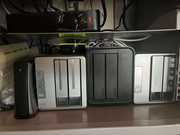
It all started as a way to move my photos from my iCloud storage because I wanted to share more with my family members who do not have iOS or Mac devices, and the web experience wasn't that good anyway. So I started researching other software and stumbled upon the home-server communities, and that's when it hit me: I could move so much more than just my photo gallery to a NAS device.
I initially started with a Raspberry Pi to thinker with more software, and when I felt ready, I bought an F4-424 Max, with three 18 TB Toshiba Enterprise drives, two 1 TB SSDs for caching, and now I'm running in Docker around 20 different services that handle my video storage, photo management, Plex server, network ad blocking, among others.
I also upgraded the RAM to 32 GB because I wanted to have as much headroom as possible. It has been a solid device. One that disappears to my family (they’re not tech-savvy) and hasn't caused any problems, which is the most important thing to me. Nobody likes to be a technician for their hobby, haha.
I thought four bays would be more than enough, but now I'm a data hoarder, and I'm quickly realizing that it might not be enough if I continue at my current pace.

Re: [Community Share] Share Your TerraMaster NAS in Action – Real Scenes, Real Stories, Real Rewards!
Posted: 11 Jul 2025, 07:10
by Techlover
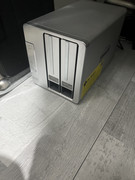
I’m currently using the Terramaster D2-310 DAS, as I’m using it for purely for storage of videos and pictures. My workflow is changing and I will eventually need to access files, and videos remotely from multiple devices.
Re: [Community Share] Share Your TerraMaster NAS in Action – Real Scenes, Real Stories, Real Rewards!
Posted: 12 Jul 2025, 20:19
by sianderson
OrionXie wrote: ↑04 Jun 2025, 19:02
We have reviewed your remote meeting notes. Initially, you had two 8TB RAID arrays, and later added two 12TB hard drives. The first drive synced successfully, but when adding the second drive, the sync failed, causing both disks in the array to lose their superblock information. Therefore, we cannot resolve this issue and recommend considering data recovery.
forgive me for asking this but surely this was the point of a RAID array that the data should have been safe on the first 12TB hard drive, so adding the 2nd 12TB hard drive should not have taken down the first hard drive but just simply copied the data onto the 2nd one, otherwise whats the point in RAID if one hard drive failure can destory the other drive to the point where it can not be resolved?
Re: [Community Share] Share Your TerraMaster NAS in Action – Real Scenes, Real Stories, Real Rewards!
Posted: 13 Jul 2025, 10:57
by MNM38
Hello,
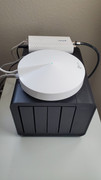
I purchased an F4-424 during black Friday last year. I could have just gone for a something smaller, but since it was on sale, I figured it'd be nice to just have the capability for future expansion. I run 2x12TB drives, which is sort of overkill for time machine back ups for 2 Macs and storage for files from multiple other devices. I do hope to expand on what I can do with the NAS, like playing around with jelly fin, but it is primarily just used for file storage.
Re: [Community Share] Share Your TerraMaster NAS in Action – Real Scenes, Real Stories, Real Rewards!
Posted: 14 Jul 2025, 00:46
by crisisacting
Have been deploying TerraMaster TNAS devices to multiple remote client offices for several years now.
After general usage as file sharing amongst their internal office network, it's predominantly also used for offsite backups of each others data, as a preventative measure to mitigate any possible downtime from an unforeseen event, should an emergency arise or from a ransomware attack, among multiple other business use case reasons to implement it.
Have been using ZeroTier as a SD-VPN to have all the units communicate with each other & have their backup data kept in encrypted folders that are not visible on their respective internal networks.
On top of that, it's also backed up to a cloud services provider both from their on-site TNAS (these are mostly 220/420 series devices and some 221/421 series units as well) as well as another backup stored on a remote TNAS (423 series unit) that's within personal homelab, which itself is backed up to a different cloud storage provider.
Am using TOS firewall rules to only allow traffic from the ZeroTier IP range, local IP range & their hardware VPN addresses to access the TNAS itself and similar IP address range rules for the respective hidden encrypted backup folders to prevent unauthorized access.
The original reason for going with TerraMaster TNAS devices was really the ability to possibly switch them to TrueNAS, however after researching further & managing to implement the above configuration on TOS itself, once it passed extensive testing, it became apparent that these didn't require the additional work hours to go through that conversion to a third-party OS.
Previously used NetGear ReadyNAS devices in a less secure version (no on-device firewall & IP control) of the above solution, however when those units lost support from that company's end of life decisions and also didn't allow for more minute settings as TOS has, the switch was made & generally has been performing well over the years, with minimal interaction.
As long as TerraMaster keeps their TOS builds up-to-date, secure, and mostly free of major issues, it will continue to be the best solution for this use case.
Images of units prior to deployment:
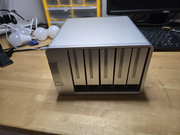
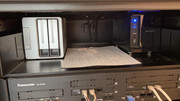
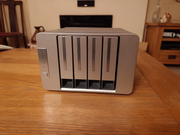 Image of TNAS syncing with previous solution:
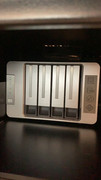
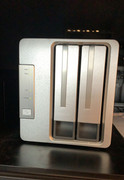
 Images of deployed units:
Re: [Community Share] Share Your TerraMaster NAS in Action – Real Scenes, Real Stories, Real Rewards!
Posted: 18 Jul 2025, 16:49
by TMsupport6
Thank you to everyone who participated in our “Community Share” event! While we initially planned to select multiple winners, due to the limited number of qualifying entries received by the deadline, we have selected one winner to receive the First Prize – TerraMaster F2-424 NAS.
Congratulations to our winner @sianderson and please contact us at
[email protected] to arrange your prize delivery.
Note: We’d love to see more real-world usage stories from our community! If more users continue to share their setups and stories in this thread, we’ll be happy to select more winners in a future round.
Thanks again for your support!
Re: [Community Share] Share Your TerraMaster NAS in Action – Real Scenes, Real Stories, Real Rewards!
Posted: 18 Jul 2025, 16:55
by TMsupport6
Dear sianderson, congratulations on winning the First Prize! Please contact us at
[email protected] to claim your prize.
Re: [Community Share] Share Your TerraMaster NAS in Action – Real Scenes, Real Stories, Real Rewards!
Posted: 18 Jul 2025, 17:06
by sianderson
wow many thanks for selecting me, email has been sent

im sure it will get good use
Re: [Community Share] Share Your TerraMaster NAS in Action – Real Scenes, Real Stories, Real Rewards!
Posted: 18 Jul 2025, 20:14
by warxcore
TMsupport6 wrote: ↑18 Jul 2025, 16:49
Thank you to everyone who participated in our “Community Share” event! While we initially planned to select multiple winners, due to the limited number of qualifying entries received by the deadline, we have selected one winner to receive the First Prize – TerraMaster F2-424 NAS.
Congratulations to our winner @sianderson and please contact us at
[email protected] to arrange your prize delivery.
Note: We’d love to see more real-world usage stories from our community! If more users continue to share their setups and stories in this thread, we’ll be happy to select more winners in a future round.
Thanks again for your support!
Is there any second prize or third as indicated on the first post?
Re: [Community Share] Share Your TerraMaster NAS in Action – Real Scenes, Real Stories, Real Rewards!
Posted: 22 Jul 2025, 02:16
by sianderson
thank you soo much for it (its in and working just needs configuring now) oops just realised i have mixed up the bays on the F2-210 and F2-423 thats why they are out of alignment haha