Page 2 of 2
Re: App Center Empty
Posted: 13 Apr 2025, 11:21
by crisisacting
Gremlin wrote: ↑13 Apr 2025, 05:28
This symptom of WAN being "disconnected" has come up previously. IIRC that was due to using VPN/Tailscale/similar with a configuration issue. Maybe a forum search is in order.
It's likely
this thread
With this solution:
oscar1412 wrote: ↑23 Mar 2025, 04:17
Hi, TerraMaster support gave me the solution:
ssh
1. rm -rf /etc/resolvconf.conf
2. ln -sf /run/systemd/resolve/stub-resolv.conf /etc/resolv.conf
Re: App Center Empty
Posted: 14 Apr 2025, 04:49
by RachelF42
None of the results I found were applicable, I've tried both DHCP and static IP, I'm not using a VPN, and F2-212 does not appear to currently use the stub resolver mentioned in
viewtopic.php?p=44720&hilit=wan+disconnected#p44720
Re: App Center Empty
Posted: 20 Apr 2025, 01:22
by RachelF42
Due to the lack of resolution, I will be returning my device to Amazon for a refund.

Re: App Center Empty
Posted: 20 Apr 2025, 12:15
by TMLila
RachelF42 wrote: ↑13 Apr 2025, 04:39
Gremlin wrote: ↑12 Apr 2025, 16:59
Security Isolation Mode enabled?
Security Isolation Mode has been disabled the whole time
EthanLiu wrote: ↑12 Apr 2025, 15:03
How is your currently used NAS device connected to the network?
Directly to the ISP-provided router, via the ethernet cable that came in the TNAS box
EthanLiu wrote: ↑12 Apr 2025, 15:03
Please check the network connection status through the data dashboard on the right side of the desktop or the "Overview" function in the control panel.
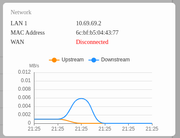
EthanLiu wrote: ↑12 Apr 2025, 15:03
Please confirm that the connected router can normally access the Internet.
I have an upcycled laptop acting as a Proxmox server connected that way too, it can access both the internet and the SMB shares on TNAS fine
My desktop is connected via WiFi and also has no issues with internet or SMB
EthanLiu wrote: ↑12 Apr 2025, 15:03
you may try replacing the network switch device or switching to another network interface for testing.
I would rather exhaust all other options before replacing my router since it's only the TNAS having issues
Re: App Center Empty
Posted: 20 Apr 2025, 12:15
by TMLila
RachelF42 wrote: ↑13 Apr 2025, 04:39
Gremlin wrote: ↑12 Apr 2025, 16:59
Security Isolation Mode enabled?
Security Isolation Mode has been disabled the whole time
EthanLiu wrote: ↑12 Apr 2025, 15:03
How is your currently used NAS device connected to the network?
Directly to the ISP-provided router, via the ethernet cable that came in the TNAS box
EthanLiu wrote: ↑12 Apr 2025, 15:03
Please check the network connection status through the data dashboard on the right side of the desktop or the "Overview" function in the control panel.
EthanLiu wrote: ↑12 Apr 2025, 15:03
Please confirm that the connected router can normally access the Internet.
I have an upcycled laptop acting as a Proxmox server connected that way too, it can access both the internet and the SMB shares on TNAS fine
My desktop is connected via WiFi and also has no issues with internet or SMB
EthanLiu wrote: ↑12 Apr 2025, 15:03
you may try replacing the network switch device or switching to another network interface for testing.
I would rather exhaust all other options before replacing my router since it's only the TNAS having issues
Re: App Center Empty
Posted: 20 Apr 2025, 12:19
by TMLila
RachelF42 wrote: ↑13 Apr 2025, 04:39
Gremlin wrote: ↑12 Apr 2025, 16:59
Security Isolation Mode enabled?
Security Isolation Mode has been disabled the whole time
EthanLiu wrote: ↑12 Apr 2025, 15:03
How is your currently used NAS device connected to the network?
Directly to the ISP-provided router, via the ethernet cable that came in the TNAS box
EthanLiu wrote: ↑12 Apr 2025, 15:03
Please check the network connection status through the data dashboard on the right side of the desktop or the "Overview" function in the control panel.
EthanLiu wrote: ↑12 Apr 2025, 15:03
Please confirm that the connected router can normally access the Internet.
I have an upcycled laptop acting as a Proxmox server connected that way too, it can access both the internet and the SMB shares on TNAS fine
My desktop is connected via WiFi and also has no issues with internet or SMB
EthanLiu wrote: ↑12 Apr 2025, 15:03
you may try replacing the network switch device or switching to another network interface for testing.
I would rather exhaust all other options before replacing my router since it's only the TNAS having issues
Hello! We apologize for not being able to solve your problem in time.
You can make an appointment with our customer service team through the official website for remote technical support service and our engineers will assist you.