
This is our official website. https://www.terra-master.com/
Once again WAN Disconnected
Re: Once again WAN Disconnected
To contact our team, please send email to following addresses, remember to replace (at) with @
Technical team: support(at)terra-master.com (for technical support)
Service team: service(at)terra-master.com (for purchasing, return, replacement, RMA service)
Technical team: support(at)terra-master.com (for technical support)
Service team: service(at)terra-master.com (for purchasing, return, replacement, RMA service)


Re: Once again WAN Disconnected
Did you get a fix?
I seem to be facing a similar issue also started around start mid way through the month.
I seem to be facing a similar issue also started around start mid way through the month.


Re: Once again WAN Disconnected
I've had the same problem for almost 6 months since Terramaster sat, they don't know why it is.
-
CraftyClown

- Posts: 47
- Joined: 03 Jan 2023, 17:13

Re: Once again WAN Disconnected
It’s definitely a software issue. I did a fresh install and it fixed the issue for me

Re: Once again WAN Disconnected
No similar cases have been verified yet; we will continue to monitor the situation. Additionally, it is recommended that you provide at least your NAS model and TOS version.
To contact our team, please send email to following addresses, remember to replace (at) with @:
Technical team: support(at)terra-master.com (for technical support)
Service team: service(at)terra-master.com (for purchasing, return, replacement, RMA service)
Technical team: support(at)terra-master.com (for technical support)
Service team: service(at)terra-master.com (for purchasing, return, replacement, RMA service)

Re: Once again WAN Disconnected
WAN DISCONNECTED
Can not get NAS to connect to internet/outside world. I suspect? following a power outage but not sure so would be grateful for any suggestions before I contact support.
Unit is F4-423
TOS Version 6.0.610-00165
Bios/InitBoot Version 5.19
Hyper Cache 250 GB m.2 SSD in Balanced mode
3 x 4TB drives in TRAID
1 x 2TB sata SSD in Single Disk Mode
Connected Via LAN 1
Static IPs via TP link Deco X50
After power was restored to my house, I restarted the NAS as it was not automatically set to restart. All appeared normal, TNAS PC is working, normal PC backups are working, ISPY was working via docker to record camera footage on the SSD. The Dashboard shows LAN 1 with the normal IP address. (also shown on the DECO ) Nothing shown is the logs.
My desktop, HTPC, chromebook and raspberry pi all connect to the internet as normal so the issue appears to be with the NAS. Other than restarting the unit I touched /altered nothing.
It was only when I looked at the forum a few days later, I noticed there was an update but could not download/install it then I noticed that the WAN was DISCONNECTED.
I can log in from outside the local network via my mobile with Tailscale so that is working ok. Since I have tried restarting and fault finding ISPY will no longer start on docker.
The WAN will not reconnect. I have tried the usual:
Resetting the DECO.
Multiple restarts both on LAN1 and LAN2.
Security Isolation Mode was NOT active, but have tried activating and resetting it.
Restarting without the HDDs/sata SSD inserted.
Changing the ethernet cable. (even though it works normally on the local network)
Followed the instructions in WAN disconnected: viewtopic.php?t=5939
Any simple suggestions, I am only a basic user so please keep it simple. Am I missing the obvious?
Can not get NAS to connect to internet/outside world. I suspect? following a power outage but not sure so would be grateful for any suggestions before I contact support.
Unit is F4-423
TOS Version 6.0.610-00165
Bios/InitBoot Version 5.19
Hyper Cache 250 GB m.2 SSD in Balanced mode
3 x 4TB drives in TRAID
1 x 2TB sata SSD in Single Disk Mode
Connected Via LAN 1
Static IPs via TP link Deco X50
After power was restored to my house, I restarted the NAS as it was not automatically set to restart. All appeared normal, TNAS PC is working, normal PC backups are working, ISPY was working via docker to record camera footage on the SSD. The Dashboard shows LAN 1 with the normal IP address. (also shown on the DECO ) Nothing shown is the logs.
My desktop, HTPC, chromebook and raspberry pi all connect to the internet as normal so the issue appears to be with the NAS. Other than restarting the unit I touched /altered nothing.
It was only when I looked at the forum a few days later, I noticed there was an update but could not download/install it then I noticed that the WAN was DISCONNECTED.
I can log in from outside the local network via my mobile with Tailscale so that is working ok. Since I have tried restarting and fault finding ISPY will no longer start on docker.
The WAN will not reconnect. I have tried the usual:
Resetting the DECO.
Multiple restarts both on LAN1 and LAN2.
Security Isolation Mode was NOT active, but have tried activating and resetting it.
Restarting without the HDDs/sata SSD inserted.
Changing the ethernet cable. (even though it works normally on the local network)
Followed the instructions in WAN disconnected: viewtopic.php?t=5939
Any simple suggestions, I am only a basic user so please keep it simple. Am I missing the obvious?


Re: Once again WAN Disconnected
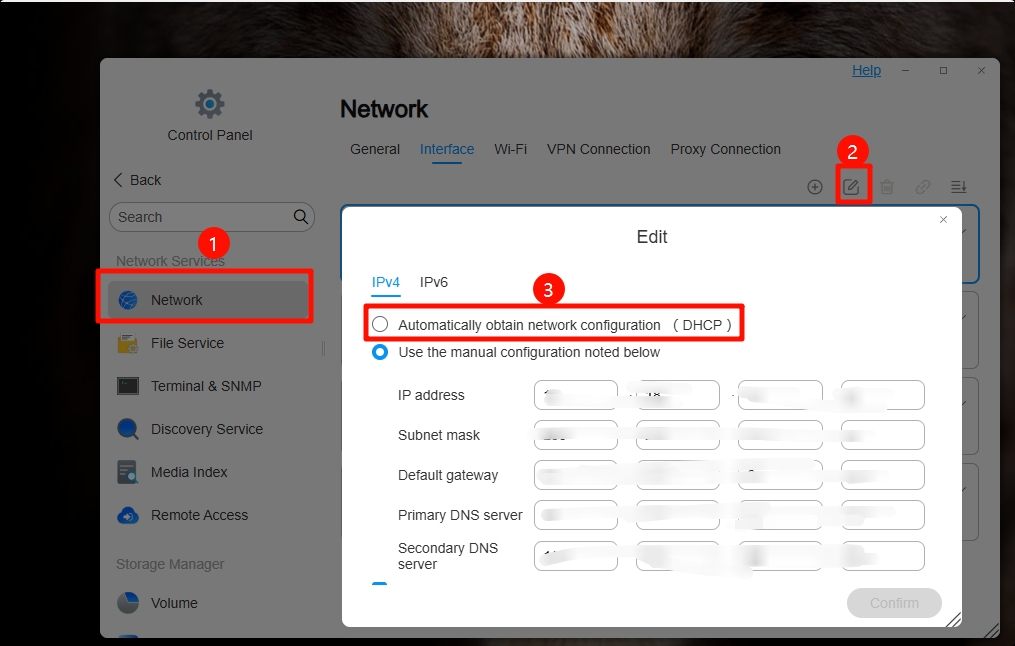
I'm sorry to hear that. Could you please check if the LAN port on the "System Dashboard" shows the WAN as red and disconnected? You might want to try switching from a static IP to DHCP mode, as this could potentially help. The method for switching to DHCP mode is illustrated in the image below:
To contact our team, please send email to following addresses, remember to replace (at) with @:
Support team: support(at)terra-master.com (for technical support only)
Support team: support(at)terra-master.com (for technical support only)
Re: Once again WAN Disconnected
Hi thanks for the quick reply. Just to clarify the "System Dashboard" shows the WAN as red and disconnected. The static IP that I referred to I meant that the TP Link router "Deco X50" had the TNAS address reserved so it would always have that address. Docker and ISPY appear to be working again with the cameras recording to the sata SSDTMnick wrote: ↑09 Mar 2025, 11:13I'm sorry to hear that. Could you please check if the LAN port on the "System Dashboard" shows the WAN as red and disconnected? You might want to try switching from a static IP to DHCP mode, as this could potentially help. The method for switching to DHCP mode is illustrated in the image below:
However the current state is that I have removed the address reservation from the DECO and complied with viewtopic.php?t=5939 and your instruction above. Please see the attached screen print. So any further advice would be welcome.
Re: Once again WAN Disconnected
Any chance of a response from Terramaster? I see from this thread I am not the only one this has happened to. I have updated my TOS version to 6.0.650-00165 and the WAN is still shown in Red as Disconnected whereas local network traffic is fine.
Re: Once again WAN Disconnected
The status of the WAN connection is determined by testing connections with multiple servers located in various actual locations.
It is possible that your network cannot connect to them, hence the correct status cannot be displayed.
Currently, there is no way to resolve this issue for you.
To contact our team, please send email to following addresses, remember to replace (at) with @:
Technical team: support(at)terra-master.com (for technical support)
Service team: service(at)terra-master.com (for purchasing, return, replacement, RMA service)
Technical team: support(at)terra-master.com (for technical support)
Service team: service(at)terra-master.com (for purchasing, return, replacement, RMA service)