Page 2 of 3

Re: Photos 3.0 Now is Released!

Posted: 02 Jan 2025, 00:09
by nale88
My thumbnail generation is hung. I've restarted the media indexing once again, once finished, nothing has been happening for the past 30ish minutes. Still displays 0.00% like last time.

This is the end of the media.log:

Code: Select all

[2025/01/01 16:41:37] metadata.c:962: info: Parsing /Volume1/Photos/**redacted**/img_18_1705158694758.webp ImageMetadata
[2025/01/01 16:41:37] metadata.c:1134: info: can't get width and height from metadata
[2025/01/01 16:41:37] metadata.c:1142: error: Unsuccessful getting image width 0 or height 0
[2025/01/01 16:41:37] scanner.c:663: error: Unsuccessful getting details for /Volume1/Photos/**redacted**/img_18_1705158694758.webp
[2025/01/01 16:41:37] metadata.c:962: info: Parsing /Volume1/Photos/**redacted**/img_1_1708318074916.webp ImageMetadata
[2025/01/01 16:41:37] metadata.c:1134: info: can't get width and height from metadata
[2025/01/01 16:41:37] metadata.c:1142: error: Unsuccessful getting image width 0 or height 0
[2025/01/01 16:41:37] scanner.c:663: error: Unsuccessful getting details for /Volume1/Photos/**redacted**/img_1_1708318074916.webp
[2025/01/01 16:41:37] metadata.c:962: info: Parsing /Volume1/Photos/**redacted**/img_2_1708318080596.webp ImageMetadata
[2025/01/01 16:41:37] metadata.c:1134: info: can't get width and height from metadata
[2025/01/01 16:41:37] metadata.c:1142: error: Unsuccessful getting image width 0 or height 0
[2025/01/01 16:41:37] scanner.c:663: error: Unsuccessful getting details for /Volume1/Photos/**redacted**/img_2_1708318080596.webp
[2025/01/01 16:41:37] metadata.c:962: info: Parsing /Volume1/Photos/**redacted**/img_3_1708318084815.webp ImageMetadata
[2025/01/01 16:41:37] metadata.c:1134: info: can't get width and height from metadata
[2025/01/01 16:41:37] metadata.c:1142: error: Unsuccessful getting image width 0 or height 0
[2025/01/01 16:41:37] scanner.c:663: error: Unsuccessful getting details for /Volume1/Photos/**redacted**/img_3_1708318084815.webp
[2025/01/01 16:41:37] metadata.c:962: info: Parsing /Volume1/Photos/**redacted**/img_4_1708318089274.webp ImageMetadata
[2025/01/01 16:41:37] metadata.c:1134: info: can't get width and height from metadata
[2025/01/01 16:41:37] metadata.c:1142: error: Unsuccessful getting image width 0 or height 0
[2025/01/01 16:41:37] scanner.c:663: error: Unsuccessful getting details for /Volume1/Photos/**redacted**/img_4_1708318089274.webp
[2025/01/01 16:41:37] metadata.c:962: info: Parsing /Volume1/Photos/**redacted**/img_5_1708318094360.webp ImageMetadata
[2025/01/01 16:41:37] metadata.c:1134: info: can't get width and height from metadata
[2025/01/01 16:41:37] metadata.c:1142: error: Unsuccessful getting image width 0 or height 0
[2025/01/01 16:41:37] scanner.c:663: error: Unsuccessful getting details for /Volume1/Photos/**redacted**/img_5_1708318094360.webp
[2025/01/01 16:41:37] scanner.c:1141: info: Scanning /Volume1/Photos/**redacted**/
[2025/01/01 16:41:37] scanner.c:1282: warn: Scanning /Volume1/Photos finished (0 files)!
[2025/01/01 16:41:37] scanner.c:1141: info: Scanning /home/nale/Photos
[2025/01/01 16:41:37] playlist.c:113: warn: Parsing playlists...
[2025/01/01 16:41:37] playlist.c:247: warn: Finished parsing playlists.
[2025/01/01 16:41:42] scanner.c:1664: info: add scanning complete websocker message: ter_msg_add -c system -l info -s notification -k media_index_finfish -o 0 -o 0 -o 0 -o 0 -o 0
[2025/01/01 16:41:42] scanner.c:1668: info: thumbnailTool begin work
[2025/01/01 16:41:43] minidlna.c:1448: info: Scanner exited
[2025/01/01 16:41:43] monitor_inotify.c:527: info: start monitor inotify the file
Apart from this there is only a mention of finished directorys. Also, the errors on metadata are I presume because the few pictures have been downloaded from Facebook and they tend to be downloaded as webp, but instead they are pngs. The Irfanview detects these changes and renames, but I believe I have missed these few files.

Any suggestions for the thumbnails?

Also, why does media index keeps adding private folder from home/user/Photos? I do not use this directory and I keep removing it...
Re: Photos 3.0 Now is Released!

Posted: 02 Jan 2025, 23:28
by TMnick
nale88 wrote: 02 Jan 2025, 00:09
Hello, thank you for your patience. Now I will answer your questions:

1.Regarding the thumbnails, is the progress still at 0.00%? You can try uninstalling the application and reinstalling it to see if that helps.
2.From your logs, it appears that some of your photos have resolution issues that the system cannot recognize, resulting in display errors.
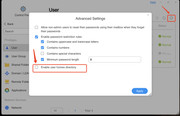
3.The "home/user/Photos" folder is the "Personal Space" in the Photos application, which is useful when multiple users are using it, such as when you and your family or friends share the Photos application. If you want to disable it, you can go to the TOS system's "User" - "Advanced Settings" and uncheck the option to enable user homes directories, as shown in the image below:

Image

Re: Photos 3.0 Now is Released!

Posted: 03 Jan 2025, 04:09
by nale88
TMnick wrote: 02 Jan 2025, 23:28
Hi, yes, it's still at 0.00%. When I wrote the post, I already removed the Terra Photos (including the settings - checkmark that appears when uninstalling the app), restarted the Media Indexer completely, and reinstalled the Terra Photos.

I had to reinstall it because I had translation errors and even then, it was stuck at 0.00%.

I understand the errors, this is only on a few pictures, which are irrelevant. I don't see if this could be the issue.

Regarding the third point, understood! Thank you for the clarification.

Could the issue be that I upgraded the TOS5 to TOS6 without complete system reinstallation? All my settings and shared files remained, but I updated from last TOS5 to TOS6 v555? I didn't have any issues with any other app and I chose to keep the settings mostly because of my docker files.

Re: Photos 3.0 Now is Released!

Posted: 03 Jan 2025, 08:43
by TMnick
nale88 wrote: 03 Jan 2025, 04:09
TMnick wrote: 02 Jan 2025, 23:28
Hi, yes, it's still at 0.00%. When I wrote the post, I already removed the Terra Photos (including the settings - checkmark that appears when uninstalling the app), restarted the Media Indexer completely, and reinstalled the Terra Photos.

I had to reinstall it because I had translation errors and even then, it was stuck at 0.00%.

I understand the errors, this is only on a few pictures, which are irrelevant. I don't see if this could be the issue.

Regarding the third point, understood! Thank you for the clarification.

Could the issue be that I upgraded the TOS5 to TOS6 without complete system reinstallation? All my settings and shared files remained, but I updated from last TOS5 to TOS6 v555? I didn't have any issues with any other app and I chose to keep the settings mostly because of my docker files.
I'm sorry to hear that your issue persists. You can make an appointment for remote assistance by contacting customer service on the official website to schedule it for you.

Re: Photos 3.0 Now is Released!

Posted: 03 Jan 2025, 15:31
by nale88
Sure, not a problem, this is not an urgency by any means. I will try to check on my end once again and if not I'll contact them.

Re: Photos 3.0 Now is Released!

Posted: 06 Jan 2025, 14:39
by nale88
TMnick wrote: 03 Jan 2025, 08:43
Just a quick update, I disabled the media indexer, restarted the machine, enabled it again and restarted it. And it finally works! Must've been something from the TOS5 remained, I do have about 60k of pictures.

Re: Photos 3.0 Now is Released!

Posted: 06 Jan 2025, 18:19
by TMnick
nale88 wrote: 06 Jan 2025, 14:39
I'm glad to hear that it's working properly now. Thank you for providing the information, and we'll also conduct multiple tests to identify the root cause.

Re: Photos 3.0 Now is Released!

Posted: 09 Jan 2025, 19:03
by nicky6501
I'm having a similar problem. I tried what you done but, without success. Now I'm Reindexing all setting "Creation time" (I think it is a new TOS6 fetaure) instead of "Modification Time". Hope it helps. I'll take you informed.
Regards

Re: Photos 3.0 Now is Released!

Posted: 09 Jan 2025, 22:20
by RyanYang
nicky6501 wrote: 09 Jan 2025, 19:03 I'm having a similar problem. I tried what you done but, without success. Now I'm Reindexing all setting "Creation time" (I think it is a new TOS6 fetaure) instead of "Modification Time". Hope it helps. I'll take you informed.
Regards
You can try to kill the thumbnail process by doing the following:
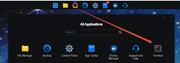
1. Go to all applications on the TOS desktop and open Terminal. Then enter

Code: Select all

ps aux | grep thumbnailDaemon
to view the thumbnail process ID.
2. Remember "/ usr/sbin/thumbnailDaemon" in the line of the first number (process ID), and then execute the

Code: Select all

kill 9 process ID
Image
Image

Re: Photos 3.0 Now is Released!

Posted: 11 Jan 2025, 01:03
by nicky6501
I wrote an email to the support team this afternoon.
Hope this helps to have a solution.
Regards