

Thanks for the confirmation that this problem is being actively addressed by TM.
Resource Monitor Blank after Docker Update
Re: Resource Monitor Blank after Docker Update
F4-423 - 2 x12TB & 1x14TB & 1x16TB - BTRFS TRAID
Re: Resource Monitor Blank after Docker Update
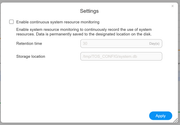
I had to turn off the historical data retention since it is not working for me. This results in real-time data only, so the selections for Today and Yesterday etc.. are not available for selection.
F4-423 - 2 x12TB & 1x14TB & 1x16TB - BTRFS TRAID
Re: Resource Monitor Blank after Docker Update
I upgraded to TOS 6.0.577 today (24Dec24) and I am disappointed that the issue I brought up to TM has not been fixed in this version. It has been 3 weeks since it was reported for TM for a fix, but it has not been fixed to date.TMpraj wrote: ↑05 Dec 2024, 21:18It can be confirmed that the issue you encountered was caused by the TOS system. The issue has been addressed, but according to our procedures, it will be further handled in subsequent versions. We apologize for any inconvenience caused to your use. Please continue to keep an eye on the subsequent updates and releases of TOS.
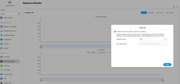
TM: When will this error of not being able to save Resource Monitor data over time be fixed?
F4-423 - 2 x12TB & 1x14TB & 1x16TB - BTRFS TRAID


Re: Resource Monitor Blank after Docker Update
From what I can see it is performing correctly. Selected 30 days and displaying each time period as I choose. (although I have not much activity to monitor on this machine).
F5-221 TOS7.0.1278 - 4x4TB (Ironwolf) Traid
F2-424 TOS7.0.1278 - 2x500GB nvme (P3) Traid, 2x6TB HDD (HGST) Traid
F2-221 TOS7.0.1278 - 1x3TB Ext4, 1x4TB Btrfs
F2-425+ TOS7.0.1278 - 2x500GB nvme (P3) Traid, 2x6TB HDD (EXOS) Traid
F2-424 TOS7.0.1278 - 2x500GB nvme (P3) Traid, 2x6TB HDD (HGST) Traid
F2-221 TOS7.0.1278 - 1x3TB Ext4, 1x4TB Btrfs
F2-425+ TOS7.0.1278 - 2x500GB nvme (P3) Traid, 2x6TB HDD (EXOS) Traid
Re: Resource Monitor Blank after Docker Update
Thanks for your response, but it's not working for me at all.
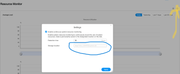
The settings for saving the Resource Monitor have the file and file location as "/tmp/TOS_CONFIG/system.db". It is "greyed-out" and I cannot change it.
The file location "/tmp/TOS_CONFIG/" does not have a "system.db" in that directory on my F4-423 NAS running TOS 6.0.577 (and the prior version).
It does have a filed named "resource-monitor.db" which I assume is the correct file to use but the settings GUI will not let me change it (greyed-out).
In a prior post in this thread, TM confirmed it is an issue. Maybe it is not an issue for every TM NAS, but it is for me.
TMpraj: It can be confirmed that the issue you encountered was caused by the TOS system. The issue has been addressed, but according to our procedures, it will be further handled in subsequent versions. We apologize for any inconvenience caused to your use. Please continue to keep an eye on the subsequent updates and releases of TOS.
See attached screen shots confirmation of what I stated above.

F4-423 - 2 x12TB & 1x14TB & 1x16TB - BTRFS TRAID