Page 2 of 2
Re: How to Replace a Failed Hard Drive in a RAID
Posted: 14 Dec 2025, 15:54
by TMjack
Hello, regarding your current 27TB storage space, it is in a normal state. If you plan to replace the hard drives in your TRAID array, it is recommended that the capacity of the new hard drive should be greater than or equal to the maximum capacity of the existing hard drives in the array. This ensures optimal utilization of the entire TRAID space. Specifically, it is advisable to replace the current 512GB SSD with a 24TB hard drive.
viewtopic.php?t=8036
Re: How to Replace a Failed Hard Drive in a RAID
Posted: 14 Dec 2025, 21:58
by Sneake
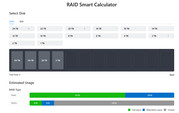
Hello. Thank you for the reply. I did replace the 512GB SSD
I had 2x24TB, 1x3TB, 1x512GB.
I now have 2x24TB, 1x20TB, 1x3TB.
According to the RAID calculator, I should have 47TB of space to use
Re: How to Replace a Failed Hard Drive in a RAID
Posted: 14 Dec 2025, 22:30
by TMbuddy
Yes. If the storage pool is recreated, the available capacity will be 47 TB. Since you have replaced the disks, the capacity is still allocated and calculated based on the previous RAID configuration. Please back up your data and recreate a new storage pool.
Re: How to Replace a Failed Hard Drive in a RAID
Posted: 14 Dec 2025, 22:39
by Sneake
So there is no way to increase the capacity without wiping the data from all 4 drives? I don't have a way to back up this much data.
If I eventually replace the 3TB drive with a larger one, I would have to wipe all the drives again?
When I replaced the 512GB SSD with the 20TB HDD, I was able to increase the Volume size by 3-5TB (I don't remember how much exactly). It seems like it's possible to update the Volume size without wiping the drives, but it isn't working correctly.
Re: How to Replace a Failed Hard Drive in a RAID
Posted: 15 Dec 2025, 10:11
by TMnight
If a larger-capacity hard drive is used to replace the existing 3TB hard drive, it can not only expand the storage capacity but also avoid data loss. Currently, there are two main solutions to increase storage capacity:
Solution 1: Directly replace the existing 3TB hard drive with a larger-capacity one. This method eliminates the need for data backup, is simple to operate, and can directly enhance storage capacity.
Solution 2: First, back up all the data, then delete the existing storage pool, and finally create a new, larger-capacity storage pool. However, given that data backup is not feasible at present, this solution is not viable.
Re: How to Replace a Failed Hard Drive in a RAID
Posted: 17 Dec 2025, 07:46
by Sneake
You said that if I replace the 3TB drive with a larger drive, it will increase capacity and will avoid data loss. That makes sense to me.
Just last week I replaced a 512GB SSD with a 20TB HDD but didn't get the increased storage and am being instructed to wipe the drives and rebuild. I don't understand what the difference is.
Re: How to Replace a Failed Hard Drive in a RAID
Posted: 17 Dec 2025, 15:44
by CursaYang
Hello, under normal circumstances, you should be entitled to 47T of storage space.
Please generate and download the log report in TOS > Technical Support > Issue Report, then send it to our technical support email (
[email protected]). We will analyze it. Please include the link to this post in the body of the email.
Re: How to Replace a Failed Hard Drive in a RAID
Posted: 18 Dec 2025, 08:52
by Sneake
Thank you. The email has been sent.