Page 2 of 2
Re: Duple Backup setup
Posted: 05 Nov 2024, 21:47
by Krbuc
TMgevin wrote: ↑05 Nov 2024, 14:33
DrDigital wrote: ↑05 Nov 2024, 09:34
I am having the exact same issue. Trying to backup a F2-424 to an F2-212. I have Duple Backup Vault installed on the F2-212 and Duple Backup installed on the F2-424 and no luck. Please post the solution here so I can keep moving forward as well.
I have resorted to using RSYNC to backup the F2-424 but that doesn't work for home directories so I use TFM Backup to save the home directories on the remote TNAS by mounting the home directories locally. Pretty clunky and really would expect TNAS to TNAS backup to be super simple...
I'm very sorry for the inconvenience, but currently DupleBackup does not support mutual backup between devices with X86 architecture (F2-424) and those with ARM architecture (F2-212). We have already reported this issue to our product team for consideration and optimization. Thank you for your understanding and patience.
Does it work using 2, F2-212 units? Or not yet?
Re: Duple Backup setup
Posted: 06 Nov 2024, 08:57
by GevinKe
Krbuc wrote: ↑05 Nov 2024, 21:47
TMgevin wrote: ↑05 Nov 2024, 14:33
DrDigital wrote: ↑05 Nov 2024, 09:34
I am having the exact same issue. Trying to backup a F2-424 to an F2-212. I have Duple Backup Vault installed on the F2-212 and Duple Backup installed on the F2-424 and no luck. Please post the solution here so I can keep moving forward as well.
I have resorted to using RSYNC to backup the F2-424 but that doesn't work for home directories so I use TFM Backup to save the home directories on the remote TNAS by mounting the home directories locally. Pretty clunky and really would expect TNAS to TNAS backup to be super simple...
I'm very sorry for the inconvenience, but currently DupleBackup does not support mutual backup between devices with X86 architecture (F2-424) and those with ARM architecture (F2-212). We have already reported this issue to our product team for consideration and optimization. Thank you for your understanding and patience.
Does it work using 2, F2-212 units? Or not yet?
Hello! DB is supported for use on two F2-212 devices, as DB is compatible with NAS devices that share the same architecture, such as ARM. Since F2-212 is a NAS of this architecture, it is compatible. If you encounter any issues while urgently needing to use it, please feel free to contact our technical support. Alternatively, you can choose to wait for our upcoming new release. Thank you for your understanding and support!
Re: Duple Backup setup
Posted: 06 Nov 2024, 09:29
by Krbuc
Hello,
My brand new HDD started making noise so I got a new one and installed the OS again, set it up again. Now DB is working fine between the 2, F2-212 devices. So it must have just been an error on the HDD causing problems.
The only thing I'm having an issue with now is there is 1 user whos folder wont show up on DB as well as its not in the file manager when signed in as the admin user. So I cant add it to backup. From what I understand when you create a user it automatically adds a folder in their name. But I cant find it anywhere.
Re: Duple Backup setup
Posted: 06 Nov 2024, 11:42
by TMzethar
Krbuc wrote: ↑06 Nov 2024, 09:29
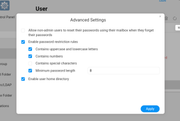
Please go to TOS > Control Panel > User > More(...) > Advanced Settings, check "Enable user home directory".
Re: Duple Backup setup
Posted: 06 Nov 2024, 11:47
by Krbuc
This setting? It was already turned on
Re: Duple Backup setup
Posted: 06 Nov 2024, 11:57
by Krbuc
I got it. There was nothing in the folder so I deleted it and created it again and that worked