Page 2 of 2
Re: Can't access Plex Media Server folder continued
Posted: 13 Oct 2024, 04:52
by plexjellyfin
they pushed a new update today regarding permissions try the update. If not create an entirely new folder and before you move anything over make sure all the permissions are set. I would then recommend moving over 1 folder to test.
Hope that helps.
Re: Can't access Plex Media Server folder continued
Posted: 14 Oct 2024, 21:01
by beagle062
Hi Plexjellyfin,
Plex is now able to successfully scan my media in sub-folders in the “Shared Folder”
1 - I updated my TOS to the newly released TOS 6.0.513.
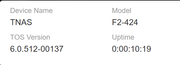
2 - in TOS, I used Edit Shared Folder checkbox option to “Replace the permissions of all the subdirectories with the permissions of the folder”
3 - Next, I assigned application user (plex) read/write permission on the share /Volume1/_Movies-Archive
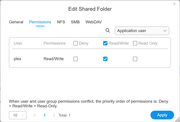
The TOS 6.0.513 update fixed the permission issue for me. The TOS update release notes said there were permission fixes added to TOS 6.0.513 update. I guess the security permissions updates fixed the issue.
Thank you all!!!
It appears that the Plex application user account (plex) cannot browse or transverse the sub-folders below the TNAS shared folder.
Re: Can't access Plex Media Server folder continued
Posted: 14 Oct 2024, 21:04
by beagle062
Ignore line "It appears that the Plex application user account (plex) cannot browse or transverse the sub-folders below the TNAS shared folder."
The text is a cut & paste error left over from previous message.
Re: Can't access Plex Media Server folder continued
Posted: 14 Nov 2024, 00:44
by Nick10
Hi how do I find app permissions on TOS 3?
Thanks
Re: Can't access Plex Media Server folder continued
Posted: 14 Nov 2024, 01:31
by Nick10
will updating from TOS 3 erase my data?
Re: Can't access Plex Media Server folder continued
Posted: 03 Dec 2024, 00:56
by sim667
lam3094 wrote: ↑13 Oct 2024, 03:55
Thank you all for the help on this. I had followed the same information as plexjellyfin and that had fixed the problem. I managed to get plex to recognise the folder now...however, I can see the media inside the folder (.avi, .mp4 etc files) and added this as a library, but when it tries to load the category e.g films, it comes up as "Films" is empty. I know that they all work as my current Plex Server files have all just been moved over there. I have also tested it with just a few files to see if the same thing happens (which it does.)
Have you checked the permissions of the files themselves?
I'm a keen plex user, and plex not recognizing media is almost always permissions based