Page 2 of 3
Re: Raid 5 Problems - F4 424Pro - VERY STRANGE
Posted: 06 Sep 2024, 17:38
by TMzethar
Based on the system report you provided, we have further confirmed that this is a hardware level problem and not system related.
You can try disconnecting the UPS from the mains. If the problem persists, it can be determined to be a hardware failure of the device.
Re: Raid 5 Problems - F4 424Pro - VERY STRANGE
Posted: 06 Sep 2024, 21:10
by carlosdesedas
TMzethar wrote: ↑06 Sep 2024, 17:38
Based on the system report you provided, we have further confirmed that this is a hardware level problem and not system related.
You can try disconnecting the UPS from the mains. If the problem persists, it can be determined to be a hardware failure of the device.
Ok. I just did that.. turned off the NAS... disconnected from the UPS, connected it directly to the wall, turned back on and the 4 drives, storage pool and volumes appeared again... just as last time...
Let's see what happens... thanks...
Re: Raid 5 Problems - F4 424Pro - VERY STRANGE
Posted: 06 Sep 2024, 21:13
by carlosdesedas
Gremlin wrote: ↑06 Sep 2024, 05:12
What is the smart data telling you?
Since reconnecting the NAS directly to the wall and the other 2 drives reappeared (as before), I can confirm that ALL 4 drives have a SMART value 188 Connection Timeout of 100.
thanks
Re: Raid 5 Problems - F4 424Pro - VERY STRANGE
Posted: 06 Sep 2024, 22:42
by Gremlin
Must say I am very curious as to how powering device via a UPS can result in a hardware failure in the device and, consequently mark a drive as 'failing'?
Also, did you mean for OP to power nas directly from mains or did you mean to power via ups battery. ("You can try disconnecting the UPS from the mains")
Re: Raid 5 Problems - F4 424Pro - VERY STRANGE
Posted: 06 Sep 2024, 22:48
by carlosdesedas
I am very curious too.. but I'm following the steps.. I don't want TERRA to think I don't want to follow their suggestions... but in the end, this NAS has to be connected to a UPS... I've never had a UPS be an issue and I have 5 other qnaps... let's see
Re: Raid 5 Problems - F4 424Pro - VERY STRANGE
Posted: 07 Sep 2024, 22:05
by carlosdesedas
TMzethar wrote: ↑06 Sep 2024, 17:38
Based on the system report you provided, we have further confirmed that this is a hardware level problem and not system related.
You can try disconnecting the UPS from the mains. If the problem persists, it can be determined to be a hardware failure of the device.
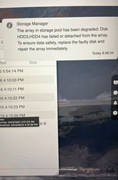
Hi. following my last report and following your instructions, I disconnected the NAS from the UPS and connected it directly to the wall outlet. Everything was working for around 24 hours. But today I logged in the NAS at around 8:45am, browsed through the folders and suddenly, a minute after being logged in I got the Storage Manager message that HDD3 and HDD4 have failed or detached from the NAS. attached is the report.
So obviously, the 4 x 18TB HDDs are NOT the problem, the power is NOT the problem. It's very suspicious that it happened as I logged in and at the same time. Please just send me a new NAS to the following address given in the email I submitted to support. This is a BRAND NEW NAS and BRAND new HDDs...
Thanks,
Carlos
Re: Raid 5 Problems - F4 424Pro - VERY STRANGE
Posted: 07 Sep 2024, 22:32
by Gremlin
That's sad. What file system(s) were you running?- I don't recall seeing it mentioned anywhere.
Re: Raid 5 Problems - F4 424Pro - VERY STRANGE
Posted: 07 Sep 2024, 22:35
by carlosdesedas
It's written somewhere on the emails and posts.. But it started on tos 6.0.436 if not mistaken and it carried over again to 6.0.461 (latest)...
Re: Raid 5 Problems - F4 424Pro - VERY STRANGE
Posted: 07 Sep 2024, 22:37
by Gremlin
No, I got the version. File system? BTRFS? EXT4?

Re: Raid 5 Problems - F4 424Pro - VERY STRANGE
Posted: 07 Sep 2024, 22:38
by carlosdesedas
Oh.. EXT4