
Modified TMusbflashing.exe and fixed individual failures.
md5: 8d805d6ccf110626be8120096b0e85a0
How to Flash a New USB Initboot for TOS on Windows PC?
Re: How to Flash a New USB Initboot for TOS on Windows PC?
To contact our team, please send email to following addresses, remember to replace (at) with @:
Technical team: support(at)terra-master.com (for technical support)
Service team: service(at)terra-master.com (for purchasing, return, replacement, RMA service)
Technical team: support(at)terra-master.com (for technical support)
Service team: service(at)terra-master.com (for purchasing, return, replacement, RMA service)

Re: How to Flash a New USB Initboot for TOS on Windows PC?
The old TMusbflashing.exe didn't work.
I used a burning utility(Etcher) to write the image file to the tiny black disk and it worked.
I don't know if the new TMusbflashing.exe work but I'm tired of tossing it around again.
I used a burning utility(Etcher) to write the image file to the tiny black disk and it worked.
I don't know if the new TMusbflashing.exe work but I'm tired of tossing it around again.
lol


Re: How to Flash a New USB Initboot for TOS on Windows PC?
WORSE THAN USELESS!
Apart from changing the required image file from 'usb_boot.img' to 'usb.img' which was really annoying, the script has not changed anything as far as I can see.
I will try again, but like previous poster I think we are wasting our time.
F5-221 TOS7.0.1278 - 4x4TB (Ironwolf) Traid
F2-424 TOS7.0.1278 - 2x500GB nvme (P3) Traid, 2x6TB HDD (HGST) Traid
F2-221 TOS7.0.1278 - 1x3TB Ext4, 1x4TB Btrfs
F2-425+ TOS7.0.1278 - 2x500GB nvme (P3) Traid, 2x6TB HDD (EXOS) Traid
F2-424 TOS7.0.1278 - 2x500GB nvme (P3) Traid, 2x6TB HDD (HGST) Traid
F2-221 TOS7.0.1278 - 1x3TB Ext4, 1x4TB Btrfs
F2-425+ TOS7.0.1278 - 2x500GB nvme (P3) Traid, 2x6TB HDD (EXOS) Traid
Re: How to Flash a New USB Initboot for TOS on Windows PC?
This is the output for every possible device:
As you can see Option 1: Physical drive 6 appears to be the correct drive.
The resulting boot image appears as attached:
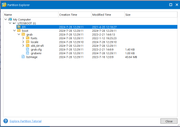
I have no idea if this is correct (nothing in EFI folder?) and at the moment I cannot test it. I'm not going to dismantle the F2-424 motherboard again until there is some certainty.
Code: Select all
PS C:\usb> .\TMusbflashing.exe
Available USB storage devices:
1: \\.\PHYSICALDRIVE6
2: \\.\PHYSICALDRIVE4
3: \\.\PHYSICALDRIVE2
4: \\.\PHYSICALDRIVE5
5: \\.\PHYSICALDRIVE3
Warning: All data on the USB device will be erased! Please back up your data in advance.
Select a USB device (1-5): 1
Writing image to \\.\PHYSICALDRIVE6...
Failed to write cleared MBR. Error code: 5

Microsoft DiskPart version 10.0.19041.3636

Copyright (C) Microsoft Corporation.
On computer: GRAHAM-PRO10B

The disk you specified is not valid.

There is no disk selected.
Failed to run diskpart script.
Failed to write to device. Error code: 5

PS C:\usb> .\TMusbflashing.exe
Available USB storage devices:
1: \\.\PHYSICALDRIVE6
2: \\.\PHYSICALDRIVE4
3: \\.\PHYSICALDRIVE2
4: \\.\PHYSICALDRIVE5
5: \\.\PHYSICALDRIVE3
Warning: All data on the USB device will be erased! Please back up your data in advance.
Select a USB device (1-5): 5
Writing image to \\.\PHYSICALDRIVE3...
Failed to delete drive layout. Error code: 21

Microsoft DiskPart version 10.0.19041.3636

Copyright (C) Microsoft Corporation.
On computer: GRAHAM-PRO10B

The disk you specified is not valid.

There is no disk selected.
Failed to run diskpart script.

PS C:\usb> .\TMusbflashing.exe
Available USB storage devices:
1: \\.\PHYSICALDRIVE6
2: \\.\PHYSICALDRIVE4
3: \\.\PHYSICALDRIVE2
4: \\.\PHYSICALDRIVE5
5: \\.\PHYSICALDRIVE3
Warning: All data on the USB device will be erased! Please back up your data in advance.
Select a USB device (1-5): 2
Writing image to \\.\PHYSICALDRIVE4...
Failed to delete drive layout. Error code: 21

Microsoft DiskPart version 10.0.19041.3636

Copyright (C) Microsoft Corporation.
On computer: GRAHAM-PRO10B

The disk you specified is not valid.

There is no disk selected.
Failed to run diskpart script.

PS C:\usb> .\TMusbflashing.exe
Available USB storage devices:
1: \\.\PHYSICALDRIVE6
2: \\.\PHYSICALDRIVE4
3: \\.\PHYSICALDRIVE2
4: \\.\PHYSICALDRIVE5
5: \\.\PHYSICALDRIVE3
Warning: All data on the USB device will be erased! Please back up your data in advance.
Select a USB device (1-5): 3
Writing image to \\.\PHYSICALDRIVE2...
Failed to delete drive layout. Error code: 21

Microsoft DiskPart version 10.0.19041.3636

Copyright (C) Microsoft Corporation.
On computer: GRAHAM-PRO10B

The disk you specified is not valid.

There is no disk selected.
Failed to run diskpart script.

PS C:\usb> .\TMusbflashing.exe
Available USB storage devices:
1: \\.\PHYSICALDRIVE6
2: \\.\PHYSICALDRIVE4
3: \\.\PHYSICALDRIVE2
4: \\.\PHYSICALDRIVE5
5: \\.\PHYSICALDRIVE3
Warning: All data on the USB device will be erased! Please back up your data in advance.
Select a USB device (1-5): 4
Writing image to \\.\PHYSICALDRIVE5...
Failed to delete drive layout. Error code: 21

Microsoft DiskPart version 10.0.19041.3636

Copyright (C) Microsoft Corporation.
On computer: GRAHAM-PRO10B

The disk you specified is not valid.

There is no disk selected.
Failed to run diskpart script.The resulting boot image appears as attached:
I have no idea if this is correct (nothing in EFI folder?) and at the moment I cannot test it. I'm not going to dismantle the F2-424 motherboard again until there is some certainty.
F5-221 TOS7.0.1278 - 4x4TB (Ironwolf) Traid
F2-424 TOS7.0.1278 - 2x500GB nvme (P3) Traid, 2x6TB HDD (HGST) Traid
F2-221 TOS7.0.1278 - 1x3TB Ext4, 1x4TB Btrfs
F2-425+ TOS7.0.1278 - 2x500GB nvme (P3) Traid, 2x6TB HDD (EXOS) Traid
F2-424 TOS7.0.1278 - 2x500GB nvme (P3) Traid, 2x6TB HDD (HGST) Traid
F2-221 TOS7.0.1278 - 1x3TB Ext4, 1x4TB Btrfs
F2-425+ TOS7.0.1278 - 2x500GB nvme (P3) Traid, 2x6TB HDD (EXOS) Traid
Re: How to Flash a New USB Initboot for TOS on Windows PC?
So ... Well done @Lord.mjj
Etcher appears to do the job. Quickly, quietly and free! No messing around. All you need is a usb drive and the usb_boot.img file or whatever you choose to call it. drive selection is easy and obvious. No messing with command lines (powershell) plus there are versions for pretty much every os. (Including explanations of possible errors.)
Here is the same drive I posted earlier re-written by Etcher:
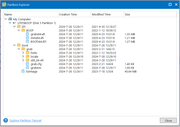
and it now looks complete (so, don't try and tell me it's a "drive issue" or anything else).
[rhetorical question]
If we cannot rely on @TM to provide a simple flash script how can we rely on the os itself.?
[/rhetorical question]
Etcher appears to do the job. Quickly, quietly and free! No messing around. All you need is a usb drive and the usb_boot.img file or whatever you choose to call it. drive selection is easy and obvious. No messing with command lines (powershell) plus there are versions for pretty much every os. (Including explanations of possible errors.)
Here is the same drive I posted earlier re-written by Etcher:
and it now looks complete (so, don't try and tell me it's a "drive issue" or anything else).
[rhetorical question]
If we cannot rely on @TM to provide a simple flash script how can we rely on the os itself.?
[/rhetorical question]
F5-221 TOS7.0.1278 - 4x4TB (Ironwolf) Traid
F2-424 TOS7.0.1278 - 2x500GB nvme (P3) Traid, 2x6TB HDD (HGST) Traid
F2-221 TOS7.0.1278 - 1x3TB Ext4, 1x4TB Btrfs
F2-425+ TOS7.0.1278 - 2x500GB nvme (P3) Traid, 2x6TB HDD (EXOS) Traid
F2-424 TOS7.0.1278 - 2x500GB nvme (P3) Traid, 2x6TB HDD (HGST) Traid
F2-221 TOS7.0.1278 - 1x3TB Ext4, 1x4TB Btrfs
F2-425+ TOS7.0.1278 - 2x500GB nvme (P3) Traid, 2x6TB HDD (EXOS) Traid


Re: How to Flash a New USB Initboot for TOS on Windows PC?
TMusbflashing is a USB flashing tool developed by one of our engineer. It's possible that its strategies for dealing with various environments may not be fully considered, and the tool may encounter obstacles when working in some environments. Thank you all for your feedback! If third-party ready-made tools can complete the flashing task well, we also recommend using them. We will verify Etcher and, if it is indeed suitable, we will list it as a recommended tool. Thank you!
To contact our team, please send email to following addresses, remember to replace (at) with @:
Support team: support(at)terra-master.com (for technical support only)
Service team: service(at)terra-master.com (for purchasing, return, replacement, RMA service)
Support team: support(at)terra-master.com (for technical support only)
Service team: service(at)terra-master.com (for purchasing, return, replacement, RMA service)
Re: How to Flash a New USB Initboot for TOS on Windows PC?
The full name is 'balenaEtcher' by Balena Ltd.
F5-221 TOS7.0.1278 - 4x4TB (Ironwolf) Traid
F2-424 TOS7.0.1278 - 2x500GB nvme (P3) Traid, 2x6TB HDD (HGST) Traid
F2-221 TOS7.0.1278 - 1x3TB Ext4, 1x4TB Btrfs
F2-425+ TOS7.0.1278 - 2x500GB nvme (P3) Traid, 2x6TB HDD (EXOS) Traid
F2-424 TOS7.0.1278 - 2x500GB nvme (P3) Traid, 2x6TB HDD (HGST) Traid
F2-221 TOS7.0.1278 - 1x3TB Ext4, 1x4TB Btrfs
F2-425+ TOS7.0.1278 - 2x500GB nvme (P3) Traid, 2x6TB HDD (EXOS) Traid


Re: How to Flash a New USB Initboot for TOS on Windows PC?
Tried mounting with Rufus. successfully wrote the first time.
Started NAS with limited success. Had to power down and try to reimage flashdrive.
Should have used the instructions here because I bricked it.
Guess I'm just going to buy a new one off of amazon. because I dont have any mini USB that will fit.
https://www.amazon.com/dp/B0BXBYJ5YR?ps ... yp_imgToDp for US.
Pretty unhappy with how this is faulty brand new right out of the box. Am I going to reflash every time the power goes out?
Started NAS with limited success. Had to power down and try to reimage flashdrive.
Should have used the instructions here because I bricked it.
Guess I'm just going to buy a new one off of amazon. because I dont have any mini USB that will fit.
https://www.amazon.com/dp/B0BXBYJ5YR?ps ... yp_imgToDp for US.
Pretty unhappy with how this is faulty brand new right out of the box. Am I going to reflash every time the power goes out?

Re: How to Flash a New USB Initboot for TOS on Windows PC?
What is the model of your device? Is it a new device? Why do you need to flash a new USB Initboot?
To contact our team, please send email to following addresses, remember to replace (at) with @
Technical team: support(at)terra-master.com (for technical support)
Service team: service(at)terra-master.com (for purchasing, return, replacement, RMA service)
Technical team: support(at)terra-master.com (for technical support)
Service team: service(at)terra-master.com (for purchasing, return, replacement, RMA service)

Re: How to Flash a New USB Initboot for TOS on Windows PC?
It seems the download links in the original message are no longer valid. Can't seem to locate usb_boot_120M_uefi.img anywhere else, anyone have a link or new location, or can share their downloaded copy?