Re: Plex library is empty, but has access to NAS media!
Posted: 14 Oct 2024, 00:08
I managed to solve the problem.
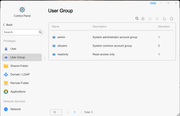
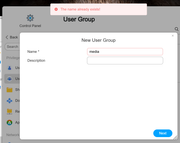
I looked again at beagle's post and his comment "application user (plex) can not transverse folder below first folder share /Volume1/_Movies-Archive". That led me to look at the Properties for the individual subfolders (containing the actual movie files) in the Multimedia > Movies folder and then check the Permissions for the User Group "media". I saw that the "Deny" box was ticked instead of "Read/Write". I wanted to avoid having to manually change the Properties>Permission>User Group>media for each individual folder. So, I went to Control Panel>User Group and saw that the User group "media" had no members. I edited the "media" User Group to add my User name to it as I had given myself read/write privileges. With that change, all of the individual movie and tv subfolders showed the Permission for the User Group "media" as being "Read/Write" instead of "Deny". With that change, the Plex Media Server could now "see" all of the movies and the library for Movies was now populated with the actual movies. Same thing with all of the subfolders in my Multimedia > TV folder.
I hope this solution works for others.
The references to "Terramaster NAS is currently unavailable" were references to earlier deleted instal attempts. Still not sure why they showed up, but I unpinned them and they went away. Still appear when you click More, but they are just an annoyance at this point.
I looked again at beagle's post and his comment "application user (plex) can not transverse folder below first folder share /Volume1/_Movies-Archive". That led me to look at the Properties for the individual subfolders (containing the actual movie files) in the Multimedia > Movies folder and then check the Permissions for the User Group "media". I saw that the "Deny" box was ticked instead of "Read/Write". I wanted to avoid having to manually change the Properties>Permission>User Group>media for each individual folder. So, I went to Control Panel>User Group and saw that the User group "media" had no members. I edited the "media" User Group to add my User name to it as I had given myself read/write privileges. With that change, all of the individual movie and tv subfolders showed the Permission for the User Group "media" as being "Read/Write" instead of "Deny". With that change, the Plex Media Server could now "see" all of the movies and the library for Movies was now populated with the actual movies. Same thing with all of the subfolders in my Multimedia > TV folder.
I hope this solution works for others.
The references to "Terramaster NAS is currently unavailable" were references to earlier deleted instal attempts. Still not sure why they showed up, but I unpinned them and they went away. Still appear when you click More, but they are just an annoyance at this point.