Page 2 of 2
Re: How does the computer remotely login to TNAS?
Posted: 07 Sep 2025, 19:03
by Sergeyproxy
Hi guys!
Can you explain how to connect remotely to the TOS network folder and display it as a network drive in Windows?
NAS TerraMaster F2-424
Re: How does the computer remotely login to TNAS?
Posted: 13 Dec 2025, 08:07
by tw33k
You might need to open the port in your router for this to work.
Re: How does the computer remotely login to TNAS?
Posted: 11 May 2026, 21:44
by petrose
TMSupport wrote: ↑15 May 2020, 12:15
The method to log in TNAS.online is to input the website of
www.TNAS.online in the browser address bar, or to click ‘Remote Login’ button in TNAS application ............
Guys, isn't it time for an update to these seemingly useful tips from 2020 ?
I have a few questions, to be answered in such an update (and I am running TOS 7 latest Beta Build 7.0.0567):
- What is the purpose of the Virtual IP address exposed in Control Panel - Remote Access menu ?
(if not something, that can be used instead of DDNS as well as SMB /WebDAV Access !)
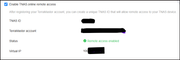
- How to utilize SMB Access remotely ie from another sub-doman than 192.168.* ?
(here I expect all required FW Port openings to be listed)
- How to utilize WebDav Access remotely from a client, such as Windows 11 ?
(here I also expect all required FW Port openings to be listed)
Re: How does the computer remotely login to TNAS?
Posted: 12 May 2026, 09:19
by EriChan
Thank you very much for your interest in the TerraMaster community and your valuable feedback on the 2020 old post. Indeed, with the release of TOS 6 and the TOS 7 Beta you are currently using, the system's remote access architecture and security mechanisms have undergone significant changes. The 2020 guide was applicable at that time, but for today's advanced versions, we have more modern solutions and will update the relevant content as soon as possible.
Regarding your specific questions about remote access, here are detailed explanations and suggestions:
Purpose of "Virtual IP Address"
The "Virtual IP Address" you see in TOS's remote access menu is mainly designed for the TNAS.online remote access service. It is a tunnel IP assigned to your TNAS device by the TerraMaster relay server. When your network environment is in a complex symmetric NAT or without a public IP address, TNAS establishes an encrypted channel with TerraMaster's global relay nodes via this virtual IP. The virtual IP is only used for internal routing within the TNAS.online system and cannot be used to replace DDNS, SMB or WebDAV access.
How to remotely access via SMB and WebDAV
It is not recommended to directly map the default SMB port (445) to the public network on your router, as this will make your NAS highly vulnerable to ransomware attacks. WebDAV is an ideal protocol for mounting network drives across public networks.
TOS-side settings:
1. Enable the service in "Control Panel > Network > File Services > WebDAV".
2. Ensure that user permissions are assigned to the relevant shared folders.
Required route ports to open:
- WebDAV HTTP: Default port 8800.
- WebDAV HTTPS (recommended): Default port 474.
Windows 11 client connection:
Native method: Right-click "This PC" > "Map network drive", enter `
https://your DDNS domain name:474` as the address.
Note: Windows 11 requires WebDAV to use HTTPS (SSL) by default for a successful connection.
Re: How does the computer remotely login to TNAS?
Posted: 03 Jun 2026, 02:52
by petrose
Thanks, appreciate you will update the 2020 guide

I will - based on your response - not look at SMB as an option.
Instead I will focus on WebDAV. However the User permissions you refer to on the TOS-side, to allow for WebDAV access is no longer in the WebDAV section (as I understand it was < TOS V6). Its not even listed in User/Group ACL Permissions.
I am now on the latest TOS 7 Beta 7.0.0601 and here is what I have:
1. Created a CO-domain named sonjanas.rosenberg-it.dk managed by the hosting company I normally use. This is set to direct all requests to the WAN address of my TerraMaster.
2. Trying to add the network location using webDAV gives this:
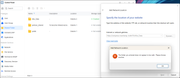
As you can see, I have a Folder, which is enabled for sharing, and I cannot access it using port 474.
I also tried to Browse towards the base URL
https://sonjanas.rosenberg-it.dk:474 and I did receive a request for authentication, but then it timed out.
I have allowed port traffic for 474 (TCP+UDP) in the target router.
Have I missed something ?
Re: How does the computer remotely login to TNAS?
Posted: 03 Jun 2026, 09:00
by MikeZhang
You can try mounting again using a third-party WebDAV client (such as RaiDrive or WinSCP):
Server Address: Enter https://<your TNAS_IP or domain name>:<port>
Credentials: Enter the username and password of your TerraMaster NAS administrator or corresponding authorized account.
Re: How does the computer remotely login to TNAS?
Posted: 03 Jun 2026, 18:25
by petrose
MikeZhang wrote: ↑03 Jun 2026, 09:00
You can try mounting again using a third-party WebDAV client (such as RaiDrive or WinSCP):
Server Address: Enter https://<your TNAS_IP or domain name>:<port>
Credentials: Enter the username and password of your TerraMaster NAS administrator or corresponding authorized account.
I tried WinSCP short ago, and it responds:
Code: Select all
Could not connect to server: A connection attempt failed because the connected party did not properly respond after a period of time, or established connection failed because connected host has failed to respond.
Connection failed.
Am I missing a Port opening other than 443 ?
Re: How does the computer remotely login to TNAS?
Posted: 04 Jun 2026, 08:44
by MikeZhang
If WinSCP tries to query the root directory, TOS 6 will often refuse to respond or time out because it expects you to specify the WebDAV entry point.
To fix this in WinSCP:
1.Open your saved connection session for sonjanas.rosenberg-it.dk.
2.Click the Advanced... button (under the password field).
3.Under the Environment section, click on Directories.
4.In the Remote directory field, do not leave it blank. You must specify the WebDAV share path. On TerraMaster, this is typically formatted as:
/dav or /webdav or /dav/YourSharedFolderName
5.Click OK and try connecting.
Re: How does the computer remotely login to TNAS?
Posted: 04 Jun 2026, 19:16
by petrose
The Step 4, is a bit amystery to me. I have only one file area defined as Shared Folder:
/Alle_Data
There is no notion in the folder name of the access mechanism, wheter its SFTP, WebDAV, SMB or alike.
Its Shared so the client(s) can use the Shared Folder in any (doable and workable) way.
Is the TOS expecting the folder root is named /dav or /webdav ?
I tried, but that failed too, to specify /Alle_Data as my remote WinSCP Directory: Time Out
That kind of behaviour is also why I ask for e better explanation of Remote Access, and Data Sharing.
Re: How does the computer remotely login to TNAS?
Posted: 11 Jun 2026, 00:39
by sianderson
a simpler option is if your router supports VPN (Server) then if you configure it as a Server your computer can then connect to the VPN, and then it will naturally have access to SMB on the NAS to map a network drive as it will believe your remote computer is naturally on the same network as the NAS
also because its secured behind a VPN, you are not exposing SMB to the internet, it depends why you want to remotely access the data though, are you as a human happy to just connect when you need something or are you trying to automate access for another purpose