Re: Cannot get Motion Detection events to record on NAS.
Posted: 14 Nov 2026, 07:11
Thank you for the detailed report. The camera-side arming schedule, the linkage method and the ONVIF connection are all set correctly, so there is nothing to redo there.
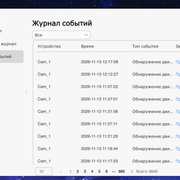
We should be straight with you about the wording you quoted. It comes from our product information, and it does not describe what Surveillance Manager currently does. In the current implementation, motion events are extracted from footage that has already been recorded and listed under Logs > Event Logs, where the corresponding clip can be opened. Recording only when motion occurs was stated as not yet supported in TOS 7 in our February 2026 update, and we are not able to give a release timeframe. We understand this is not what that description led you to expect, and we will pass the discrepancy on for review.
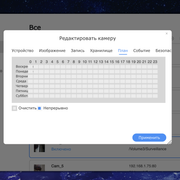
We would also rather not assume that the two options in your Plan grid are the intended layout for build 1.0.111 without checking it against that build. Could you help us with three read-only checks?
1. A screenshot of Edit Camera > Plan, including the options and colour legend below the grid.
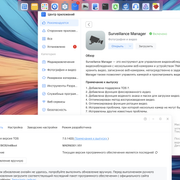
2. Your TOS version and the exact Surveillance Manager build shown in App Center.
3. Whether any motion events currently appear under Logs > Event Logs; if none do, please also export the application log via Logs > Export.