Page 2 of 3
Re: The storage pool has been expanded, but the volume cannot be expanded?
Posted: 12 Dec 2025, 11:46
by Nashdor
I know this is an old thread but this is the closest topic to what I am experiencing but don't want to take action until I know for sure I'm not going to jeopardize my data. Havent filled my other nas back up with HD's yet so can't offload and redo just yet. Hoping someone can help.
F4-426Max. 4-10TB WD Migrated from F4-424Pro. Added a 24TB Seagate last week. Expanded Pool and Volume just fine, migrated data in that I needed to. Added my second 24 TB Seagate a couple days ago. Couple days to sync per norm. Total pool 58.16TB as expected. Increased the volume to max. Didn't catch the issue right away unfortunately. Upgraded to TOS 6.0.794 in the meantime as it had released.
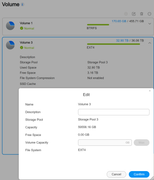
Advertised size on the volume page still shows 36.
In the edit screen it shows the full capacity and zero free space, greyed out Max button.
Restarted a couple of times including the TOS upgrade.
Re: The storage pool has been expanded, but the volume cannot be expanded?
Posted: 12 Dec 2025, 15:39
by TMzethar
posting.php?mode=quote&f=79&p=52091
It is recommended that you enter the following commands in the Terminal to check the capacity allocation situation. It is possible that the logical volume has been expanded, but the file system has not been fully expanded.
This method involves modifications to storage structures and file systems. Please ensure that operations are performed when power supply is normal, load is idle, and there is no risk of disk disconnection by cats.
Re: The storage pool has been expanded, but the volume cannot be expanded?
Posted: 12 Dec 2025, 20:02
by Nashdor
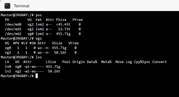
Is there something else I can do? Again, not fully confident that the unmount and re-mount at the beginning of the thread is the solution for my particular issue.
Re: The storage pool has been expanded, but the volume cannot be expanded?
Posted: 13 Dec 2025, 15:06
by TMzethar
From the information you provided, the expansion was blocked in the final step because the volume was in use and could not be unmounted.
For your situation, please first disable all apps, file services, media indexing, and other services as much as possible. Then unmount the mounted Volume 3 (EXT4 file system) to allow it to be expanded.
unmount:
Extend Volume 3 (EXT4 file system) Capacity:
Code: Select all
e2fsck -f /dev/vg2/lv2 -y
resize2fs /dev/mapper/vg2-lv2
After the capacity expansion is completed,enter this to mount it back:
Re: The storage pool has been expanded, but the volume cannot be expanded?
Posted: 13 Dec 2025, 17:45
by Nashdor
Well, I hope this is recoverable..... only having a small heart attack.
Re: The storage pool has been expanded, but the volume cannot be expanded?
Posted: 23 Dec 2025, 12:48
by alfonsoramirzz
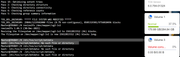
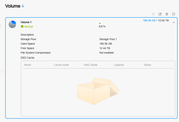
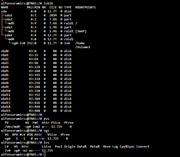
I bought a TNA F4-424 MAX and I am facing the same issue described in this post. So, I run the commands you posted in the first comment but I am still not seeing free space.
can you please help me to fix it?
Re: The storage pool has been expanded, but the volume cannot be expanded?
Posted: 24 Dec 2025, 08:28
by CursaYang
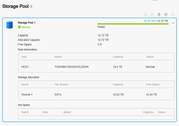
It seems that the capacity of the current storage pool and volume is consistent. What capacity hard disks are you using in the NAS?
Re: The storage pool has been expanded, but the volume cannot be expanded?
Posted: 24 Dec 2025, 09:10
by alfonsoramirzz
CursaYang wrote: ↑24 Dec 2025, 08:28
It seems that the capacity of the current storage pool and volume is consistent. What capacity hard disks are you using in the NAS?
I bought and installed two Toshiba NAS Systems N300 Internal 14TB HDDs. The HDDs are not listed as Recommended or Not recommended in the compatibility page, "HDD for NAS" tab:
https://www.terra-master.com/pages/comp ... tab_PeCJUc
Re: The storage pool has been expanded, but the volume cannot be expanded?
Posted: 25 Dec 2025, 08:21
by CursaYang
Two 14T hard drives are set up as a TRAID array, and the current storage pool and volume sizes are normal. Are you referring to being unable to store data? You need to first create a shared folder located on Volume 1 in the shared folders, and then you can access it in File Manager.
Re: The storage pool has been expanded, but the volume cannot be expanded?
Posted: 17 Jan 2026, 09:05
by TheMightyEthan
I'm on an F4-210 trying to expand a 9 TB array to 27 TB, and I followed the instructions above and have got to the
step. The instructions say I should see it expand over a few tens of seconds, but it's been more than half an hour and it hasn't advanced passed the very first message.

I understand the entire process might take a while, but I had expected some time of update as it progressed. How long should I wait before thinking something's wrong?