Page 2 of 3
Re: F4-210: Can't access appdata via explorer
Posted: 17 Jun 2021, 12:59
by donsenilo
As I wrote, I don't use backup. So what else could be the problem ?
Re: F4-210: Can't access appdata via explorer
Posted: 17 Jun 2021, 15:25
by TMSupport
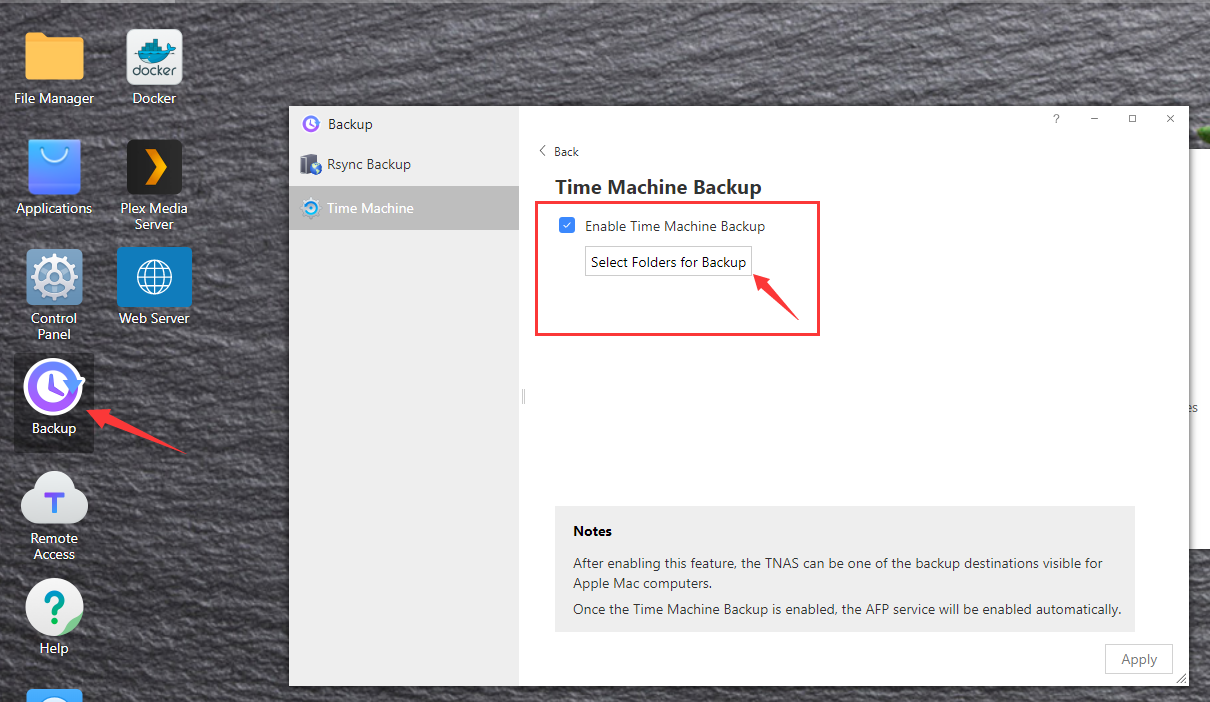
As I wrote, Time Machine is enabled automatically. Please disable it at TOS Desktop - Backup.
Re: F4-210: Can't access appdata via explorer
Posted: 17 Jun 2021, 22:46
by donsenilo
OMG !!! Yes, it's deactivated ...
Re: F4-210: Can't access appdata via explorer
Posted: 18 Jun 2021, 10:59
by TMSupport
Could appdata be accessed after disabling appdata folder at Time Machine and deactivating Time Machine?
Re: F4-210: Can't access appdata via explorer
Posted: 19 Jun 2021, 04:32
by donsenilo
No.
Re: F4-210: Can't access appdata via explorer
Posted: 21 Jun 2021, 11:02
by TMSupport
Please advise whether it’s ok to let our engineer has a remote session to check it. Please contact support(@)terra-master.com to confirm it.
Re: F4-210: Can't access appdata via explorer
Posted: 07 Jul 2021, 01:31
by donsenilo
After disabling the guest-user I found out that I have no access as Admin to my NAS via Windows Explorer.
So I enabled guest and guess what: Yes ! now I have absolutely no access to my NAS !!!!!!
What now ?!?
Re: F4-210: Can't access appdata via explorer
Posted: 07 Jul 2021, 10:37
by TMSupport
The guest user has been disabled months here and I never lose access of Admin with SMB access.
Please reinstall the TOS to see whether it's ok:
viewtopic.php?f=75&t=423
Re: F4-210: Can't access appdata via explorer
Posted: 07 Jul 2021, 21:35
by donsenilo
I have done option 1, the NAS is running but I can't access the login-page. The TNAS PC App found the NAS correctly.
Immediately HELP !!!
Re: F4-210: Can't access appdata via explorer
Posted: 07 Jul 2021, 22:00
by donsenilo
donsenilo wrote: ↑07 Jul 2021, 21:35
I have done option 1, the NAS is running but I can't access the login-page. The TNAS PC App found the NAS correctly.
Immediately HELP !!!
Chrome writes "ERR_CONNECTION_REFUSED"