
The Technical Support had to access the NAS to fix the issue.
The RAID is now repaired and I have not lost any data.
Instructions for RAID Repairing

Re: Instructions for RAID Repairing
Hi. Same issue.
The storage pool shows the "hard disk not found" error, but whole disks has the "good" status.
I tried to launch the "RAID repair" command, but the operation takes one second and then everything goes back to the way it was before, with the error.
Both lights blink; maybe the operation is still in progress? How long can it last with two 6 TB drives?
Thanks.
The storage pool shows the "hard disk not found" error, but whole disks has the "good" status.
I tried to launch the "RAID repair" command, but the operation takes one second and then everything goes back to the way it was before, with the error.
Both lights blink; maybe the operation is still in progress? How long can it last with two 6 TB drives?
Thanks.
Re: Instructions for RAID Repairing
After six hours, the LEDs no longer blink and nothing has changed... what to do?

Re: Instructions for RAID Repairing
{L_BUTTON_AT}sil4ps
Please provide your TNAS model and TOS version. And take the necessary screenshots to explain the problem in detail.
To contact our team, please send email to following addresses, remember to replace (at) with @:
Technical team: support(at)terra-master.com (for technical support)
Service team: service(at)terra-master.com (for purchasing, return, replacement, RMA service)
Technical team: support(at)terra-master.com (for technical support)
Service team: service(at)terra-master.com (for purchasing, return, replacement, RMA service)


Re: Instructions for RAID Repairing
{L_BUTTON_AT}TMSupport
Just to confirm, is this process suitable for TRaid as well? It was not mentioned in the original post.
F5-221 TOS6.0.794 - 4x4TB Traid (TNAS UPS Server  Broken )
F2-424 TOS7.0.0392 {BETA} - 2x500GB nvme (P3) Traid, 2x6T HDD Traid
F2-221 TOS7.0.0364 - 1x3TB Ext4, 1x4TB Ext4 [Test system]
Gremlin is in 'Listening' mode
Broken )F2-424 TOS7.0.0392 {BETA} - 2x500GB nvme (P3) Traid, 2x6T HDD Traid
F2-221 TOS7.0.0364 - 1x3TB Ext4, 1x4TB Ext4 [Test system]
Gremlin is in 'Listening' mode
Re: Instructions for RAID Repairing
Ok, sorry for the delay...
The NAS model is F2-420 and mounts two 6 TB disks.
The TOS version is 4.2.40.2203011626.
Here the screenshots.
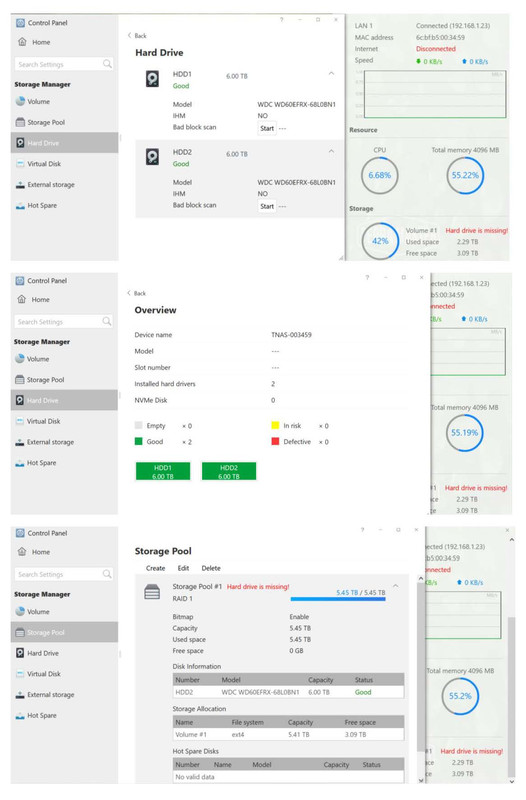
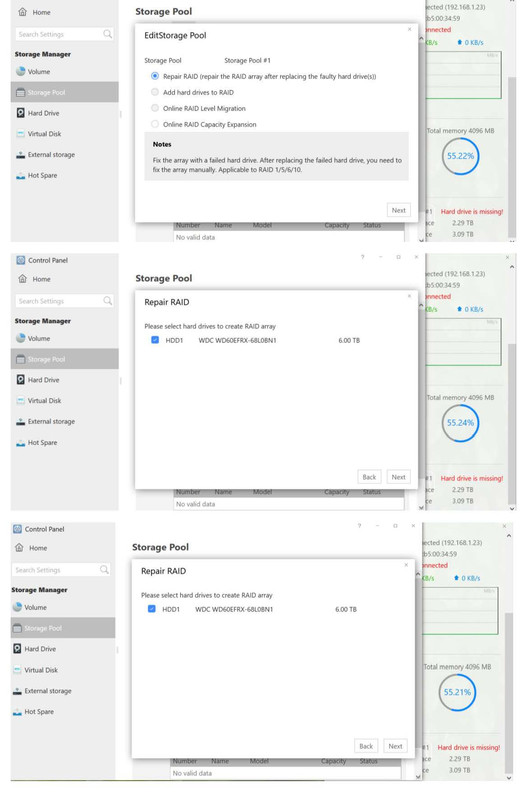
The NAS model is F2-420 and mounts two 6 TB disks.
The TOS version is 4.2.40.2203011626.
Here the screenshots.
Re: Instructions for RAID Repairing
...and no, doesn't seem suitable for TRaid.
Thanks!
Thanks!


Re: Instructions for RAID Repairing
i just upgraded one of my 6tb drives to a 10tb with no issue. I waited a few days after the array was done rebuilding to start the next drive upgrade. it went through the process okay but it never changed status from Hard Drive is Missing to Rebuilding/Synchronizing and showed that the drive was good. So i put the drive i was replacing back in and rebuilt it okay. should i restart the NAS and try again?
Re: Instructions for RAID Repairing
You can restart the NAS and try again.
To ensure that it accurately recognizes unplugged disk and newly inserted disk, please wait for it to sound an alarm and say “Missing” before putting in a new disk.
To contact our team, please send email to following addresses, remember to replace (at) with @:
Technical team: support(at)terra-master.com (for technical support)
Service team: service(at)terra-master.com (for purchasing, return, replacement, RMA service)
Technical team: support(at)terra-master.com (for technical support)
Service team: service(at)terra-master.com (for purchasing, return, replacement, RMA service)
-
scheppi2003

- Posts: 16
- Joined: 17 Jul 2022, 22:29

Re: Instructions for RAID Repairing
I do have a similar problem. Second time I lost all comunications witht he server. For whatever reason I could comunicate after days and reinstalled TOS again. On instalation system told me disc 2 needs to be reformated. Which it did without problem. However my storage pool now is degraded and the EDIT BUTTON is greyed out.