

F5-422 (MAPL0304V22) + D8 Hybrid
Updated w/o visible problems
TOS 7.0.1130 (x86) Official Release Update
Re: TOS 7.0.1130 (x86) Official Release Update
F5-422 (MAPL0304V22) - TOS 7.0.1278 (x86)
D8 Hybrid
D8 Hybrid


Re: TOS 7.0.1130 (x86) Official Release Update
Look I think it's time to start ignoring the line " Fixed various other known issues". Everyone who has reported an issue re-tests the issue reported and almost always it's not fixed yet. I'm taking the approach if I don't see the specific issue called out, I'm not re-testing it.
Oh yeah all three devices updated w/o issues.
Oh yeah all three devices updated w/o issues.
F6-424 & F4-425 Plus at 7.0.1298
F4-424 Pro (x2) at 7.0.1298
D4-320 (Offline until I can afford more HDDs)
F4-424 Pro (x2) at 7.0.1298
D4-320 (Offline until I can afford more HDDs)
-
sianderson

- Silver Member
- Posts: 452
- Joined: 02 Aug 2020, 03:42

Re: TOS 7.0.1130 (x86) Official Release Update
both my units updated, no actual issues but i did notice that the F2-423 did not start my VM automatically it was showing as powered off (VMS APP) whereas the F2-424 did
both set to auto start and have always auto started in the past
both set to auto start and have always auto started in the past
F2-424 TOS 7.0.1278
F2-423 TOS 7.0.1278
F2-210 TOS 4.2.44
D4-320
C/O
F4-424 TOS 6.0.794
F2-423 TOS 7.0.1278
F2-210 TOS 4.2.44
D4-320
C/O
F4-424 TOS 6.0.794


Re: TOS 7.0.1130 (x86) Official Release Update
Regarding the structure of our update notes, we would like to clarify the following:crisisacting wrote: ↑11 Aug 2026, 21:24Despite that non-specific & wide casting bug fix, based on the responses of others, neither of the previously observed NTP issue & docker issues are fixed; will only install to a standalone TNAS that's not in testbed nor production use.
Any issues that have been reported to us by users and have been confirmed as fixed in this release are always listed individually and item by item in the first few sections of the update notes, so that everyone can quickly check whether the issues they care about have been resolved.
As for Item #9, "Fixed some other known issues," it covers only minor issues that were discovered during our internal testing or that occur only in very specific scenarios—issues that have not been previously reported by users. They are grouped together at the end solely to keep the announcement concise and readable.
To contact our team, please send email to following addresses, remember to replace (at) with @
Technical team: support(at)terra-master.com (for technical support)
Service team: service(at)terra-master.com (for purchasing, return, replacement)
Technical team: support(at)terra-master.com (for technical support)
Service team: service(at)terra-master.com (for purchasing, return, replacement)

Re: TOS 7.0.1130 (x86) Official Release Update
Do you have any questions about this folder?
This folder contains an icon resource library used by the file manager module. It is used to display icons corresponding to different file types, folder status, mount protocols, encryption status, etc. in the web interface. Do not delete or modify it at will, otherwise icons will be missing or displayed abnormally in the web interface.And this folder will be updated with system or file manager updates.
To contact our team, please send email to following addresses, remember to replace (at) with @
Technical team: support(at)terra-master.com (for technical support)
Service team: service(at)terra-master.com (for purchasing, return, replacement, RMA service)
Technical team: support(at)terra-master.com (for technical support)
Service team: service(at)terra-master.com (for purchasing, return, replacement, RMA service)


Re: TOS 7.0.1130 (x86) Official Release Update
After the upgrade, an error that was already there since TOS7 is now worse:
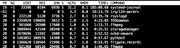
for now i'm using the workaround in another post. won't make the problem disappear, but at least systemd-journal process goes back to idle cpu
This is now flooding even more the /var/log/syslog constantly, and i have a constant systemd-journal at 40% cpuAug 12 07:16:45 TNAS kernel: [28922.668303] pcieport 0000:00:1c.6: AER: Correctable error message received from 0000:00:1c.6
Aug 12 07:16:45 TNAS kernel: [28922.668322] pcieport 0000:00:1c.6: PCIe Bus Error: severity=Correctable, type=Physical Layer, (Receiver ID)
Aug 12 07:16:45 TNAS kernel: [28922.668325] pcieport 0000:00:1c.6: device [8086:54be] error status/mask=00000001/00002000
Aug 12 07:16:45 TNAS kernel: [28922.668328] pcieport 0000:00:1c.6: [ 0] RxErr (First)
for now i'm using the workaround in another post. won't make the problem disappear, but at least systemd-journal process goes back to idle cpu
Model is an F4-424printf '\x01\x20\x00\x00' | dd of=/sys/bus/pci/devices/0000:00:1c.6/config bs=1 seek=$((0x114)) count=4 2>/dev/null


Re: TOS 7.0.1130 (x86) Official Release Update
Update / confirmed workaround:
I found the cause of the NTP issue in /etc/ntp.conf.
The following line was configured:
127.127.1.0 is LOCAL(0). With prefer enabled, ntpd consistently selected the local clock instead of the external NTP servers, even though they were reachable.
I removed only prefer:
After restarting NTP, an external NTP server was selected instead of LOCAL(0).
The fix also survived a complete NAS reboot and the NAS continued synchronizing with external NTP servers.
This appears to confirm that prefer on LOCAL(0) is causing the NTP synchronization problem in TOS 7.
Could TerraMaster please confirm whether this prefer setting is intentional and, if not, whether it will be corrected in a future TOS release?
Current workaround: remove prefer from the 127.127.1.0 entry in /etc/ntp.conf.
I found the cause of the NTP issue in /etc/ntp.conf.
The following line was configured:
Code: Select all
server 127.127.1.0 minpoll 6 maxpoll 10 iburst prefer
I removed only prefer:
Code: Select all
server 127.127.1.0 minpoll 6 maxpoll 10 iburst
The fix also survived a complete NAS reboot and the NAS continued synchronizing with external NTP servers.
This appears to confirm that prefer on LOCAL(0) is causing the NTP synchronization problem in TOS 7.
Could TerraMaster please confirm whether this prefer setting is intentional and, if not, whether it will be corrected in a future TOS release?
Current workaround: remove prefer from the 127.127.1.0 entry in /etc/ntp.conf.
F4-425 Plus | 16GB RAM | Intel(R) N150 | 3× 12TB HDD (TRAID) | 1× 1TB NVMe | 1× 500GB NVMe

Re: TOS 7.0.1130 (x86) Official Release Update
Thank you, that worked. Unfortunately, the syslog still shows it's generating the false temperature reports and switching the drives between active and standby every 30 minutes. I have to admit I'm losing faith in the development team at this point.CursaYang wrote: ↑11 Aug 2026, 16:30smartd.service = smartmontools.service
Please execute the following command to re-enable smartd.service:
Code: Select all
systemctl enable smartmontools.init.serviceCode: Select all
systemctl start smartmontools.init.serviceCode: Select all
ln -s /etc/systemd/system/smartmontools.init.service /etc/systemd/system/smartd.serviceCode: Select all
systemctl status smartd.service
F2-425 Plus, 16GB RAM, 2 x 500GB WD SN700 EXT4 RAID1, 2 x 3TB WD Red EXT4 RAID1, TOS 7.0.<latest>
F4-SSD, 16GB RAM, 4 x 4TB SN700 Btrfs TRAID, TOS 7.0.<latest>
F4-SSD, 16GB RAM, 4 x 4TB SN700 Btrfs TRAID, TOS 7.0.<latest>

Re: TOS 7.0.1130 (x86) Official Release Update
The fix for this issue was not included in TOS version 7.0.1130 (x86). We will address this issue in a future release.
To contact our team, please send email to following addresses, remember to replace (at) with @
Technical team: support(at)terra-master.com(for technical support)
Service team: service(at)terra-master.com(for purchasing, return, replacement, RMA service)
Technical team: support(at)terra-master.com(for technical support)
Service team: service(at)terra-master.com(for purchasing, return, replacement, RMA service)

Re: TOS 7.0.1130 (x86) Official Release Update
/usr/static/images/file_manager, this folder contains an icon resource libraryTMlinda wrote: ↑12 Aug 2026, 11:32Do you have any questions about this folder?
This folder contains an icon resource library used by the file manager module. It is used to display icons corresponding to different file types, folder status, mount protocols, encryption status, etc. in the web interface. Do not delete or modify it at will, otherwise icons will be missing or displayed abnormally in the web interface.And this folder will be updated with system or file manager updates.
/"usr/static/images/file_manager, this folder is empty. And it contains a strange symbol "
F4-423