

If you can rebuild md9 with one drive, why not with 2?
[Help] System Disk Configuration with 1 System Disk
Re: [Help] System Disk Configuration with 1 System Disk
F5-221 TOS7.0.1278 - 4x4TB (Ironwolf) Traid
F2-424 TOS7.0.1278 - 2x500GB nvme (P3) Traid, 2x6TB HDD (HGST) Traid
F2-221 TOS7.0.1278 - 1x3TB Ext4, 1x4TB Btrfs
F2-425+ TOS7.0.1278 - 2x500GB nvme (P3) Traid, 2x6TB HDD (EXOS) Traid
F2-424 TOS7.0.1278 - 2x500GB nvme (P3) Traid, 2x6TB HDD (HGST) Traid
F2-221 TOS7.0.1278 - 1x3TB Ext4, 1x4TB Btrfs
F2-425+ TOS7.0.1278 - 2x500GB nvme (P3) Traid, 2x6TB HDD (EXOS) Traid


Re: [Help] System Disk Configuration with 1 System Disk
Is the flow for this process then, install my 2 new NVME drives and create a volume in RAID 1 configuration. Then proceed to migrate the System Disk from HDD1 over to SSD1.
The final part is where Im a bit confused, do I basically do another migration to the second SSD? or how do I make both SSDs the system disk at that point.


Re: [Help] System Disk Configuration with 1 System Disk
First, migrate the system from the HDD to one of the SSDs, then add the other SSD to the system drive as well.
To contact our team, please send email to following addresses, remember to replace (at) with @
Technical team: support(at)terra-master.com(for technical support)
Service team: service(at)terra-master.com(for purchasing, return, replacement, RMA service)
Technical team: support(at)terra-master.com(for technical support)
Service team: service(at)terra-master.com(for purchasing, return, replacement, RMA service)
Re: [Help] System Disk Configuration with 1 System Disk
That was said before, but I don't see it happening in practice. Please explain the process in more detail. The only method I see to progress from one system disk to two, is to re-install the system from a '.ins' file and HOPE the versions don't conflict when there is no '.ins' file for the version in place.
I actually did this today. Tos7.0.1105 in place and .ins for 7.0.0791 installed - Then updated back to .1105.
Incidentally, I also tried re-installing system configuration and that did not repair the network settings, despite that option being available and checked. A lot of trouble for what should be (conceivably) a simple operation.
F5-221 TOS7.0.1278 - 4x4TB (Ironwolf) Traid
F2-424 TOS7.0.1278 - 2x500GB nvme (P3) Traid, 2x6TB HDD (HGST) Traid
F2-221 TOS7.0.1278 - 1x3TB Ext4, 1x4TB Btrfs
F2-425+ TOS7.0.1278 - 2x500GB nvme (P3) Traid, 2x6TB HDD (EXOS) Traid
F2-424 TOS7.0.1278 - 2x500GB nvme (P3) Traid, 2x6TB HDD (HGST) Traid
F2-221 TOS7.0.1278 - 1x3TB Ext4, 1x4TB Btrfs
F2-425+ TOS7.0.1278 - 2x500GB nvme (P3) Traid, 2x6TB HDD (EXOS) Traid
Re: [Help] System Disk Configuration with 1 System Disk
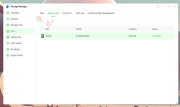
Assume there are currently two HDDs and two SSDs, namely HDD1, HDD2, SSD1 and SSD2, and the system residing on the HDDs is to be migrated to the SSD.
1.Use the System Disk Migration feature to migrate the system stored on HDD1 and HDD2 to SSD1.
2.Use the Add System Disk feature to add SSD2 to the system disk as well.
To contact our team, please send email to following addresses, remember to replace (at) with @
Technical team: support(at)terra-master.com(for technical support)
Service team: service(at)terra-master.com(for purchasing, return, replacement, RMA service)
Technical team: support(at)terra-master.com(for technical support)
Service team: service(at)terra-master.com(for purchasing, return, replacement, RMA service)
Re: [Help] System Disk Configuration with 1 System Disk
OK - mea culpa - my only excuse was not seeing that button as active (old man's eyes and colour choices I guess).
Quick Follow up:
Why ask for a password when migrating disks, but not when adding? Not a problem for me, but a little odd.
Should one be able to access System Disk Migration from Tnas-mobile?
Quick Follow up:
Why ask for a password when migrating disks, but not when adding? Not a problem for me, but a little odd.
Should one be able to access System Disk Migration from Tnas-mobile?
F5-221 TOS7.0.1278 - 4x4TB (Ironwolf) Traid
F2-424 TOS7.0.1278 - 2x500GB nvme (P3) Traid, 2x6TB HDD (HGST) Traid
F2-221 TOS7.0.1278 - 1x3TB Ext4, 1x4TB Btrfs
F2-425+ TOS7.0.1278 - 2x500GB nvme (P3) Traid, 2x6TB HDD (EXOS) Traid
F2-424 TOS7.0.1278 - 2x500GB nvme (P3) Traid, 2x6TB HDD (HGST) Traid
F2-221 TOS7.0.1278 - 1x3TB Ext4, 1x4TB Btrfs
F2-425+ TOS7.0.1278 - 2x500GB nvme (P3) Traid, 2x6TB HDD (EXOS) Traid

Re: [Help] System Disk Configuration with 1 System Disk
Adding a system drive has limited impact on the current system. However, migration and deletion operations are more sensitive and carry certain risks.Gremlin wrote: ↑06 Aug 2026, 14:05 OK - mea culpa - my only excuse was not seeing that button as active (old man's eyes and colour choices I guess).
Quick Follow up:
Why ask for a password when migrating disks, but not when adding? Not a problem for me, but a little odd.
Should one be able to access System Disk Migration from Tnas-mobile?
Although, under normal circumstances, migrating or deleting a system drive does not affect system integrity, both operations include a step that removes the system from the old drive — superuser(administrator) should be fully aware of this behavior.
Whether performing a migration or a deletion, please ensure that the target drive (for migration) or the remaining system drive (for deletion) is healthy before proceeding, to avoid system abnormalities after the operation.
To contact our team, please send email to following addresses, remember to replace (at) with @:
Technical team: support(at)terra-master.com (for technical support)
Service team: service(at)terra-master.com (for purchasing, return, replacement, RMA service)
Technical team: support(at)terra-master.com (for technical support)
Service team: service(at)terra-master.com (for purchasing, return, replacement, RMA service)