[Help] F4-424 unreachable every 48-72h (or less)

Discuss, seek assistance, and report issues related to hardware components, such as hardware platforms, memory, network ports, power supplies, UPS systems, and so on.
User avatar
MikeZhang
TM Support
Posts: 381
Joined: 05 Sep 2023, 22:21

Re: [Help] F4-424 unreachable every 48-72h (or less)

Post by MikeZhang »

exqo wrote: 27 May 2026, 15:34
After reading carefully your description, we found it's similar issue with @rgrg1

You may also follow above method posted by @TMnight
and update us with the result after you try
To contact our team, please send email to following addresses, remember to replace (at) with @

Technical team: support(at)terra-master.com(for technical support)
Service team: service(at)terra-master.com(for purchasing, return, replacement, RMA service)
User avatar
exqo
Posts: 31
Joined: 20 Dec 2025, 19:54
France

Re: [Help] F4-424 unreachable every 48-72h (or less)

Post by exqo »

MikeZhang wrote: 27 May 2026, 18:15
exqo wrote: 27 May 2026, 15:34
After reading carefully your description, we found it's similar issue with @rgrg1

You may also follow above method posted by @TMnight
and update us with the result after you try
Thank you very much for the detailed guide and for taking this issue seriously. I have now completed both recommended steps and wanted to update you.
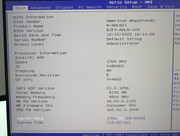
**1. BIOS update — done.**
I followed the guide (FAT32 USB, all storage removed, flashed via HDMI). The update completed successfully. Verified in BIOS Setup:
- BIOS Version: BJFX-ADLN-109
- Build Date and Time: 12/15/2025 16:14:28
(Previous version was MADN0101.V07, build 11/15/2024.)

Image

**2. Kernel boot parameter — done.**
Confirmed the idle driver first:
- cat /sys/devices/system/cpu/cpuidle/current_driver -> intel_idle

So the system is now running exactly per your recommendations: updated BIOS + C-state limiting at the kernel level.

I'll report back with the results. If the freezes stop, that confirms the fix; if they persist despite the updated BIOS and the kernel C-state limit, I assume the next step would be to look at other hardware factors (e.g. a full MemTest86 pass on the RAM), and I'd welcome your guidance at that point.

Thank you again for your continued support.
F4-424 - 2x4TB (Ironwolf) Traid + 1x8TB (WD Red)
TOS: 7.0.0746
RAM: 8GB
Bios: BJFX-ADLN-109
User avatar
rgrg1
Posts: 17
Joined: 07 Apr 2026, 02:41
Hungary

Re: [Help] F4-424 unreachable every 48-72h (or less)

Post by rgrg1 »

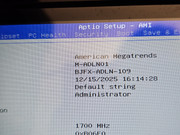
Thank you for your help and guideline. I also successfully made the modifications.
BIOS updated to BJFX-ADLN-109 and kernel parameter intel_idle.max_cstate=1 applied to both boot disks. After reboot, C-state output shows only POLL — C1E, C6, C8, C10 completely gone. Monitoring for stability. Will report back.

gabor@TNAS:~# for c in /sys/devices/system/cpu/cpu[0-9]*; do echo "==================== $(basename $c) ===================="; for s in $c/cpuidle/state*; do echo "$(cat $s/name): usage=$(cat $s/usage), time=$(cat $s/time)"; done; echo; done

Code: Select all

==================== cpu0 ====================
POLL: usage=429217, time=96739979
==================== cpu1 ====================
POLL: usage=420671, time=94242920
==================== cpu2 ====================
POLL: usage=440831, time=98504574
==================== cpu3 ====================
POLL: usage=445463, time=98816693
BIOS Information

Code: Select all

        Version: BJFX-ADLN-109
        Release Date: 11/15/2024
Image

Debug mode has been successfully enabled.

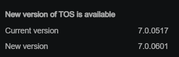
One question: is it safe to update TOS now, or will a TOS update overwrite the grub.cfg and remove the intel_idle.max_cstate=1 parameter? Should we reapply it manually after every TOS update?
Image
User avatar
crisisacting
Silver Member
Posts: 499
Joined: 20 Jan 2022, 16:42

Re: [Help] F4-424 unreachable every 48-72h (or less)

Post by crisisacting »

TMnight wrote: 27 May 2026, 18:07
MikeZhang wrote: 27 May 2026, 18:15
Is said fix applicable to the rest of the (non-pro) 424 series N95 based TNAS devices?

Due to general activity on these units, haven't experienced the issue yet, however would prefer to implement these fixes as a precaution/preventative measure.

Please advise.
User avatar
MikeZhang
TM Support
Posts: 381
Joined: 05 Sep 2023, 22:21

Re: [Help] F4-424 unreachable every 48-72h (or less)

Post by MikeZhang »

crisisacting wrote: 29 May 2026, 01:57
Above guideline is for F4-424 NAS model, you may follow above steps and keep monitoring if you encounter similar issue.
To contact our team, please send email to following addresses, remember to replace (at) with @

Technical team: support(at)terra-master.com(for technical support)
Service team: service(at)terra-master.com(for purchasing, return, replacement, RMA service)
User avatar
MikeZhang
TM Support
Posts: 381
Joined: 05 Sep 2023, 22:21

Re: [Help] F4-424 unreachable every 48-72h (or less)

Post by MikeZhang »

rgrg1 wrote: 29 May 2026, 01:01
Thanks for your time and patience.
We recommend monitoring this issue in the current environment for a period of time.
If the problem disappears and the system becomes stable, you can proceed with the update.
To contact our team, please send email to following addresses, remember to replace (at) with @

Technical team: support(at)terra-master.com(for technical support)
Service team: service(at)terra-master.com(for purchasing, return, replacement, RMA service)
User avatar
MikeZhang
TM Support
Posts: 381
Joined: 05 Sep 2023, 22:21

Re: [Help] F4-424 unreachable every 48-72h (or less)

Post by MikeZhang »

exqo wrote: 28 May 2026, 21:20
Thanks for your time and patience.
We look forward a good news feedback from your side.

If the issue persists, we will keep looking at other hardware factors and provide corresponding guidance in details
To contact our team, please send email to following addresses, remember to replace (at) with @

Technical team: support(at)terra-master.com(for technical support)
Service team: service(at)terra-master.com(for purchasing, return, replacement, RMA service)
User avatar
xtimt
Posts: 3
Joined: 26 Mar 2026, 04:06
Russia

Re: [Help] F4-424 unreachable every 48-72h (or less)

Post by xtimt »

MikeZhang wrote: 29 May 2026, 16:10
crisisacting wrote: 29 May 2026, 01:57
Above guideline is for F4-424 NAS model, you may follow above steps and keep monitoring if you encounter similar issue.
Hello.
I have a similar issue with the f4-424 max.

Here's my command output:

Code: Select all

xtimt@TNAS:/# dmidecode -t bios
# dmidecode 3.3
Getting SMBIOS data from sysfs.
SMBIOS 3.5.0 present.

Handle 0x0000, DMI type 0, 26 bytes
BIOS Information
Vendor: American Megatrends International, LLC.
Version: 5.26 
Release Date: 01/17/2025 
Address: 0xF0000 
Runtime Size: 64 kB 
ROM Size: 0 MB 
Characteristics: 
PCI is supported 
BIOS is upgradeable 
BIOS shadowing is allowed 
Boot from CD is supported 
Selectable boot is supported 
BIOS ROM is socketed 
EDD is supported 
ACPI is supported 
BIOS boot specification is supported 
Targeted content distribution is supported 
UEFI is supported 
BIOS Revision: 5.26

Handle 0x0011, DMI type 13, 22 bytes
BIOS Language Information 
Language Description Format: Long 
Installable Languages: 1 
en|US|iso8859-1 
Currently Installed Language: en|US|iso8859-1

Handle 0x004E, DMI type 13, 22 bytes
BIOS Language Information 
Language Description Format: Abbreviated 
Installable Languages: 1 
enUS 
Currently Installed Language: enUS

Code: Select all

xtimt@TNAS:/# for c in /sys/devices/system/cpu/cpu[0-9]*; do echo "==================== $(basename $c) ====================="; for s in $c/cpuidle/state*; do echo "$(cat $s/name): usage=$(cat $s/usage), time=$(cat $s/time)"; done; echo; done
==================== cpu0 ====================
POLL: usage=130244, time=3165474
C1E: usage=1674990, time=350709497
C6: usage=216347, time=156176162
C8: usage=417421, time=357933877
C10: usage=4934996, time=33193990710

==================== cpu1 ====================
POLL: usage=119220, time=2591768
C1E: usage=485638, time=91715897
C6: usage=41912, time=29913157
C8: usage=104319, time=91161945
C10: usage=1793059, time=34341356340

==================== cpu10 ====================
POLL: usage=101193, time=1469611
C1E: usage=1654739, time=290438472
C6: usage=123784, time=94341695
C8: usage=225140, time=198083435
C10: usage=2554646, time=34063671763

==================== cpu11 ====================
POLL: usage=100997, time=1447640
C1E: usage=1534888, time=267077762
C6: usage=114784, time=87983492
C8: usage=213191, time=187712077
C10: usage=2403343, time=34120816747

==================== cpu2 ====================
POLL: usage=149324, time=3083569
C1E: usage=1652976, time=361122677
C6: usage=235801, time=170020575
C8: usage=456523, time=392928736
C10: usage=4319720, time=33036082984

==================== cpu3 ====================
POLL: usage=84479, time=2175908
C1E: usage=309390, time=60359280
C6: usage=28924, time=20522904
C8: usage=74699, time=65206426
C10: usage=1125642, time=34481759365

==================== cpu4 ====================
POLL: usage=106653, time=1800607
C1E: usage=2502325, time=523794825
C6: usage=323604, time=235434401
C8: usage=504797, time=432317779
C10: usage=5282817, time=33168822977

==================== CPU5 ====================
POLL: usage=111623, time=1792346
C1E: usage=2430009, time=494916279
C6: usage=285409, time=207635619
C8: usage=427847, time=365872178
C10: usage=5048493, time=33350495211

==================== cpu6 ====================
POLL: usage=104420, time=1651037
C1E: usage=2101262, time=415340445
C6: usage=225000, time=165381035
C8: usage=343269, time=294884789
C10: usage=4450578, time=33631642343

==================== cpu7 ====================
POLL: usage=107863, time=1554232
C1E: usage=1857405, time=357466410
C6: usage=183087, time=135876199
C8: usage=288832, time=249044566
C10: usage=3996626, time=33820407079

==================== cpu8 ====================
POLL: usage=104678, time=1524786
C1E: usage=1815387, time=315879415
C6: usage=127090, time=96895208
C8: usage=225233, time=197617913
C10: usage=2726358, time=34019059108

==================== cpu9 ====================
POLL: usage=115957, time=1663529
C1E: usage=1948532, time=348457553
C6: usage=158675, time=119289423
C8: usage=269835, time=233330270
C10: usage=3038699, time=33904412488
Are the instructions and BIOS file provided above also suitable for the f4-424 max?
User avatar
MikeZhang
TM Support
Posts: 381
Joined: 05 Sep 2023, 22:21

Re: [Help] F4-424 unreachable every 48-72h (or less)

Post by MikeZhang »

xtimt wrote: 29 May 2026, 16:39
Please use BIOS file in this link https://download2.terra-master.com/F4-424_Max_BIOS.zip
All other steps keep same as per guideline provided above
We wait for your update and good news
To contact our team, please send email to following addresses, remember to replace (at) with @

Technical team: support(at)terra-master.com(for technical support)
Service team: service(at)terra-master.com(for purchasing, return, replacement, RMA service)
User avatar
xtimt
Posts: 3
Joined: 26 Mar 2026, 04:06
Russia

Re: [Help] F4-424 unreachable every 48-72h (or less)

Post by xtimt »

MikeZhang wrote: 29 May 2026, 22:12
xtimt wrote: 29 May 2026, 16:39
Please use BIOS file in this link https://download2.terra-master.com/F4-424_Max_BIOS.zip
All other steps keep same as per guideline provided above
We wait for your update and good news
Image
Post Reply

Return to “Hardware, Power and Accessories”