Page 2 of 7

Re: TOS 7.0.0601 Beta (X86) is Released for Update

Posted: 20 May 2026, 14:23
by usersky
Installed with no issue on F5-221. A bit scared about the new logo on the web login screen: Evolve to full native AI. I totally hope and wish for no AI in my storage. At the very least I wish for a kill switch to totally deactivate any AI like in Firefox for example. AI fiddling with my storage gives me creeps. I am exposed to way to much AI to need in in my storage device without installing it explicitly.

A small issue I have since some versions: on the same web login screen, using Firefox, sometimes I get the saved credential tooltip, sometimes not so in some cases at login i need to type the user/password manually. That's even worse considering the login status of a user is not preserverd after a NAS reboot.

Re: TOS 7.0.0601 Beta (X86) is Released for Update

Posted: 20 May 2026, 15:26
by MikeZhang
usersky wrote: 20 May 2026, 14:23
The AI ​​functionality integrated into TOS 7.0 is essentially the built-in OpenClaw.

Therefore: Disabling/uninstalling the OpenClaw application is equal to Disabling TOS's AI functionality

How to do it:
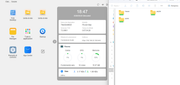
TOS Desktop → Locate the OpenClaw application icon
Right-click → Disable or uninstall directly
Alternatively, go to Control Panel → Applications, find OpenClaw, and disable it.
After disabling, features like the AI ​​assistant and AI search in the TOS interface will be unavailable, but other core NAS functions (file management, storage, backup, etc.) will remain unaffected.

Re: TOS 7.0.0601 Beta (X86) is Released for Update

Posted: 20 May 2026, 16:43
by MrVanz
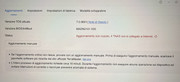
I see this but in Dashboard reported version is 7.0.0601. I stopped and restarted TNAS but no changes. It's only a bug? No apparent issues except for TNAS not connected to Tailnet.

Image

Ho risolto tutto: non c'era l'IP del Gateway e dei DNS della mia rete... sparite con l'update a 7.0.0601, dopo averle inserite a mano anche l'aggiornamento viene dato per completato e sono riuscito anche a connettere di nuovo il TNAS a Tailscale.

Re: TOS 7.0 Beta: Boot hang, internal array drop (mdadm DeviceDisappeared), and Web UI failure on F8 NVMe

Posted: 20 May 2026, 16:44
by TMnight
AES wrote: 20 May 2026, 01:48
Thank you for providing such detailed log information and technical analysis. This is very helpful for our investigation. Based on the information you provided, our initial comments are as follows:

1. Regarding the ACPI-related BIOS errors and the leftover VirtualBox rules

We have noted the ACPI-related BIOS error messages as well as the leftover VirtualBox-related rules mentioned in your logs.

The VirtualBox-related rules should indeed not be present in a production release environment. We will arrange to reproduce and verify this issue in our lab environment and clean it up in a future version.

As for the ACPI-related BIOS error messages, we will also perform further validation on the BIOS side to determine whether there are any compatibility issues.

2. Regarding the md array DeviceDisappeared / DegradedArray logs

Regarding the following events you mentioned:

DeviceDisappeared event detected on md device
DegradedArray event detected on md device

These event logs do not necessarily indicate an actual storage array failure or data corruption, nor do they necessarily have a direct impact on normal array operation.

To better assess the actual impact, we would appreciate it if you could help confirm the following after each reboot:

Whether the storage pool is displayed normally
Whether the volume is mounted correctly
Whether all SSDs are properly detected
Whether the stored data remains accessible
Whether SMB / file services are functioning normally

If all of the above are working as expected, these logs are more likely to be state transition events during the boot process rather than signs of an actual array failure.

3. Regarding the Web UI becoming inaccessible after reboot

You mentioned that the Web management interface becomes inaccessible after reboot, but access can be restored by manually running:

systemctl restart nginx

via SSH.

This behavior may indicate that certain services are not completing initialization properly during the boot process. We will further analyze the service startup sequence and dependency relationships based on the logs you provided to determine whether there is room for boot process optimization.

Thank you again for your detailed feedback. We will forward the relevant information to our product team for further analysis and verification.

If convenient, we would also appreciate it if you could continue monitoring whether the storage pool, volumes, and related services remain consistently normal after subsequent reboots. This will help us more accurately determine the scope of the issue.
Re: TOS 7.0.0601 Beta (X86) is Released for Update

Posted: 20 May 2026, 16:47
by TMnight
DCCentR wrote: 20 May 2026, 02:35
Thank you for your feedback. After further confirmation, we have verified that this issue is indeed a bug. We have already forwarded it to our product team, and it will be optimized and fixed in a future release.

Re: TOS 7.0.0601 Beta (X86) is Released for Update

Posted: 20 May 2026, 20:23
by Riccobono67
Hello Support,
After updating my NAS to firmware version 7.0.0601, the SMB service no longer works correctly on my F6-424MAX.
Details:
NAS model: F6-424MAX
RAID configuration: 6 drives
Setup: the NAS is shared to two PCs via SMB
Problem: transferring files of about 2 GB causes the SMB connection to freeze and the transfer stops; in some cases the PC becomes unresponsive. The same behavior occurs on both PCs.
Test: transferring the same files via FTP completes successfully and the files are saved to the NAS without issues
Direction: the issue occurs both when transferring from the NAS to the PC and from the PC to the NAS
Requested assistance:
Please help identify the cause and suggest a solution or steps to restore proper SMB functionality.
Please indicate which SMB settings or logs I should provide. I can also supply SMB protocol version, PC operating systems, system logs, and screenshots if needed.
I am available to provide additional information or perform tests at your request.
Best regards,

Re: TOS 7.0.0601 Beta (X86) is Released for Update

Posted: 20 May 2026, 20:36
by Riccobono67
Additional information:
Previously, with TOS release 7.0.0567 the NAS did not give any problems; the issue appeared immediately after the update.

Requested assistance:

Please help identify the cause and suggest a solution or steps to restore proper SMB functionality.
Please indicate which SMB settings or logs I should provide. I can also supply SMB protocol version, PC operating systems, system logs, and screenshots if needed.

I am available to provide additional information or perform tests at your request.

Best regards,
Cesare Riccobono

Re: TOS 7.0.0601 Beta (X86) is Released for Update

Posted: 20 May 2026, 22:29
by Gremlin
Riccobono67 wrote: 20 May 2026, 20:23 Hello Support,
After updating my NAS to firmware version 7.0.0601, the SMB service no longer works correctly on my F6-424MAX.
Details:
NAS model: F6-424MAX
RAID configuration: 6 drives
What raid configuration are you actually using on the 6 drives? 0, 1, 5, 6, Traid, Traid+ ?
Do you have SMB Multichannel enabled on NAS?
What versions of SMB protocol are configured/permitted on both Windows machines and NAS?
Which version(s) of Windows are running?

Re: TOS 7.0.0601 Beta (X86) is Released for Update

Posted: 21 May 2026, 01:00
by Riccobono67
1) 6 driver = TRAID
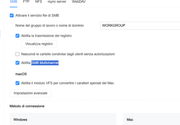
2) SMB = ON SMB - Multichannel =ON VFS MAC = ON
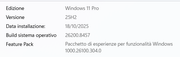
3) WINDOWS 11 PRO 25H2 BUILD 26200.8457
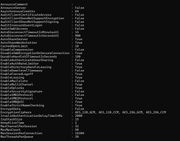
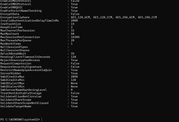
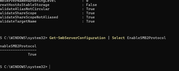
4) SMB VERISON WINDOWS SMB1 = FALSE -- SMB2 / SMB3 =TRUE
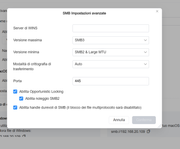
5) NAS SMB VERISON max smb3 - verison min = smb2 & large mtu crittog. = auto port = 445


Image

Image

Image

Image

Image

Image

Image

Image

Re: TOS 7.0.0601 Beta (X86) is Released for Update

Posted: 21 May 2026, 09:16
by CursaYang
Riccobono67 wrote: 21 May 2026, 01:00
Our internal tests show no lag issues when transferring files via SMB. Does the 2GB file you're transferring have a specific format?

Additionally, you can try temporarily disabling SMB multichannel and VFS MAC, then clearing the Windows SMB connection, and then testing the transfer again.