TOS 7.0.1536 (x86) Official Release Update

Official news about TOS, mobile app, PC app updates or beta releases.
User avatar
Crashoveride
Posts: 13
Joined: 15 Sep 2026, 19:59
Russia

Re: TOS 7.0.1536 (x86) Official Release Update

Post by Crashoveride »

EriChan wrote: ↑12 Nov 2026, 18:57
Thank you for your previous explanation and for forwarding my findings to the R&D team.

I've now performed additional network-level diagnostics using tcpdump and Wireshark's tshark to investigate the SMB FLUSH behavior.

I captured SMB traffic between my Mac mini M4 and TerraMaster F4-425 Pro while copying the same 17.81 GB file to the NVMe RAID 5 volume.

Results

macOS Finder
- 27 SMB FLUSH requests detected
- Previous copy times: approximately 50–53 seconds
- Network capture: 421,230 packets, with zero kernel drops

macOS ditto
- 0 SMB FLUSH requests detected
- Previous copy time: approximately 31 seconds
- Network capture: 400,413 packets, with zero kernel drops

Both captures used the same filter (tcp port 445 and less 512) and were analyzed using the same Wireshark display filter (smb2.cmd == 7).

Since the capture filter excluded packets of 512 bytes or larger, these counts may not represent every SMB FLUSH request.

These findings are consistent with my earlier strace results, which showed 29 fsync calls taking a total of 8.22 seconds during Finder copying.

I also tested your suggested macOS setting, file_ids_off=yes. Unfortunately, it made no measurable difference: Finder still required approximately 53 seconds to copy the file.

The additional network evidence strongly supports your explanation that Finder's SMB FLUSH behavior contributes to the performance difference compared with ditto.

I hope these results will be useful to your R&D team when investigating possible SMB performance improvements in future TOS 7 releases.

Thank you again for your assistance!
TerraMaster F2-425 Plus (Intel N95)
TerraMaster F4-425 Pro (Intel N350)
User avatar
mnewland
Posts: 38
Joined: 23 Apr 2023, 05:28
Great Britain

Re: TOS 7.0.1536 (x86) Official Release Update

Post by mnewland »

T6-423 everything seems fine so far.
My TNAS
  • Device = T6-423
  • RAM = 32gb official Terramaster ram
  • Disks = 3 x Seagate IronWolf ST400VN006 4TB
  • TOS = 7.0.1536
  • BIOS = 5.19
  • Mobile App = 3.5.0.81
NAS always run in Security Isolation Mode
User avatar
tnaspain
Posts: 22
Joined: 16 Sep 2026, 01:09
Canada

Re: TOS 7.0.1536 (x86) Official Release Update

Post by tnaspain »

Please look at my post here, where @snapshot folder is visible, but access to snapshot folder is now blocked in TOS 7.0.1536 on the T12-500

viewtopic.php?t=10783
This user appreciates any help. Thanks!
User avatar
tnaspain
Posts: 22
Joined: 16 Sep 2026, 01:09
Canada

Re: TOS 7.0.1536 (x86) killed Centralized Backup on the T12-500

Post by tnaspain »

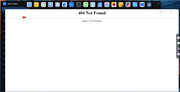
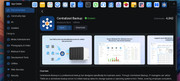
TOS 7.0.1536 also killed Centralized Backup on the T12-500.

Can't be found when "open" is clicked on. See attached images. Shows it is installed and worked until the upgrad to v.1536

Image

Image
This user appreciates any help. Thanks!
User avatar
MikeZhang
TM Support
Posts: 453
Joined: 05 Sep 2023, 22:21

Re: TOS 7.0.1536 (x86) killed Centralized Backup on the T12-500

Post by MikeZhang »

tnaspain wrote: ↑Yesterday, 06:06
That page is the web server's own 404, which means the request reaches TOS but the app's web directory is not where the web server expects it. It does not mean the app was removed, and it does not affect your existing backup tasks or their data.
To confirm which of the two possible causes it is, please run these on the T12-500 terminal:

ls -l /usr/www/CentralizedBackup
ls -la /Volume1/@apps/CentralizedBackup/webui | head
systemctl status CentralizedBackup --no-pager | head -20

and, if the app may be installed on another volume:

ls -d /Volume*/@apps/CentralizedBackup

With that we can tell whether the web link was lost during the upgrade, the web directory was not unpacked, or the backend service failed to start — the repair is different in each case.
To contact our team, please send email to following addresses, remember to replace (at) with @

Technical team: support(at)terra-master.com(for technical support)
Service team: service(at)terra-master.com(for purchasing, return, replacement, RMA service)
User avatar
OttO1916
Posts: 62
Joined: 06 Oct 2024, 04:40
Netherlands

Re: TOS 7.0.1536 (x86) Official Release Update

Post by OttO1916 »

Both F2-221 and F5-221 updated to 7.0.1536 without any issues.
F5-221 - TOS7.0.1536 - 5x4TB TRAID - 1x4TB Single USB - 2x4TB HwRAID1 USB
F2-221 - TOS7.0.1536 - 2x3TB JBOD - 1x4TB Single USB
User avatar
Asdrubal
Posts: 4
Joined: 06 Jun 2026, 11:22
France

Re: TOS 7.0.1536 (x86) Official Release Update

Post by Asdrubal »

Bonjour, Monsieur EriChan.

Vos arguments sont irrecevables !
Vous ne prônez qu'à instaurer "Compréhensions et patiences".

La première fois que : Let's Encrypt" s'inscrivit sur le forum, remonte à janvier 2021.
Fin juin 2026, après ouvertures de deux domaines, connectés sur le NAS, nous envisagions l'automatisation du renouvèlement d'un certificat/clef : Let's Encrypt.

Même réponse, obtenue 6 mois plus tôt, d'intervenants tous promus à nous aider.
"C'est programmé et accepté par TerraMaster … Veuillez patienter", et.c et.c..

En 3 jours, nous avons réalisé un script, probablement imparfait, qui pourrait ouvrir une voie à cet épineux problème. Pourriez-vous le transmettre à vos équipes afin qu'elles s'affairent maintenant à fixer quelque-chose d'avalisé par TerraMaster ?

Nous utilisons les transferts de fichiers, quelques entrées sur le NAS, et aimerions ne plus avoir à nous soucier des transferts propres à la sécurité d'un httpS.

Vos analystes responsables produits, pourraient analyser ce script, mis à la disposition de tous, qui contient un algorithme de sécurité, afin de ne plus lire d'hypothétiques promesses se fourvoyant à : Patience et compréhension !

Si vous ne savez pas faire, ou que le TOS soit mal architecturé au point de ne pas le supporter, (Dangers NGINX), dites-le nous ouvertement au lieu de parader.

Force est de constater, que toutes ces correctifs hebdomadaires deviennent pénibles et risquées ! (Cas de coupure secteur.)
De plus, au regrettable constat, qu'ils engendreraient d'autres anomalies ?
Chez TerraMaster, c'est visiblement l'usager qui participe au "Contrôle final".

Le matériel est magnifique, personne ne vous dira le contraire.
Votre logiciel, lui, s'affiche comme étant un univers truffé de bugs !

Pour conclure, je joins ici-même sur le forum, notre travail de participation.
Merci à vous désormais, d'intervenir à réguler ce manque.
Nous ne sommes pas les seuls.

Je vous salue Monsieur.
Asdrubal.

SCRIPT SUR FORUM ** SCRIPT SUR FORUM ** SCRIPT SUR FORUM
User avatar
Asdrubal
Posts: 4
Joined: 06 Jun 2026, 11:22
France

Re: TOS 7.0.1536 (x86) Official Release Update

Post by Asdrubal »

SCRIPT SUR FORUM ** SCRIPT SUR FORUM ** SCRIPT SUR FORUM

#!/bin/sh

# ==
# TerraMaster TOS 7 - Installation automatique d'un certificat
# ACME avec acme.sh et Nginx
#
# Domaine : abcdef.duckdns.org
# NAS : TerraMaster F4-424 Pro
#
# - Certificat stocké dans /Volume1/cert/
# - Nginx utilise directement ces fichiers
# - Liens symboliques pour les autres écouteurs HTTPS
# - acme.sh --install-cert pour les renouvellements
# - Rechargement Nginx après renouvellement
#
# Sécurité :
# - Sauvegarde avant modification
# - Vérification de la clé et du certificat
# - Test nginx -t
# - Retour arrière en cas d'échec
#
# ATTENTION : script proposé, non testé sur le NAS.
# Exécution requise en root.
# Ne modifie jamais tnasonline.conf.
# ===

set -u

# ---
# PARAMÈTRES
# ---

DOMAIN="abcdef.duckdns.org"

ACME_HOME="/home/Mon-nas/.acme.sh"
ACME="$ACME_HOME/acme.sh"
ACME_DIR="$ACME_HOME/${DOMAIN}_ecc"

SOURCE_KEY="$ACME_DIR/$DOMAIN.key"
SOURCE_CERT="$ACME_DIR/fullchain.cer"
ACME_CONF="$ACME_DIR/$DOMAIN.conf"

CERT_DIR="/Volume1/cert"
TARGET_KEY="$CERT_DIR/server.key"
TARGET_CERT="$CERT_DIR/server.pem"

NGINX_DIR="/etc/nginx"
NGINX_CONF="$NGINX_DIR/nginx.conf"

RELOAD_CMD="nginx -t && service nginx force-reload"

STAMP="$(date +%Y%m%d-%H%M%S)-$$"
BACKUP="/Volume1/cert-backup-$STAMP"
TMP_CONF="/tmp/nginx.conf.new.$$"

# ---
# FONCTIONS
# ---

error() {
echo ""
echo "ERREUR : $1"
exit 1
}

save_path() {
PATH_TO_SAVE="$1"
NAME="$2"

if [ -e "$PATH_TO_SAVE" ] || [ -L "$PATH_TO_SAVE" ]; then
cp -a "$PATH_TO_SAVE" "$BACKUP/$NAME" ||
error "Impossible de sauvegarder $PATH_TO_SAVE"
else
touch "$BACKUP/$NAME.absent" ||
error "Impossible d'enregistrer l'absence de $PATH_TO_SAVE"
fi
}

restore_path() {
PATH_TO_RESTORE="$1"
NAME="$2"

rm -f "$PATH_TO_RESTORE"

if [ -e "$BACKUP/$NAME" ] || [ -L "$BACKUP/$NAME" ]; then
cp -a "$BACKUP/$NAME" "$PATH_TO_RESTORE"
fi
}

rollback() {
echo ""
echo "==="
echo "RETOUR ARRIÈRE"
echo "==="

restore_path "$NGINX_CONF" "nginx.conf"
restore_path "$NGINX_DIR/server.crt" "server.crt"
restore_path "$NGINX_DIR/server.key" "server.key"

restore_path "$TARGET_CERT" "server.pem"
restore_path "$TARGET_KEY" "server.key.data"

restore_path "$ACME_CONF" "acme-domain.conf"

echo "Vérification de la configuration restaurée..."

if nginx -t; then
if service nginx force-reload; then
echo "Configuration précédente restaurée et Nginx rechargé."
else
echo "ATTENTION : le rechargement de Nginx a échoué."
fi
else
echo "ATTENTION : la configuration restaurée échoue au test Nginx."
fi

echo "Sauvegarde conservée : $BACKUP"
}

abort_with_rollback() {
MESSAGE="$1"
rollback
error "$MESSAGE"
}

# ---
# 1. CONTRÔLES PRÉALABLES
# ---

[ "$(id -u)" = "0" ] ||
error "Ce script doit être exécuté avec les droits root."

[ -x "$ACME" ] ||
error "Programme acme.sh introuvable ou non exécutable."

[ -f "$SOURCE_KEY" ] ||
error "Clé privée ACME introuvable."

[ -f "$SOURCE_CERT" ] ||
error "Certificat ACME introuvable."

[ -f "$NGINX_CONF" ] ||
error "Configuration Nginx introuvable."

[ ! -d "$NGINX_DIR/server.crt" ] ||
error "server.crt est un répertoire : intervention manuelle nécessaire."

[ ! -d "$NGINX_DIR/server.key" ] ||
error "server.key est un répertoire : intervention manuelle nécessaire."

# Une seule paire de directives doit être présente dans nginx.conf.

CERT_COUNT=$(grep -Ec \
'^[[:space:]]*ssl_certificate[[:space:]]' "$NGINX_CONF")

KEY_COUNT=$(grep -Ec \
'^[[:space:]]*ssl_certificate_key[[:space:]]' "$NGINX_CONF")

[ "$CERT_COUNT" = "1" ] ||
error "Nombre inattendu de directives ssl_certificate."

[ "$KEY_COUNT" = "1" ] ||
error "Nombre inattendu de directives ssl_certificate_key."

# ---
# 2. VÉRIFICATION DE LA CLÉ ET DU CERTIFICAT
# ---

CERT_PUB=$(
openssl x509 -in "$SOURCE_CERT" -pubkey -noout |
openssl pkey -pubin -outform DER 2>/dev/null |
openssl dgst -sha256
)

KEY_PUB=$(
openssl pkey -in "$SOURCE_KEY" -pubout -outform DER 2>/dev/null |
openssl dgst -sha256
)

[ -n "$CERT_PUB" ] &&
[ "$CERT_PUB" = "$KEY_PUB" ] ||
error "La clé privée ne correspond pas au certificat."

# ---
# 3. PRÉPARATION DES RÉPERTOIRES
# ---

mkdir -p "$CERT_DIR" ||
error "Impossible de créer $CERT_DIR."

chmod 755 "$CERT_DIR" ||
error "Impossible de régler les droits du répertoire."

mkdir -p "$BACKUP" ||
error "Impossible de créer le répertoire de sauvegarde."

chmod 700 "$BACKUP"

# ---
# 4. SAUVEGARDE DE L'INSTALLATION EXISTANTE
# ---

echo "Sauvegarde de la configuration actuelle..."

save_path "$NGINX_CONF" "nginx.conf"
save_path "$NGINX_DIR/server.crt" "server.crt"
save_path "$NGINX_DIR/server.key" "server.key"

save_path "$TARGET_CERT" "server.pem"
save_path "$TARGET_KEY" "server.key.data"

save_path "$ACME_CONF" "acme-domain.conf"

# ---
# 5. INSTALLATION INITIALE DES FICHIERS
# ---

echo "Installation du certificat et de sa clé..."

rm -f "$TARGET_CERT" "$TARGET_KEY"

cp "$SOURCE_CERT" "$TARGET_CERT" &&
cp "$SOURCE_KEY" "$TARGET_KEY" &&
chmod 644 "$TARGET_CERT" &&
chmod 600 "$TARGET_KEY" ||
abort_with_rollback "Installation initiale des fichiers impossible."

# ---
# 6. MODIFICATION LIMITÉE DE NGINX.CONF
# ---

echo "Préparation de la nouvelle configuration Nginx..."

sed \
-e 's|^[[:space:]]*ssl_certificate[[:space:]].*;| ssl_certificate /Volume1/cert/server.pem;|' \
-e 's|^[[:space:]]*ssl_certificate_key[[:space:]].*;| ssl_certificate_key /Volume1/cert/server.key;|' \
"$NGINX_CONF" > "$TMP_CONF" ||
abort_with_rollback "Préparation de nginx.conf impossible."

# Vérification des deux nouvelles directives.

[ "$(grep -Ec \
'^[[:space:]]*ssl_certificate[[:space:]]+/Volume1/cert/server.pem;' \
"$TMP_CONF")" = "1" ] ||
abort_with_rollback "Directive ssl_certificate incorrecte."

[ "$(grep -Ec \
'^[[:space:]]*ssl_certificate_key[[:space:]]+/Volume1/cert/server.key;' \
"$TMP_CONF")" = "1" ] ||
abort_with_rollback "Directive ssl_certificate_key incorrecte."

# Remplacement du contenu sans changer les attributs du fichier original.

cat "$TMP_CONF" > "$NGINX_CONF" ||
abort_with_rollback "Modification de nginx.conf impossible."

rm -f "$TMP_CONF"

# ---
# 7. CRÉATION DES LIENS SYMBOLIQUES DE MIKE
# ---

echo "Création des liens symboliques..."

rm -f "$NGINX_DIR/server.crt" "$NGINX_DIR/server.key"

ln -s "$TARGET_CERT" "$NGINX_DIR/server.crt" ||
abort_with_rollback "Création du lien server.crt impossible."

ln -s "$TARGET_KEY" "$NGINX_DIR/server.key" ||
abort_with_rollback "Création du lien server.key impossible."

# tnasonline.conf reste strictement inchangé.

# ---
# 8. VALIDATION DE LA CONFIGURATION NGINX
# ---

echo "Test de la nouvelle configuration Nginx..."

nginx -t ||
abort_with_rollback "Nginx refuse la nouvelle configuration."

# 9. ENREGISTREMENT DU DÉPLOIEMENT AUTOMATIQUE ACME

echo "Enregistrement du déploiement automatique ACME..."

"$ACME" --install-cert \
-d "$DOMAIN" \
--ecc \
--home "$ACME_HOME" \
--key-file "$TARGET_KEY" \
--fullchain-file "$TARGET_CERT" \
--reloadcmd "$RELOAD_CMD"

if [ "$?" -ne 0 ]; then
abort_with_rollback "La commande acme.sh --install-cert a échoué."
fi

# ---
# 10. VÉRIFICATION FINALE
# ---

echo "Vérification finale..."

nginx -t ||
abort_with_rollback "Échec de la vérification finale de Nginx."

echo ""
echo "=="
echo "INSTALLATION INITIALE RÉUSSIE"
echo "=="
echo ""
echo "Domaine : $DOMAIN"
echo "Certificat : $TARGET_CERT"
echo "Clé privée : $TARGET_KEY"
echo "Sauvegarde : $BACKUP"
echo ""
echo "Déploiement automatique enregistré dans acme.sh."
echo "Commande de rechargement : $RELOAD_CMD"
echo ""
echo "Le fichier tnasonline.conf n'a pas été modifié."
echo "=="

exit 0
Post Reply

Return to “Update Notice”