[Help] How to hide third-party App Center apps for standard users in TOS 7?

Permissions, Users, Uear groups, shared folders, LDAP/domain
Post Reply
User avatar
eavn
Posts: 2
Joined: 11 Jun 2025, 15:52
Vietnam

[Help] How to hide third-party App Center apps for standard users in TOS 7?

Post by eavn »

Hi TOS Support Team & Community,

I am running TOS 7 (version 7.0.1422) and need assistance with user privilege management for installed applications.

When third-party applications (e.g., please see the attached screenshot) are installed from the App Center, their icons automatically appear on the TOS desktop/main interface for all standard users. However, these third-party apps do not show up under Control Panel > Privileges > Application Permissions, so I cannot set them to Deny for specific users or groups.
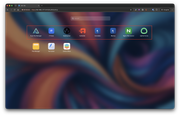
Image
My goal is to restrict standard users so they can only see and access Photos and File Manager, hiding all other installed third-party apps from their desktop.

Is there a built-in feature, permission setting, or workaround in TOS 7 to hide these App Center apps or restrict their launch access for non-admin users?

Thanks in advance for your guidance!
User avatar
snapsh0t
Posts: 95
Joined: 19 Oct 2025, 03:23
Great Britain

Re: [Help] How to hide third-party App Center apps for standard users in TOS 7?

Post by snapsh0t »

Do your standard users really need to access the NAS desktop at all? File Manager access can easily be replaced by Windows File Explorer on the PC desktop (or Mac equivalent) and there must be an equivalent to Photos available.
F2-425 Plus, 16GB RAM, 2 x 500GB WD SN700 EXT4 RAID1, 2 x 3TB WD Red EXT4 RAID1, TOS 7.0.<latest>
F4-SSD, 16GB RAM, 4 x 4TB WD SN700 Btrfs TRAID, TOS 7.0.<latest>
User avatar
EriChan
TM Support
Posts: 434
Joined: 06 Jan 2026, 12:27
China

Re: [Help] How to hide third-party App Center apps for standard users in TOS 7?

Post by EriChan »

eavn wrote: ↑Today, 13:12
Thank you for your feedback!

Currently, TOS 7 does not support hiding third-party App Center applications or configuring application launch permissions for standard users. We have forwarded this feature request to our product team for evaluation in future updates.
To contact our team, please send email to following addresses, remember to replace (at) with @

Technical team: support(at)terra-master.com(for technical support)
Service team: service(at)terra-master.com(for purchasing, return, replacement, RMA service)
Post Reply

Return to “Privileges”