

Please take a closer look at my previous description — we followed your example exactly: the folders were not created at the same time. We first created "Documents," "Movies," and "Photos," and only then created the "Downloads" folder. At this point, in the folder list that appears after selecting "Copy" or "Move" in File Manager, the "Downloads" folder appears after the "Documents" folder.
TOS 7.0.1188 (x86) Official Release Update
Re: TOS 7.0.1188 (x86) Official Release Update
To contact our team, please send email to following addresses, remember to replace (at) with @
Technical team: support(at)terra-master.com(for technical support)
Service team: service(at)terra-master.com(for purchasing, return, replacement, RMA service)
Technical team: support(at)terra-master.com(for technical support)
Service team: service(at)terra-master.com(for purchasing, return, replacement, RMA service)


Re: TOS 7.0.1188 (x86) Official Release Update
T6-423
Since installing the update and running the NAS for a few days the performance of the NAS has slowed. My son was complaining he couldn't use Jellyfin this afternoon - I connected to the NAS and the desktop would not load properly in the resource monitor it showed as high load but CPU and memory showed little utilization - a reboot has fixed it for now. though I'm guessing something is up as I haven't experienced this before.
Jellyfin is on 10.11.15
Since installing the update and running the NAS for a few days the performance of the NAS has slowed. My son was complaining he couldn't use Jellyfin this afternoon - I connected to the NAS and the desktop would not load properly in the resource monitor it showed as high load but CPU and memory showed little utilization - a reboot has fixed it for now. though I'm guessing something is up as I haven't experienced this before.
Jellyfin is on 10.11.15
My TNAS
- Device = T6-423
- RAM = 32gb official Terramaster ram
- Disks = 3 x Seagate IronWolf ST400VN006 4TB
- TOS = 7.0.1201
- BIOS = 5.19
- Mobile App = 3.5.0.81
Re: TOS 7.0.1188 (x86) Official Release Update
Load is related not only to CPU and memory usage, but also to hard drive read/write activity. At this point, the cause can no longer be identified after a restart. If you encounter a similar issue next time, please enable debug mode and, after the device restarts, download the debug logs and send them to us.
To contact our team, please send email to following addresses, remember to replace (at) with @
Technical team: support(at)terra-master.com(for technical support)
Service team: service(at)terra-master.com(for purchasing, return, replacement, RMA service)
Technical team: support(at)terra-master.com(for technical support)
Service team: service(at)terra-master.com(for purchasing, return, replacement, RMA service)


Re: TOS 7.0.1188 (x86) Official Release Update
I created a new Shared Folder called "Test" and then created three folders inside it in the following order:CursaYang wrote: ↑14 Sep 2026, 17:09Please take a closer look at my previous description — we followed your example exactly: the folders were not created at the same time. We first created "Documents," "Movies," and "Photos," and only then created the "Downloads" folder. At this point, in the folder list that appears after selecting "Copy" or "Move" in File Manager, the "Downloads" folder appears after the "Documents" folder.
AAA
ZZZ
BBB
In the normal File Manager view, the folders are correctly displayed in alphabetical order:
AAA → BBB → ZZZ
See screenshot:
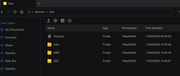
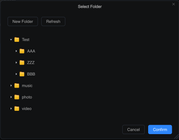
However, when I navigate to a different folder (Downloads), right-click on a file and select Move, the Select Folder window does not use the same alphabetical sorting.
As shown in the screenshot below, the folders are displayed in the order they were created, with the last-created folder "BBB" appearing last:
Expected behavior
The Select Folder view should use the same alphabetical sorting as the normal File Manager view:
AAA → BBB → ZZZ
Actual behavior
The folders appear to be sorted according to their creation order:
AAA → ZZZ → BBB
It would be helpful if the Select Folder dialog used the same sorting behavior as the main File Manager view.
Additional information
This behavior does not occur when using the TNAS mobile app. The folders are displayed correctly there.
Therefore, the issue appears to be specific to the TOS 7 File Manager / "Select Folder" interface, where the folder sorting is inconsistent with the normal File Manager view.
F4-425 Plus | 16GB RAM | Intel(R) N150 | 3× 12TB HDD (TRAID) | 1× 1TB NVMe | 1× 500GB NVMe
Re: TOS 7.0.1188 (x86) Official Release Update
When selecting "Move" or "Copy to" a directory in File Manager, the shared folders at the top level are sorted in A-Z, a-z order, but the subfolders under a shared folder are sorted by creation time. We have reported this issue to our product team. Please wait for a future version update.
To contact our team, please send email to following addresses, remember to replace (at) with @
Technical team: support(at)terra-master.com(for technical support)
Service team: service(at)terra-master.com(for purchasing, return, replacement, RMA service)
Technical team: support(at)terra-master.com(for technical support)
Service team: service(at)terra-master.com(for purchasing, return, replacement, RMA service)
Re: TOS 7.0.1188 (x86) Official Release Update
just realize i posted this to the wrong place - removed
My TNAS
- Device = T6-423
- RAM = 32gb official Terramaster ram
- Disks = 3 x Seagate IronWolf ST400VN006 4TB
- TOS = 7.0.1201
- BIOS = 5.19
- Mobile App = 3.5.0.81