

Hello,
I received my TerraMaster D4-320 five days ago and have a few questions about it.
The post is a little long, but I would appreciate any detailed feedback or information on the questions below.
----
# 1. Fan Replacement
The stock cooling fan has a high-pitched noise, which is quite uncomfortable in a quiet environment. So I am considering replacing it with a Noctua NF-A12x25.
It looks like some small design changes were made compared with the earlier version. For example, the fan screws are now mounted from inside the housing.
Does the current version still use a JST 2.54 mm connector for the fan header?
Also, is there anything I should be careful about when replacing the fan?
----
# 2. Temperature During Standby
After leaving the D4-320 in standby mode, with the connected PC shut down, for several hours, the right-side plastic housing around the PCB and the area around the connectors become warm.
Is this normal for the D4-320 when it is in standby?
----
# 3. Fan Temperature Control
What temperature is used to control the fan speed?
Is the fan curve based on the PCB temperature, or on the temperature of the installed HDDs?
----
# 4. Slow Write Speed After a Cold Boot
(Resolved, but I would like to know why)
I am currently using an MSI MAG X870 TOMAHAWK WIFI motherboard.
Since I first installed the D4-320, I had a problem where the write speed stayed below 50 MB/s after a cold boot.
The read speed was normal, and only the write speed was affected.
Of course, I am using the original USB cable and power adapter that came with the D4-320.
The behavior was always the same:
* Cold boot: Write speed below 50 MB/s
* After rebooting the PC: Write speed returned to normal
* Every cold boot: The same problem happened again
* Different USB ports on the motherboard: The same problem occurred
After trying several things, I found that installing MSI's `ASMedia 116x SATA Controller Driver` completely fixed the problem.
My PC does not have any internal SATA devices.
Why would installing this driver fix the problem even though I am not using any internal SATA devices?
Can the `ASMedia 116x SATA Controller Driver` affect the D4-320 even when no SATA devices are connected?
Is there any known compatibility issue or possible reason for this?
For reference, the SATA controller on the MSI MAG X870 TOMAHAWK WIFI is an ASMedia ASM1064.
----
# 5. Drive Wake-up / Firmware
(Resolved, but I would like to know why)
After that, while using the D4-320, I had an intermittent problem where the drive in Slot 1 would sometimes fail to wake up from sleep and disappear.
I tested different drives and slot configurations and found that the problem only occurred when an HDD and an SSD were used together, and only when the affected drive was installed in Slot 1. I tested two WD Purple HDDs and a Samsung 860 EVO SSD, and all of them showed the same behavior under these conditions.
* HDD + SSD: Problem occurred in Slot 1
* HDD/SSD alone in Slot 1: No problem
* HDDs only: No problem
* Other slots: No problem
At the time, Windows 11 Device Manager showed Code 43, and Event Viewer showed UASPStor Event ID 129.
I then reflashed the firmware using MPTool, and the problem has not happened again so far.
However, the firmware version was 210830D163F7 both before and after the reflash.
Why would reflashing the same firmware version fix the problem?
Could the reflash process have reset some settings or internal data, even though the firmware version itself stayed the same?
Thank you for taking the time to read through everything. I would really appreciate a detailed answer.
[Help] Several Questions About the D4-320
[Help] Several Questions About the D4-320
Last edited by cmpstwmbt on 09 Sep 2026, 17:29, edited 1 time in total.


Re: [Help] Several Questions About the D4-320
1、The fan port still uses the JST-XH 2.54mm interface. If you wish to replace it with a Noctua fan, you will need a PWM conversion cable.
2、Even if the hard drive is in standby mode, internal circuits and components will still generate heat, so this is a normal phenomenon.
3、The D4-320 is equipped with an intelligent temperature-controlled fan, and its rotation speed is managed by multiple temperature monitoring points inside the device.
4、The MSI MAG X870 TOMAHAWK WIFI platform may experience abnormal PCIe/USB power management or device initialization status during the cold boot phase. After installing the ASMedia SATA driver, system devices undergo re-enumeration and initialization, which may indirectly alter the status of related controllers, thereby restoring the USB write performance of the D4-320 to normal.
5、Although the firmware version still displays 210830D163F7 after re-flashing, the flashing process does not mean the device's internal status has remained completely unchanged. The firmware tool may also execute controller reset, Flash data re-initialization, and reset of certain internal configuration or status parameters at the same time. Therefore, re-flashing the same firmware version may still eliminate the previously existing abnormal status.
Based on the test results you described, the issue shows clear conditional correlation: it only occurs when an HDD is installed in bay 1 while SSDs are present in other drive bays, and is accompanied by Windows UASPStor Event ID 129 and Device Code 43. This is more likely attributed to the USB-SATA bridge controller failing to properly restore the status of a SATA port during the HDD sleep/wake-up process. As the issue has currently disappeared after re-flashing the same firmware, we will conduct further internal investigation into the port management, power management of the bridge chip, as well as the HDD/SSD mixed sleep/wake-up process.
2、Even if the hard drive is in standby mode, internal circuits and components will still generate heat, so this is a normal phenomenon.
3、The D4-320 is equipped with an intelligent temperature-controlled fan, and its rotation speed is managed by multiple temperature monitoring points inside the device.
4、The MSI MAG X870 TOMAHAWK WIFI platform may experience abnormal PCIe/USB power management or device initialization status during the cold boot phase. After installing the ASMedia SATA driver, system devices undergo re-enumeration and initialization, which may indirectly alter the status of related controllers, thereby restoring the USB write performance of the D4-320 to normal.
5、Although the firmware version still displays 210830D163F7 after re-flashing, the flashing process does not mean the device's internal status has remained completely unchanged. The firmware tool may also execute controller reset, Flash data re-initialization, and reset of certain internal configuration or status parameters at the same time. Therefore, re-flashing the same firmware version may still eliminate the previously existing abnormal status.
Based on the test results you described, the issue shows clear conditional correlation: it only occurs when an HDD is installed in bay 1 while SSDs are present in other drive bays, and is accompanied by Windows UASPStor Event ID 129 and Device Code 43. This is more likely attributed to the USB-SATA bridge controller failing to properly restore the status of a SATA port during the HDD sleep/wake-up process. As the issue has currently disappeared after re-flashing the same firmware, we will conduct further internal investigation into the port management, power management of the bridge chip, as well as the HDD/SSD mixed sleep/wake-up process.
To contact our team, please send email to following addresses, remember to replace (at) with @
Technical team: support(at)terra-master.com(for technical support)
Service team: service(at)terra-master.com(for purchasing, return, replacement, RMA service)
Technical team: support(at)terra-master.com(for technical support)
Service team: service(at)terra-master.com(for purchasing, return, replacement, RMA service)
Re: [Help] Several Questions About the D4-320
Thank you very much for the detailed response.CursaYang wrote: ↑09 Sep 2026, 16:05 5、Although the firmware version still displays 210830D163F7 after re-flashing, the flashing process does not mean the device's internal status has remained completely unchanged. The firmware tool may also execute controller reset, Flash data re-initialization, and reset of certain internal configuration or status parameters at the same time. Therefore, re-flashing the same firmware version may still eliminate the previously existing abnormal status.
Based on the test results you described, the issue shows clear conditional correlation: it only occurs when an HDD is installed in bay 1 while SSDs are present in other drive bays, and is accompanied by Windows UASPStor Event ID 129 and Device Code 43. This is more likely attributed to the USB-SATA bridge controller failing to properly restore the status of a SATA port during the HDD sleep/wake-up process. As the issue has currently disappeared after re-flashing the same firmware, we will conduct further internal investigation into the port management, power management of the bridge chip, as well as the HDD/SSD mixed sleep/wake-up process.
Regarding the issue mentioned in point 5, I don't think I explained it clearly enough, so I would like to clarify a few things.
The problem occurred whether an SSD or an HDD was installed in Slot 1.
When I first encountered the problem, the setup was:
* Slot 1: SSD, Slot 2: HDD, Slot 3: HDD
I then tested different drive configurations and found that the same problem occurred whether the drive in Slot 1 was an SSD or an HDD.
However, the problem did not occur when an SSD or HDD was used alone in Slot 1, and it also did not occur when multiple HDDs were installed without SSD.
In other words, the problem only occurred when an SSD and HDD were used together, and even in that case, it only occurred in Slot 1.
Please keep this in mind.
I also have a couple of additional questions:
* Is it okay to leave the D4-320 powered on 24/7, 365 days a year, continuously in standby mode without turning it off?
* Regardless of the issues I mentioned above, is there any plan for future firmware updates for the D4-320?
Thank you again for your help.
Re: [Help] Several Questions About the D4-320
The D4-320 can remain powered on 24/7. Apart from this one, there are currently no other firmware updates for the D4-320: viewtopic.php?t=7111
To contact our team, please send email to following addresses, remember to replace (at) with @
Technical team: support(at)terra-master.com(for technical support)
Service team: service(at)terra-master.com(for purchasing, return, replacement, RMA service)
Technical team: support(at)terra-master.com(for technical support)
Service team: service(at)terra-master.com(for purchasing, return, replacement, RMA service)
Re: [Help] Several Questions About the D4-320
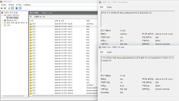
I think the first slot on the D4-320 I received is probably defective.
The issue just happened again. This time, however, the drive wasn't even in sleep mode. It became unresponsive as soon as I tried to read a file, and the same problem occurred.
I think I should probably request a return from the seller.
The issue just happened again. This time, however, the drive wasn't even in sleep mode. It became unresponsive as soon as I tried to read a file, and the same problem occurred.
I think I should probably request a return from the seller.
Re: [Help] Several Questions About the D4-320
Before proceeding with the after-sales service, please test the same HDD and SSD combination in other slots. For example, if the issue occurred in slots 1 and 2, does it still occur when you switch to slots 2 and 3, or slots 3 and 4?
If the issue lies with a particular HDD or SSD itself, then moving it to another slot should, in theory, cause the issue to follow that drive. If what you are currently observing is this — whenever an HDD and an SSD are present at the same time, Slot 1 tends to have problems, but the same drives work fine when placed in other slots — this may indicate a fault in Slot 1.
If the issue lies with a particular HDD or SSD itself, then moving it to another slot should, in theory, cause the issue to follow that drive. If what you are currently observing is this — whenever an HDD and an SSD are present at the same time, Slot 1 tends to have problems, but the same drives work fine when placed in other slots — this may indicate a fault in Slot 1.
To contact our team, please send email to following addresses, remember to replace (at) with @
Technical team: support(at)terra-master.com(for technical support)
Service team: service(at)terra-master.com(for purchasing, return, replacement, RMA service)
Technical team: support(at)terra-master.com(for technical support)
Service team: service(at)terra-master.com(for purchasing, return, replacement, RMA service)
Re: [Help] Several Questions About the D4-320
Originally, I mistakenly thought that the fourth slot was Slot 1, so I used Slots 4, 3, and 2. I did not experience the issue when using Slots 4, 3, and 2. Later, I realized that the leftmost slot was actually Slot 1. After switching to Slots 1, 2, and 3, the issue started to occur.