
Based on your description, it appears that one of your NVMe SSDs was previously used as a Hyper Cache SSD, but Hyper Cache has since been disabled.
However, judging from the screenshot, it still retains the partition format from when it was a Hyper Cache SSD, indicating that it does not contain the TOS system.
This may be why you were unable to boot the system when only one SSD was installed in the F6-424. (This is why you removed the other SSD, which was the only one containing the TOS system.)
After booting TOS with both SSDs, go to Storage Management > Disks/System Disk to see which NVMe SSD the TOS system is located on.
[Help] NVMe Drive Question
Re: [Help] NVMe Drive Question
To contact our team, please send email to following addresses, remember to replace (at) with @:
Technical team: support(at)terra-master.com (for technical support)
Service team: service(at)terra-master.com (for purchasing, return, replacement, RMA service)
Technical team: support(at)terra-master.com (for technical support)
Service team: service(at)terra-master.com (for purchasing, return, replacement, RMA service)

Re: [Help] NVMe Drive Question
Incorrect.TMzethar wrote: ↑01 Sep 2026, 16:33 Based on your description, it appears that one of your NVMe SSDs was previously used as a Hyper Cache SSD, but Hyper Cache has since been disabled.
However, judging from the screenshot, it still retains the partition format from when it was a Hyper Cache SSD, indicating that it does not contain the TOS system.
This may be why you were unable to boot the system when only one SSD was installed in the F6-424. (This is why you removed the other SSD, which was the only one containing the TOS system.)
After booting TOS with both SSDs, go to Storage Management > Disks/System Disk to see which NVMe SSD the TOS system is located on.
I removed NVMe-2, which was the Hyper Cache, and the system did NOT boot.
Thinking I might have made a mistake, I removed NVMe-1, and reinstalled NVMe-2 - the system still didn't boot.
It only boots when both NVMes are installed.
When I first bought the unit, I installed TOS on ONE NVMe and nothing else. Afterwards, I installed the Hyper Cache, and THEN I installed the hard drives. I was told this is the proper way to ensure that TOS is installed ONLY on the one NVMe.
"Storage Management > Disks/System Disk to see which NVMe SSD the TOS system is located on." TOS is on NVMe-1
F4-423
TOS version is 6.0.694
BIOS is 5.19
Hard drives 4x ST24000NT002-3N1101 24TB Iron Wolf Pro
TOS - Crucial P310 4TB PCIe Gen4 2280 NVMe M.2
Hypercache - Crucial P310 4TB PCIe Gen4 2280 NVMe M.2
OWC 32GB (2x16GB) DDR4 3200 PC4-25600 CL22
TOS version is 6.0.694
BIOS is 5.19
Hard drives 4x ST24000NT002-3N1101 24TB Iron Wolf Pro
TOS - Crucial P310 4TB PCIe Gen4 2280 NVMe M.2
Hypercache - Crucial P310 4TB PCIe Gen4 2280 NVMe M.2
OWC 32GB (2x16GB) DDR4 3200 PC4-25600 CL22
Re: [Help] NVMe Drive Question
This is a strange phenomenon that warrants further investigation. It could be a coincidence, or it could be due to some other unknown cause.
The boot-related issues after the upgrade to TOS7 are most likely related to the BIOS settings and the USB Initboot version of the bootloader.
You can try adjusting the BIOS boot order, or try flashing the built-in USB Initboot with a version specifically designed for TOS7. This might resolve the issue.
viewtopic.php?t=6433
As for the cause of this phenomenon, I will continue to observe and investigate it.
The boot-related issues after the upgrade to TOS7 are most likely related to the BIOS settings and the USB Initboot version of the bootloader.
You can try adjusting the BIOS boot order, or try flashing the built-in USB Initboot with a version specifically designed for TOS7. This might resolve the issue.
viewtopic.php?t=6433
As for the cause of this phenomenon, I will continue to observe and investigate it.
To contact our team, please send email to following addresses, remember to replace (at) with @:
Technical team: support(at)terra-master.com (for technical support)
Service team: service(at)terra-master.com (for purchasing, return, replacement, RMA service)
Technical team: support(at)terra-master.com (for technical support)
Service team: service(at)terra-master.com (for purchasing, return, replacement, RMA service)
Re: [Help] NVMe Drive Question
A bit more information.
I booted without the hard drives, put them in after boot, the system saw them, I was able to mount them, and then I formatted the hard drives.
I still had the same error when I booted with the hard drives installed.
I'll try once more to make Boot Option #1 the NVMe.
I booted without the hard drives, put them in after boot, the system saw them, I was able to mount them, and then I formatted the hard drives.
I still had the same error when I booted with the hard drives installed.
I'll try once more to make Boot Option #1 the NVMe.
F4-423
TOS version is 6.0.694
BIOS is 5.19
Hard drives 4x ST24000NT002-3N1101 24TB Iron Wolf Pro
TOS - Crucial P310 4TB PCIe Gen4 2280 NVMe M.2
Hypercache - Crucial P310 4TB PCIe Gen4 2280 NVMe M.2
OWC 32GB (2x16GB) DDR4 3200 PC4-25600 CL22
TOS version is 6.0.694
BIOS is 5.19
Hard drives 4x ST24000NT002-3N1101 24TB Iron Wolf Pro
TOS - Crucial P310 4TB PCIe Gen4 2280 NVMe M.2
Hypercache - Crucial P310 4TB PCIe Gen4 2280 NVMe M.2
OWC 32GB (2x16GB) DDR4 3200 PC4-25600 CL22
Re: [Help] NVMe Drive Question
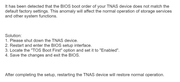
I found "TOS Boot First" under the 'Fast' tab, and it is set to 'Enabled' - if I set it to 'Disabled' the device will not boot at all.
If I set 'Boot Option #1' to NVMe, it will not boot.
If I set 'Boot Option #2' to the NVMe, it does boot, but I get the error.
I wish I had never started this update business. The damned thing was working OK, but I wanted both NAS boxes to have the same TOS version.
EDIT:
To be clear, I CAN boot without issues, but only if I remove the hard drives.
This is completely insane.
If I set 'Boot Option #1' to NVMe, it will not boot.
If I set 'Boot Option #2' to the NVMe, it does boot, but I get the error.
I wish I had never started this update business. The damned thing was working OK, but I wanted both NAS boxes to have the same TOS version.
EDIT:
To be clear, I CAN boot without issues, but only if I remove the hard drives.
This is completely insane.
F4-423
TOS version is 6.0.694
BIOS is 5.19
Hard drives 4x ST24000NT002-3N1101 24TB Iron Wolf Pro
TOS - Crucial P310 4TB PCIe Gen4 2280 NVMe M.2
Hypercache - Crucial P310 4TB PCIe Gen4 2280 NVMe M.2
OWC 32GB (2x16GB) DDR4 3200 PC4-25600 CL22
TOS version is 6.0.694
BIOS is 5.19
Hard drives 4x ST24000NT002-3N1101 24TB Iron Wolf Pro
TOS - Crucial P310 4TB PCIe Gen4 2280 NVMe M.2
Hypercache - Crucial P310 4TB PCIe Gen4 2280 NVMe M.2
OWC 32GB (2x16GB) DDR4 3200 PC4-25600 CL22
Re: [Help] NVMe Drive Question
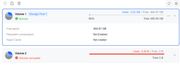
This is what I have when I boot to the NVMe without hard drives:
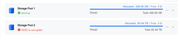
Then I add the hard drives:
Next I mount the hardives/volume:
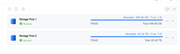
Now if I rebbot, I'll get that warning about setting 'TOS Boot First' to Enabled -- which it already is.
Then I add the hard drives:
Next I mount the hardives/volume:
Now if I rebbot, I'll get that warning about setting 'TOS Boot First' to Enabled -- which it already is.
F4-423
TOS version is 6.0.694
BIOS is 5.19
Hard drives 4x ST24000NT002-3N1101 24TB Iron Wolf Pro
TOS - Crucial P310 4TB PCIe Gen4 2280 NVMe M.2
Hypercache - Crucial P310 4TB PCIe Gen4 2280 NVMe M.2
OWC 32GB (2x16GB) DDR4 3200 PC4-25600 CL22
TOS version is 6.0.694
BIOS is 5.19
Hard drives 4x ST24000NT002-3N1101 24TB Iron Wolf Pro
TOS - Crucial P310 4TB PCIe Gen4 2280 NVMe M.2
Hypercache - Crucial P310 4TB PCIe Gen4 2280 NVMe M.2
OWC 32GB (2x16GB) DDR4 3200 PC4-25600 CL22

Re: [Help] NVMe Drive Question
Since the new NVMe SSD is now the system disk, we recommend removing the old system partitions from the previous system disks. This does not require formatting the hard drives or deleting the existing data.
Please follow these steps:
1. Power off the TNAS and remove the existing hard drives.
2. Leave only the new NVMe SSD installed and boot the TNAS normally.
3. After successfully entering TOS, insert the original hard drives while TOS is running.
4. Wait until TOS detects the hard drives and confirms that the existing data/storage pools are accessible.
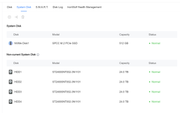
Go to: Storage Management → Disks → System Disk
In the System Disk list, identify the non-current/old system disks that still contain the previous TOS system.
Select the old system disk(s) and choose Delete/Remove to remove the old system partition.
Important: Please make sure you select the old system disk/system partition, not the storage pool or data volume. Do not select “Erase Disk,” “Delete Storage Pool,” or format the hard drives.
After the old system partitions have been removed, reboot the TNAS with the NVMe SSD and the hard drives installed.
The purpose of this operation is to make the new NVMe the only active TOS system disk, while keeping the existing data on the hard drives intact.
Please also make sure that the NVMe SSD is selected as the first boot device in the BIOS/UEFI.
To contact our team, please send email to following addresses, remember to replace (at) with @
Technical team: support(at)terra-master.com(for technical support)
Service team: service(at)terra-master.com(for purchasing, return, replacement, RMA service)
Technical team: support(at)terra-master.com(for technical support)
Service team: service(at)terra-master.com(for purchasing, return, replacement, RMA service)
Re: [Help] NVMe Drive Question
Perhaps I didn't explain it fully.
The NVMe is brand new that I received from Amazon on August 31st:
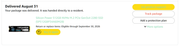
I installed the TOS on that, so I don't see how there can be any 'previous TOS'. It was a completely fresh installation.
This is my System Disk:
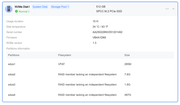
Maybe you can tell me what to do based on what you can see?
As I said before, the NAS boots when there are NO hard drives present.
Also, when I boot from the NVMe, there are no other disks. I did have a System Disk & a Hyper Drive before all this, but those two SSDs have been removed so I only have the single 512GB NVMe.
The NVMe is brand new that I received from Amazon on August 31st:
I installed the TOS on that, so I don't see how there can be any 'previous TOS'. It was a completely fresh installation.
This is my System Disk:
Maybe you can tell me what to do based on what you can see?
As I said before, the NAS boots when there are NO hard drives present.
Also, when I boot from the NVMe, there are no other disks. I did have a System Disk & a Hyper Drive before all this, but those two SSDs have been removed so I only have the single 512GB NVMe.
F4-423
TOS version is 6.0.694
BIOS is 5.19
Hard drives 4x ST24000NT002-3N1101 24TB Iron Wolf Pro
TOS - Crucial P310 4TB PCIe Gen4 2280 NVMe M.2
Hypercache - Crucial P310 4TB PCIe Gen4 2280 NVMe M.2
OWC 32GB (2x16GB) DDR4 3200 PC4-25600 CL22
TOS version is 6.0.694
BIOS is 5.19
Hard drives 4x ST24000NT002-3N1101 24TB Iron Wolf Pro
TOS - Crucial P310 4TB PCIe Gen4 2280 NVMe M.2
Hypercache - Crucial P310 4TB PCIe Gen4 2280 NVMe M.2
OWC 32GB (2x16GB) DDR4 3200 PC4-25600 CL22
Re: [Help] NVMe Drive Question
Is this what you meant?
F4-423
TOS version is 6.0.694
BIOS is 5.19
Hard drives 4x ST24000NT002-3N1101 24TB Iron Wolf Pro
TOS - Crucial P310 4TB PCIe Gen4 2280 NVMe M.2
Hypercache - Crucial P310 4TB PCIe Gen4 2280 NVMe M.2
OWC 32GB (2x16GB) DDR4 3200 PC4-25600 CL22
TOS version is 6.0.694
BIOS is 5.19
Hard drives 4x ST24000NT002-3N1101 24TB Iron Wolf Pro
TOS - Crucial P310 4TB PCIe Gen4 2280 NVMe M.2
Hypercache - Crucial P310 4TB PCIe Gen4 2280 NVMe M.2
OWC 32GB (2x16GB) DDR4 3200 PC4-25600 CL22


Re: [Help] NVMe Drive Question
Well, never seen that before and didn't know it was possible.
F5-221 TOS7.0.1278 - 4x4TB (Ironwolf) Traid
F2-424 TOS7.0.1278 - 2x500GB nvme (P3) Traid, 2x6TB HDD (HGST) Traid
F2-221 TOS7.0.1278 - 1x3TB Ext4, 1x4TB Btrfs
F2-425+ TOS7.0.1278 - 2x500GB nvme (P3) Traid, 2x6TB HDD (EXOS) Traid
F2-424 TOS7.0.1278 - 2x500GB nvme (P3) Traid, 2x6TB HDD (HGST) Traid
F2-221 TOS7.0.1278 - 1x3TB Ext4, 1x4TB Btrfs
F2-425+ TOS7.0.1278 - 2x500GB nvme (P3) Traid, 2x6TB HDD (EXOS) Traid