

I received a brand new TerraMaster F2-424 last week. Unfortunately, every configuration that includes an NVMe SSD eventually freezes after 20 minutes to 3 hours, requiring a hard power cycle.
I'm running out of ideas and would appreciate any advice on how to continue troubleshooting.
System behavior
The system freezes even after a fresh installation, with no shared folders, no applications installed, and while completely idle.
When the freeze occurs:
- Power LED remains solid.
- HDD LED remains solid (not blinking).
- Network LEDs continue blinking occasionally.
- The web interface becomes inaccessible.
- The NAS stops responding to ping.
- Pressing the power button once has no effect. The system can only be powered off by holding the power button for a forced shutdown.
- If an HDMI monitor is connected, the display remains active but shows graphical corruption (colored blinking lines), as if the video output is corrupted.
Configurations tested
I tested the following configurations:
One NVMe SSD only (tested in both M.2 slots), OS installed on the NVMe → Freeze
One NVMe SSD + one HDD, OS installed on the NVMe → Freeze
One NVMe SSD + one HDD, OS installed on the HDD → Freeze
One HDD only, OS installed on the HDD (no NVMe installed) → No issues observed (I stopped the test after about 4 hours)
The common factor is that the problem only occurs when an NVMe drive is installed, regardless of whether the operating system is installed on it.
Hardware tested
NVMe SSDs:
- Samsung 980 500GB
- WD_BLACK SN850X 2TB (brand new)
- Lexar NM790 4TB
All three exhibit exactly the same behavior.
HDD:
- Seagate IronWolf Pro 8TB
Software and firmware tested
- TOS 6
- TOS 7
- TrueNAS Community Edition
All three operating systems experience the same issue.
The NAS originally shipped with BIOS V6. After repeated freezes, I updated it to BIOS V8 from the TerraMaster forum. Unfortunately, the behavior did not change.
I also tested booting with the following kernel parameters:
intel_idle.max_cstate=0 processor.max_cstate=1 pcie_aspm=off
(C-states are disabled in the BIOS by default.)
Temperature testing
I don't believe this is an overheating issue.
The NAS was tested with the chassis open in an air-conditioned room. During all tests:
CPU temperature never exceeded 45°C.
The warmest NVMe SSD reached approximately 47°C.
The Samsung 980 was the coolest, staying below 40°C.
The freezes still occurred under these conditions, so overheating does not appear to be the cause.
At this point, I'm not sure what else to test. Since the problem occurs with three different operating systems, three different NVMe SSDs, and in both M.2 slots, I'm beginning to suspect a hardware issue with the NAS itself.
Has anyone seen similar behavior, or is there anything else I should try before requesting an RMA?
[Help] F2-424 keep freezing with NVME

Re: [Help] F2-424 keep freezing with NVME
Hi dear customer,
Sorry to hear that you have encountered an issue while using the device. Thank you for your detailed testing — it helps rule out many potential factors.
Could you please confirm whether you are using the original power adapter? (Output: 12V × ?A = ?W) Additionally, if you are using a UPS or any other external power supply, please ensure that the voltage and power output are sufficient.
If you have another RAM module of the same specification, you may try swapping it for testing. Alternatively, you can run a Memtest86 test. (Before running Memtest86, please press Ctrl + [,] to open the hidden BIOS menu and disable SA GV.)
Please send me your email address, a screenshot of your product order/invoice, and the serial number of your F2-424 via forum private message (click "Contact:" below the avatar). If it becomes necessary later on, we will provide you with the appropriate after‑sales support email address based on the information you provide.
Sorry to hear that you have encountered an issue while using the device. Thank you for your detailed testing — it helps rule out many potential factors.
Could you please confirm whether you are using the original power adapter? (Output: 12V × ?A = ?W) Additionally, if you are using a UPS or any other external power supply, please ensure that the voltage and power output are sufficient.
If you have another RAM module of the same specification, you may try swapping it for testing. Alternatively, you can run a Memtest86 test. (Before running Memtest86, please press Ctrl + [,] to open the hidden BIOS menu and disable SA GV.)
Please send me your email address, a screenshot of your product order/invoice, and the serial number of your F2-424 via forum private message (click "Contact:" below the avatar). If it becomes necessary later on, we will provide you with the appropriate after‑sales support email address based on the information you provide.
To contact our team, please send email to following addresses, remember to replace (at) with @:
Technical team: support(at)terra-master.com (for technical support)
Service team: service(at)terra-master.com (for purchasing, return, replacement, RMA service)
Technical team: support(at)terra-master.com (for technical support)
Service team: service(at)terra-master.com (for purchasing, return, replacement, RMA service)
Re: [Help] F2-424 keep freezing with NVME
More details:
- Using the provided power supply which is 12v 4A 48W. Connected directly to the wall socket (I don't use UPS).
- Using the DDR5 8GB TerraMaster memory module arrived with the unit. (unfortuantly I don't have replacment DDR5 SODIMM at this time).
EDIT:
Memtest x86:
"SA GV" was already disabled in the BIOS.
I ran MemTest86 with no drives connected (no NVMe SSDs and no HDDs).
I monitored the test the entire time.
The first pass (1/4) completed successfully with no errors.
During the second pass (2/4), approximately 39 minutes after the test started, the system froze. This time, the display went completely blank instead of freezing on the MemTest output. Note that before the it froze it didn't report any error during the second pass.
A short press of the power button had no effect. Only a long press forced the system to shut down.
- Using the provided power supply which is 12v 4A 48W. Connected directly to the wall socket (I don't use UPS).
- Using the DDR5 8GB TerraMaster memory module arrived with the unit. (unfortuantly I don't have replacment DDR5 SODIMM at this time).
EDIT:
Memtest x86:
"SA GV" was already disabled in the BIOS.
I ran MemTest86 with no drives connected (no NVMe SSDs and no HDDs).
I monitored the test the entire time.
The first pass (1/4) completed successfully with no errors.
During the second pass (2/4), approximately 39 minutes after the test started, the system froze. This time, the display went completely blank instead of freezing on the MemTest output. Note that before the it froze it didn't report any error during the second pass.
A short press of the power button had no effect. Only a long press forced the system to shut down.
Last edited by SAAM007 on 23 Jul 2026, 16:57, edited 2 times in total.
Re: [Help] F2-424 keep freezing with NVME
Okay. If the test runs normally without the SA GV option disabled, there’s no need to run it again.SAAM007 wrote: ↑23 Jul 2026, 14:47 More details:
- Using the provided power supply which is 12v 4A 48W. Connected directly to the wall socket (I don't use UPS).
- Using the DDR5 8GB TerraMaster memory module arrived with the unit. I ran Memtest86 from usb (but without the hidden bios menu) and it seems fine. Let me rerun that. (unfortuantly I don't have replacment DDR5 SODIMM at this time).
To contact our team, please send email to following addresses, remember to replace (at) with @:
Technical team: support(at)terra-master.com (for technical support)
Service team: service(at)terra-master.com (for purchasing, return, replacement, RMA service)
Technical team: support(at)terra-master.com (for technical support)
Service team: service(at)terra-master.com (for purchasing, return, replacement, RMA service)
Re: [Help] F2-424 keep freezing with NVME
I rerun it again, but this time it froze. see my update message:
Memtest x86:
"SA GV" was already disabled in the BIOS.
I ran MemTest86 with no drives connected (no NVMe SSDs and no HDDs).
I monitored the test the entire time.
The first pass (1/4) completed successfully with no errors.
During the second pass (2/4), approximately 39 minutes after the test started, the system froze. This time, the display went completely blank instead of freezing on the MemTest output. Note that before the it froze it didn't report any error during the second pass.
A short press of the power button had no effect. Only a long press forced the system to shut down.
Re: [Help] F2-424 keep freezing with NVME
That sounds a lot like the issue you experienced when connecting the M.2 SSD.
Please take a photo of the power adapter from a diagonal angle, including the information on the sticker, and check whether the adapter’s LED light (if any) is lit.
Please take a photo of the power adapter from a diagonal angle, including the information on the sticker, and check whether the adapter’s LED light (if any) is lit.
To contact our team, please send email to following addresses, remember to replace (at) with @:
Technical team: support(at)terra-master.com (for technical support)
Service team: service(at)terra-master.com (for purchasing, return, replacement, RMA service)
Technical team: support(at)terra-master.com (for technical support)
Service team: service(at)terra-master.com (for purchasing, return, replacement, RMA service)
Re: [Help] F2-424 keep freezing with NVME
The power supply I am using is the one provided with the unit. It has no led, the only TerraMaster logo is a sticker near the pin connector.
Without any load, it outut 12.251V.
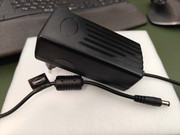
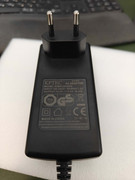
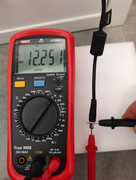
Without any load, it outut 12.251V.
Re: [Help] F2-424 keep freezing with NVME
Okay. This doesn't appear to be related to the power supply. Since you've already passed the first Memtest, that should be sufficient to confirm the RAM is working properly. We'll await the debug file generated from TOS 6/7, which will help us make a final determination.
To contact our team, please send email to following addresses, remember to replace (at) with @:
Technical team: support(at)terra-master.com (for technical support)
Service team: service(at)terra-master.com (for purchasing, return, replacement, RMA service)
Technical team: support(at)terra-master.com (for technical support)
Service team: service(at)terra-master.com (for purchasing, return, replacement, RMA service)
Re: [Help] F2-424 keep freezing with NVME
After reviewing the information we have and discussing it internally, we're fairly certain this is a hardware issue. We'd prefer to bring the unit back to our lab for analysis. So we'll have someone from our team reach out to you directly by email to exchange it for you.
Debug log is no longer needed.
Debug log is no longer needed.
To contact our team, please send email to following addresses, remember to replace (at) with @:
Technical team: support(at)terra-master.com (for technical support)
Service team: service(at)terra-master.com (for purchasing, return, replacement, RMA service)
Technical team: support(at)terra-master.com (for technical support)
Service team: service(at)terra-master.com (for purchasing, return, replacement, RMA service)
Re: [Help] F2-424 keep freezing with NVME
OK, Thank you.
But since I already ran TOS7 in debug mode for about 2 hours and 30 minutes until it froze again (idle), I am sharing to information if you need it:
I run it idle while pinging every 5 minutes.
The freeze happened about 2 hours and 30 minutes. Last good ping at 15:22:16 (after 2h 27m), not response at 15:27:19 (after 2h 32m).
syslog doesn't show anything intresting (just requests from web interface) before the freeze:
(I restart the NAS to get the logs at 15:38)
kernlog doesn't show anything.
And atoplog is 4.6MB. If you need it, I can upload it.
Thanks again.
But since I already ran TOS7 in debug mode for about 2 hours and 30 minutes until it froze again (idle), I am sharing to information if you need it:
I run it idle while pinging every 5 minutes.
The freeze happened about 2 hours and 30 minutes. Last good ping at 15:22:16 (after 2h 27m), not response at 15:27:19 (after 2h 32m).
syslog doesn't show anything intresting (just requests from web interface) before the freeze:
Code: Select all
...
IP6Address:[{IP:{IP:fe80::6ebf:b5ff:fe04:6a48 Mask:ffffffffffffffff0000000000000000} ValidLft:4294967295 PreferredLft:4294967295}] DNS4:[10.15.0.1] DNS6:[] IP4Gateway:10.15.0.1 IP6Gateway: State:33 Dulpex:full BondMode:0 Type:pci MTU:1500 MinMTU:68 MaxMTU:9194 MAC:6c:bf:b5:04:6a:48 Speed:2500 SSID: Level:0}
Jul 23 15:22:18 TNAS TOSDaemon[2089]: getInterfaceList eth info info={Error:<nil> Name:eth0 IP4Address:[{IP:{IP:10.15.0.10 Mask:ff000000} ValidLft:77616 PreferredLft:77616}] IP6Address:[{IP:{IP:fe80::6ebf:b5ff:fe04:6a48 Mask:ffffffffffffffff0000000000000000} ValidLft:4294967295 PreferredLft:4294967295}] DNS4:[10.15.0.1] DNS6:[] IP4Gateway:10.15.0.1 IP6Gateway: State:33 Dulpex:full BondMode:0 Type:pci MTU:1500 MinMTU:68 MaxMTU:9194 MAC:6c:bf:b5:04:6a:48 Speed:2500 SSID: Level:0}
Jul 23 15:22:29 TNAS TOSDaemon[2089]: getInterfaceList eth info info={Error:<nil> Name:eth0 IP4Address:[{IP:{IP:10.15.0.10 Mask:ff000000} ValidLft:77605 PreferredLft:77605}] IP6Address:[{IP:{IP:fe80::6ebf:b5ff:fe04:6a48 Mask:ffffffffffffffff0000000000000000} ValidLft:4294967295 PreferredLft:4294967295}] DNS4:[10.15.0.1] DNS6:[] IP4Gateway:10.15.0.1 IP6Gateway: State:33 Dulpex:full BondMode:0 Type:pci MTU:1500 MinMTU:68 MaxMTU:9194 MAC:6c:bf:b5:04:6a:48 Speed:2500 SSID: Level:0}
Jul 23 15:22:40 TNAS TOSDaemon[2089]: getInterfaceList eth info info={Error:<nil> Name:eth0 IP4Address:[{IP:{IP:10.15.0.10 Mask:ff000000} ValidLft:77594 PreferredLft:77594}] IP6Address:[{IP:{IP:fe80::6ebf:b5ff:fe04:6a48 Mask:ffffffffffffffff0000000000000000} ValidLft:4294967295 PreferredLft:4294967295}] DNS4:[10.15.0.1] DNS6:[] IP4Gateway:10.15.0.1 IP6Gateway: State:33 Dulpex:full BondMode:0 Type:pci MTU:1500 MinMTU:68 MaxMTU:9194 MAC:6c:bf:b5:04:6a:48 Speed:2500 SSID: Level:0}
Jul 23 15:38:08 TNAS systemd[1]: modprobe@efi_pstore.service: Deactivated successfully.
Jul 23 15:38:08 TNAS systemd[1]: Finished Load Kernel Module efi_pstore.
Jul 23 15:38:08 TNAS systemd[1]: Mounted FUSE Control File System.
...
kernlog doesn't show anything.
And atoplog is 4.6MB. If you need it, I can upload it.
Thanks again.