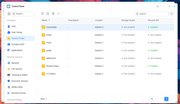
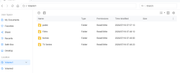
I migrated my system disk to a nvme all fine my nvme is vol 2 and volume 1 which was the old system disk has 2 folders on it which are shared folders public and homes they are no longer listed under the shared folders section and i wish to completely delete them but unable to do so in file explorer is there a way to do so this has only happend since i upgraded from tos 6 to tos 7.0.0780
When the File Manager cannot be used to perform the operation, logging in via SSH and using the command line is usually the most direct and effective method.
Open the terminal application included with TOS.
Enter the following command to view the contents of the `/Volume1` directory and confirm that the folders exist:
ls /Volume1
Delete the folders: Execute the deletion command. Please proceed with caution and verify that the path is correct.
rm -rf /Volume1/public
rm -rf /Volume1/homes
The `rm -rf` command forcibly deletes the folder and all its contents; please double-check everything before executing it.
To contact our team, please send email to following addresses, remember to replace (at) with @