If you can only see a subset of apps in the APP CENTER, this issue is usually related to your network. If you have confirmed that your NAS’s network connection is working properly — for example, you can download apps or enable TNAS Online — please visit the link below to schedule a remote troubleshooting session with our online customer support: https://salesiq.zohopublic.com/signatur ... 97d0be8892
To contact our team, please send email to following addresses, remember to replace (at) with @
Bartman wrote: ↑10 Jul 2026, 22:59
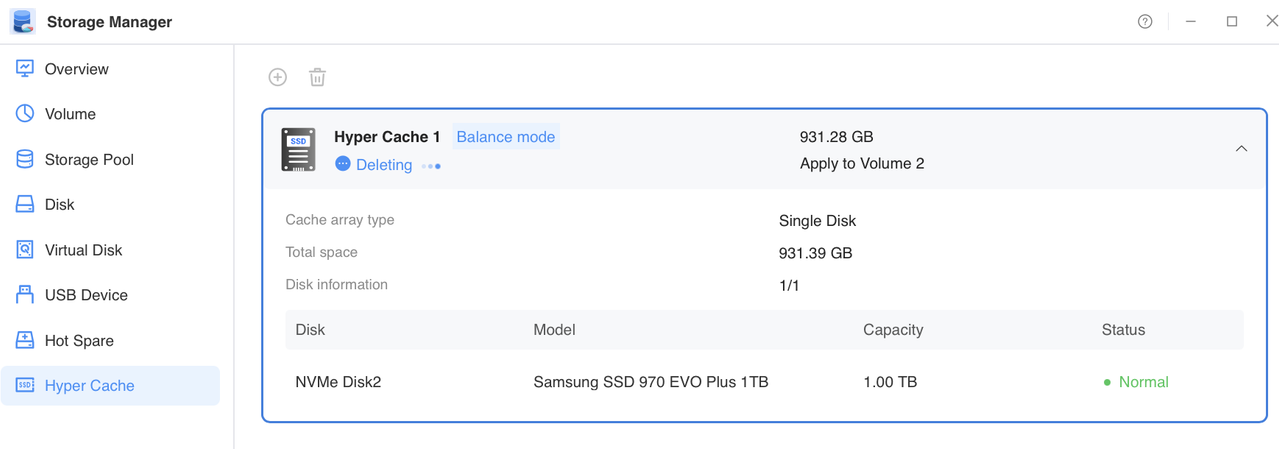
Installed OK, but Hypercache does not seem to stop deleting, been going on for over 24 hours, I even manually upgraded to this version but is still shows the same. Also theOpenclaw will not install, fails all the time, dread to see what else stops.
May I ask which version your TNAS was running before updating to this version? Also, please check the system dashboard to see if the system is sluggish.
To contact our team, please send email to following addresses, remember to replace (at) with @:
Support team: support(at)terra-master.com (for technical support only)
Service team: service(at)terra-master.com (for purchasing, return, replacement, RMA service)
I know it's not a great solution, but nothing else helped
Additionally, in the smartmontools logs I noticed that the process queries the disks for temperature every 30 minutes, maybe this is the reason for waking up?
If you can only see a subset of apps in the APP CENTER, this issue is usually related to your network. If you have confirmed that your NAS’s network connection is working properly — for example, you can download apps or enable TNAS Online — please visit the link below to schedule a remote troubleshooting session with our online customer support: https://salesiq.zohopublic.com/signatur ... 97d0be8892
Thanks so much for the feedback. Yes, I can confirm that Terramaster is using a non-standard ssl port (82) for the App Center. Once I allowed SSL to use the specific port on the firewall, all the apps and app updates showed up without an issue in the App Center. Thanks for the recommendation. I would have liked to have seen the App Center use the standard SSL ports over using a different non-standard one, but I understand.
My Hyper Cache has been stuck in the "Deleting" state for over 24 hours while in Balanced mode. Restarting the NAS has not resolved the issue. Could you please advise on how I can safely force-remove the cache?
All file services need to be disabled for that process to successfully complete the hyper-cache deletion.
A reboot, as you experienced, doesn't fulfill that requirement.
Thanks for the clarification! That makes sense now. However, I do think this process could be made more transparent to users—nowhere in the interface does it indicate that all services must be disabled beforehand. Even with this new understanding, I'm running into an issue: not all services appear to have a stop/disable button. Could you guide me on how to stop those services, or is there a workaround?
All file services need to be disabled for that process to successfully complete the hyper-cache deletion.
A reboot, as you experienced, doesn't fulfill that requirement.
Thanks for the clarification! That makes sense now. However, I do think this process could be made more transparent to users—nowhere in the interface does it indicate that all services must be disabled beforehand. Even with this new understanding, I'm running into an issue: not all services appear to have a stop/disable button. Could you guide me on how to stop those services, or is there a workaround?
It is not necessary to terminate all services; only those that have active handles on the volume directory need to be stopped. Please refer to the following instructions for identifying and stopping services that are currently using the volume: viewtopic.php?t=5955
To contact our team, please send email to following addresses, remember to replace (at) with @:
Technical team: support(at)terra-master.com (for technical support)
Service team: service(at)terra-master.com (for purchasing, return, replacement, RMA service)
I know it's not a great solution, but nothing else helped
Additionally, in the smartmontools logs I noticed that the process queries the disks for temperature every 30 minutes, maybe this is the reason for waking up?
We will conduct a verification of the matter you have brought to our attention.
To contact our team, please send email to following addresses, remember to replace (at) with @:
Technical team: support(at)terra-master.com (for technical support)
Service team: service(at)terra-master.com (for purchasing, return, replacement, RMA service)