

Sorry, I don't understand. There is currently no installation file to clean install Tos7. Either you updated from Tos6 (and that would needs be Tos6.0.0794) or you updated from a specific Tos7 Beta package. Using Tos7.0.0747 implies you updated from TOS6, but did you have the correct version of Tos6 installed on update? Knowing exactly which path you followed is important in identifying issues.BFG wrote: ↑27 Jun 2026, 19:20i do a clean installBFG wrote: ↑27 Jun 2026, 17:46 In my experience, after updating to TOS 7.0.0747 final, if SPC is enabled the management pages of the following apps do not open: VirtualBox, qBittorrent, Tailscale.
If SPC is disabled, the pages open, but after a reboot the applications do not start automatically (e.g. Docker, Portainer, VirtualBox); they have to be started manually.
TOS 7.0.0746 Official Release (X86) is Now Available
Re: TOS 7.0.0746 Official Release (X86) is Now Available
F5-221 TOS7.0.1278 - 4x4TB (Ironwolf) Traid
F2-424 TOS7.0.1278 - 2x500GB nvme (P3) Traid, 2x6TB HDD (HGST) Traid
F2-221 TOS7.0.1278 - 1x3TB Ext4, 1x4TB Btrfs
F2-425+ TOS7.0.1278 - 2x500GB nvme (P3) Traid, 2x6TB HDD (EXOS) Traid
F2-424 TOS7.0.1278 - 2x500GB nvme (P3) Traid, 2x6TB HDD (HGST) Traid
F2-221 TOS7.0.1278 - 1x3TB Ext4, 1x4TB Btrfs
F2-425+ TOS7.0.1278 - 2x500GB nvme (P3) Traid, 2x6TB HDD (EXOS) Traid
-
FredMutter

- Posts: 94
- Joined: 17 Jan 2025, 20:11

Re: TOS 7.0.0746 Official Release (X86) is Now Available
My setup: I have a TerraMaster F2-424 with BIOS MADN0101.V05, running several Docker containers (Immich, Lyrion, AdGuard, etc.) and two NVMe SSDs (no HDDs).
I first updated the BIOS to V08 (even though it wasn’t strictly necessary), and the update went smoothly.
Next, I upgraded to TOS 7. The entire update took about 5 minutes and completed without any issues.
Finally, I updated Docker and Docker Manager, which also went perfectly.
As an additional check, I verified that macOS Time Machine backups are still working correctly.
Everything is now fully up to date and running very well.
I first updated the BIOS to V08 (even though it wasn’t strictly necessary), and the update went smoothly.
Next, I upgraded to TOS 7. The entire update took about 5 minutes and completed without any issues.
Finally, I updated Docker and Docker Manager, which also went perfectly.
As an additional check, I verified that macOS Time Machine backups are still working correctly.
Everything is now fully up to date and running very well.
Model: F2-424 with TOS 7.0.1105 - currently changing every month  - Bios V08
you can discuss with me in French, German and English
- Bios V08you can discuss with me in French, German and English


Re: TOS 7.0.0746 Official Release (X86) is Now Available
finally, official release, update without problem


Re: TOS 7.0.0746 Official Release (X86) is Now Available
I download package, press "download" and install it.
All ok.
If try press "install", have error
F4-423


Re: TOS 7.0.0746 Official Release (X86) is Now Available
Thank you for the feedback. Could you please share the exact wording of the error message?
To contact our team, please send email to following addresses, remember to replace (at) with @
Technical team: support(at)terra-master.com(for technical support)
Service team: service(at)terra-master.com(for purchasing, return, replacement, RMA service)
Technical team: support(at)terra-master.com(for technical support)
Service team: service(at)terra-master.com(for purchasing, return, replacement, RMA service)


Re: TOS 7.0.0746 Official Release (X86) is Now Available
Both F2-221 and F5-221 updated to 7.0.0746 without any issues.
Thanks!
Thanks!
F5-221 - TOS7.0.1341 - 5x4TB TRAID - 1x4TB Single USB - 2x4TB HwRAID1 USB
F2-221 - TOS7.0.1341 - 2x3TB JBOD - 1x4TB Single USB
F2-221 - TOS7.0.1341 - 2x3TB JBOD - 1x4TB Single USB


Re: TOS 7.0.0746 Official Release (X86) is Now Available
I performed a clean installation of TOS 7, and it automatically downloaded version 7.0.0750.Gremlin wrote: ↑27 Jun 2026, 23:02Sorry, I don't understand. There is currently no installation file to clean install Tos7. Either you updated from Tos6 (and that would needs be Tos6.0.0794) or you updated from a specific Tos7 Beta package. Using Tos7.0.0747 implies you updated from TOS6, but did you have the correct version of Tos6 installed on update? Knowing exactly which path you followed is important in identifying issues.BFG wrote: ↑27 Jun 2026, 19:20i do a clean installBFG wrote: ↑27 Jun 2026, 17:46 In my experience, after updating to TOS 7.0.0747 final, if SPC is enabled the management pages of the following apps do not open: VirtualBox, qBittorrent, Tailscale.
If SPC is disabled, the pages open, but after a reboot the applications do not start automatically (e.g. Docker, Portainer, VirtualBox); they have to be started manually.
I installed the applications VirtualBox, TerraMaster, Docker, and Portainer, but after restarting the system they do not start automatically.
Additionally, if I enable the SPC feature, the application pages do not open.
There are still many things that need to be fixed — the exit from the beta phase was rather rushed.
Re: TOS 7.0.0746 Official Release (X86) is Now Available
Try uninstall. Can't uninstall for about 10 hours
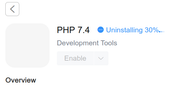
F4-423
Re: TOS 7.0.0746 Official Release (X86) is Now Available
Please try uninstalling or reinstalling after restarting the machine.
To contact our team, please send email to following addresses, remember to replace (at) with @
Technical team: support(at)terra-master.com(for technical support)
Service team: service(at)terra-master.com(for purchasing, return, replacement, RMA service)
Technical team: support(at)terra-master.com(for technical support)
Service team: service(at)terra-master.com(for purchasing, return, replacement, RMA service)
Re: TOS 7.0.0746 Official Release (X86) is Now Available
Regarding the issue you reported, here are the detailed explanations:
1. The problem of applications not starting automatically after upgrading to TOS7 has been confirmed and will be fixed in future versions.
2. Once SPC protection is enabled, unauthorized applications and executable files will be unable to access the system's network resources and storage space, resulting in it being unable to start. For details, please refer to the help manual: https://help.terra-master.com/docs/TOS7 ... /security/
To contact our team, please send email to following addresses, remember to replace (at) with @
Technical team: support(at)terra-master.com(for technical support)
Service team: service(at)terra-master.com(for purchasing, return, replacement, RMA service)
Technical team: support(at)terra-master.com(for technical support)
Service team: service(at)terra-master.com(for purchasing, return, replacement, RMA service)