

Hi all.
Can You advice how to connect to TNAS UPS Server from ESXI7 via NUT?
ESXI says me that
2026-05-28T16:02:59.156Z upsmon[2136080]: UPS [192.168.1.5]: connect failed: Connection failure: Connection refused
2026-05-28T16:03:04.159Z upsmon[2136080]: UPS [192.168.1.5]: connect failed: Connection failure: Connection refused
This ip is bonded interface of F4-425+
In ESXI NUT I filled up right login password, but refused. What i'm doing wrong?
Thanks
[Help] Connect to TOS7 UPS from esxi nut service [SOLVED]


Re: [Help] Connect to TOS7 UPS from esxi nut service
iirc nut server on Tnas has it's own set of credentials not related to authorised users.
F5-221 TOS7.0.1278 - 4x4TB (Ironwolf) Traid
F2-424 TOS7.0.1278 - 2x500GB nvme (P3) Traid, 2x6TB HDD (HGST) Traid
F2-221 TOS7.0.1278 - 1x3TB Ext4, 1x4TB Btrfs
F2-425+ TOS7.0.1278 - 2x500GB nvme (P3) Traid, 2x6TB HDD (EXOS) Traid
F2-424 TOS7.0.1278 - 2x500GB nvme (P3) Traid, 2x6TB HDD (HGST) Traid
F2-221 TOS7.0.1278 - 1x3TB Ext4, 1x4TB Btrfs
F2-425+ TOS7.0.1278 - 2x500GB nvme (P3) Traid, 2x6TB HDD (EXOS) Traid

Re: [Help] Connect to TOS7 UPS from esxi nut service
You may open TOS terminal and enter command line below and find from output.
Code: Select all
cat /etc/nut/upsd.usersTo contact our team, please send email to following addresses, remember to replace (at) with @
Technical team: support(at)terra-master.com(for technical support)
Service team: service(at)terra-master.com(for purchasing, return, replacement, RMA service)
Technical team: support(at)terra-master.com(for technical support)
Service team: service(at)terra-master.com(for purchasing, return, replacement, RMA service)
Re: [Help] Connect to TOS7 UPS from esxi nut service
I provided uspd.users with
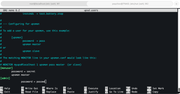
and esxi nut with

but no result. What i'm, doing wrong?
and esxi nut with
but no result. What i'm, doing wrong?


Re: [Help] Connect to TOS7 UPS from esxi nut service
Regarding your issue where the ESXi host cannot connect to the TNAS UPS server, here is a detailed explanation and recommended steps:
Based on your feedback, the "Connection refused" error is a network-level problem, meaning the ESXi host cannot reach the NUT service port (3493) on your TNAS. This has no connection to the username and password configured in upsd.users.
In TOS 7, the NUT daemon (upsd) listens only on 127.0.0.1 (localhost) by default, and external queries are blocked by default unless you manually enable the required permissions.
Here are the steps to resolve this via the web UI:
- Log into your TOS 7 system via a web browser.
- Go to Control Panel > Hardware & Power > UPS.
- Ensure that "Enable TNAS UPS Server" is correctly checked.
- Be sure to add the exact IP address of your ESXi host to the "IP Addresses" list.
- Click Apply.
To contact our team, please send email to following addresses, remember to replace (at) with @
Technical team: support(at)terra-master.com(for technical support)
Service team: service(at)terra-master.com(for purchasing, return, replacement, RMA service)
Technical team: support(at)terra-master.com(for technical support)
Service team: service(at)terra-master.com(for purchasing, return, replacement, RMA service)
Re: [Help] Connect to TOS7 UPS from esxi nut service
Big thanks for Your answer!EriChan wrote: ↑30 May 2026, 14:04Regarding your issue where the ESXi host cannot connect to the TNAS UPS server, here is a detailed explanation and recommended steps:
Based on your feedback, the "Connection refused" error is a network-level problem, meaning the ESXi host cannot reach the NUT service port (3493) on your TNAS. This has no connection to the username and password configured in upsd.users.
In TOS 7, the NUT daemon (upsd) listens only on 127.0.0.1 (localhost) by default, and external queries are blocked by default unless you manually enable the required permissions.
Here are the steps to resolve this via the web UI:
- Log into your TOS 7 system via a web browser.
- Go to Control Panel > Hardware & Power > UPS.
- Ensure that "Enable TNAS UPS Server" is correctly checked.
- Be sure to add the exact IP address of your ESXi host to the "IP Addresses" list.
After applying the settings, TOS will automatically modify upsd.conf to have upsd listen on your bonded interface (192.168.1.5). Please try this and let me know if your ESXi host can connect successfully.
- Click Apply.
Doing exactly what You said. 192.168.1.4 - ip address of ESXi host
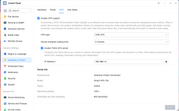
In ESXi's log see the following:

something going wrong =))
Re: [Help] Connect to TOS7 UPS from esxi nut service
To more effectively identify the root cause of the problem, we recommend that you contact our online technical support staff through the following link. We will guide you through troubleshooting steps to help resolve the related issues.
https://salesiq.zohopublic.com/signatur ... 97d0be8892
Thank you for your understanding and support!
https://salesiq.zohopublic.com/signatur ... 97d0be8892
Thank you for your understanding and support!
To contact our team, please send email to following addresses, remember to replace (at) with @
Technical team: support(at)terra-master.com(for technical support)
Service team: service(at)terra-master.com(for purchasing, return, replacement, RMA service)
Technical team: support(at)terra-master.com(for technical support)
Service team: service(at)terra-master.com(for purchasing, return, replacement, RMA service)
Re: [Help] Connect to TOS7 UPS from esxi nut service [SOLVED]
In order to finish this issue - You simply need to add ups@ before the name or ip address of Yours UPS in ESXi options.
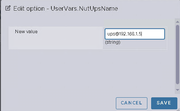
Big thanxx to Terramaster tech support.
Big thanxx to Terramaster tech support.