[Help] F8 SSD Plus missing info on Disk > Overview page after V02 to V07 BIOS update  [SOLVED]

RAID, Volume, storage pool, hard drive, USB, SSD cache and iSCSI LUN
Post Reply
User avatar
Sihastru
Posts: 2
Joined: 29 Apr 2026, 04:24
Romania

[Help] F8 SSD Plus missing info on Disk > Overview page after V02 to V07 BIOS update

Post by Sihastru »

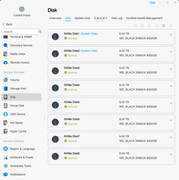
After updating the F8 SSD Plus to the V07 BIOS (from the factory V02), the Disk > Overview page no longer displays the number of drives and the slot occupancy information:
Image

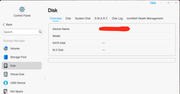
Also, the Disk > Disk page shows my drives mounted as "sdz":
Image

I am using BTRFS, all drives in one storage pool, a single volume, one drive as parity. All data was preserved, I can still access all my files on the volume. Steps I already tried:
  • BIOS - restore optimized defaults > no change
  • BIOS - used "Ctrl+," to expose and toggle CSM on/off > no change
  • TOS - restore to factory defaults > no change
Note that the BIOS update was done following the official procedure, I removed all NVME drives, noting their slots numbers, and the USB boot drive from the unit, I updated with a freshly formatted drive, left the procedure run its course, the NAS restarted, the BIOS was updated successfully. After that I reinstalled all NVME drives in their corresponding slots and the original USB boot drive in the internal port.
User avatar
TMzethar
TM Support
Posts: 2818
Joined: 27 Oct 2020, 16:43

Re: [Help] F8 SSD Plus missing info on Disk > Overview page after V02 to V07 BIOS update  [SOLVED]

Post by TMzethar »

You may have missed or made mistakes in the steps related to writing BIOS parameters. Please try again.
To contact our team, please send email to following addresses, remember to replace (at) with @:
Technical team: support(at)terra-master.com (for technical support)
Service team: service(at)terra-master.com (for purchasing, return, replacement, RMA service)
User avatar
Sihastru
Posts: 2
Joined: 29 Apr 2026, 04:24
Romania

Re: [Help] F8 SSD Plus missing info on Disk > Overview page after V02 to V07 BIOS update

Post by Sihastru »

Hi TMzethar,

You were correct, I mistakenly assumed that after the BIOS is updated and the system restarts a few times, when presented again with the shell, it would update the BIOS again, so I stopped there. But, in fact, there is another step in the automated shell where a few SMBIOS strings are updated:
  • System SKU number
  • System product
I don't have an image to upload here so others will see, but when you see it, it will be very clear. After these are updated, I was presented with the same over and over again, so that's the time to stop and consider the update process complete.

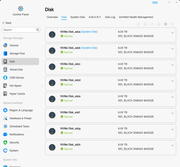
As you can see, all seems well now:
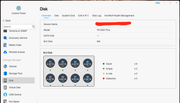
Image
Image

I'm just updating the thread in case someone else will make the same assumptions I did.

As a note, I updated the BIOS as it seems to be a prerequisite for the upcoming full release of TOS 7, which should drop soon. Normally, I would not touch it, unless there are actual issues, a per case situation.

RESOLVED.

Thank you!
Post Reply

Return to “Storage”