

Target Users:
Users currently running TOS 7.0.0299 beta or later versions.
Note:
If your TOS version is TOS 6, please refer to the TOS 7 beta update instructions first
Here, we sincerely thank users @samius, @DCCentR, @storageninja, @mcfly, @Joesh, @EriChan, @Gremlin, @vitosamin, @mmick, @Nitrokalel, @dgmigdot, @nedhedrick, @User009, @snapsh0t, @OttO1916, @Papahen, @rfbjr, @JSCFORCE and others, for their sharing and feedback. It is your support that has enabled us to quickly identify and resolve some issues.
Update Notes
Bugs fixes:
1. Fixed an issue where some images in Photos could not load thumbnails properly.
2. Fixed an issue where the TOS download button could be clicked repeatedly, causing download failures.
3. Fixed an issue where some users could not rename files via WebDAV.
4. Fixed an issue where an application failed to start automatically after being updated.
5. Fixed an issue where the device name was not updated in a timely manner in emails.
6. Fixed an issue where help documentation links on some pages were not accurately redirected.
7. Fixed an issue where the hot spare disk could not be edited after an idle disk was removed.
8. Fixed an issue where installing a deb package from the App Center might fail to parse.
9. Fixed other known issues.
Important Information:
1.Updating the system theoretically will not affect the data on your hard drives, but for safety, please make sure to back up your data in advance.
2.Before updating, ensure that your primary volume (usually volume1) has at least 3GB of available space. Insufficient storage space may cause the update to fail.
3.After the update, the IP address of your TNAS may change. Please use the TNAS PC desktop client to search for and reconnect to the device.
Update Procedure:
1.Go to TOS > Control Panel > General Settings > System > Update, and click "Check for updates."
2.Follow the prompts to update the system.
3.After the system update is complete, you may need to refresh your browser.
4.The TNAS IP address may change after the update. If you cannot connect to your TNAS using the previous IP address, use the TNAS PC client to search for the new IP address.
Client Downloads:
1. Download TNAS PC 5.2.520 for Windows OS.
2. Download TNAS PC 5.2.520 for macOS (x86 and ARM architectures).
3. Download TNAS PC 5.2.520 for macOS (ARM architecture).
4. Download TNAS PC for Linux.
5. Download TNAS Mobile 3.X for Android.
6. For iOS, experience TNAS Mobile 3.X via: https://testflight.apple.com/join/wFWYABJS.
TOS 7.0.0485 Beta (X86) is Released for Update
TOS 7.0.0485 Beta (X86) is Released for Update
To contact our team, please send email to following addresses, remember to replace (at) with @
Technical team: support(at)terra-master.com (for technical support)
Service team: service(at)terra-master.com (for purchasing, return, replacement)
Technical team: support(at)terra-master.com (for technical support)
Service team: service(at)terra-master.com (for purchasing, return, replacement)


Re: TOS 7.0.0485 Beta (X86) is Released for Update
Successful update from 7.0.0465


Re: TOS 7.0.0485 Beta (X86) is Released for Update
Successful update from 7.0.0465 here too.
F2-425 Plus, 16GB RAM, 2 x 500GB WD SN700 EXT4 RAID1, 2 x 3TB WD Red EXT4 RAID1, TOS 7.0.<latest>
F4-SSD, 16GB RAM, 4 x 4TB WD SN700 Btrfs TRAID, TOS 7.0.<latest>
F4-SSD, 16GB RAM, 4 x 4TB WD SN700 Btrfs TRAID, TOS 7.0.<latest>

Re: TOS 7.0.0485 Beta (X86) is Released for Update
Updated:
F2-424: OK
F2-425+: OK
F2-221:
Numerous "Failed to retrieve Data" messages after update. Reboot appeared to solve this.
All devices rebooted just to be sure.
F2-424: OK
F2-425+: OK
F2-221:
Numerous "Failed to retrieve Data" messages after update. Reboot appeared to solve this.
All devices rebooted just to be sure.
F5-221 TOS7.0.1278 - 4x4TB (Ironwolf) Traid
F2-424 TOS7.0.1278 - 2x500GB nvme (P3) Traid, 2x6TB HDD (HGST) Traid
F2-221 TOS7.0.1278 - 1x3TB Ext4, 1x4TB Btrfs
F2-425+ TOS7.0.1278 - 2x500GB nvme (P3) Traid, 2x6TB HDD (EXOS) Traid
F2-424 TOS7.0.1278 - 2x500GB nvme (P3) Traid, 2x6TB HDD (HGST) Traid
F2-221 TOS7.0.1278 - 1x3TB Ext4, 1x4TB Btrfs
F2-425+ TOS7.0.1278 - 2x500GB nvme (P3) Traid, 2x6TB HDD (EXOS) Traid


Re: TOS 7.0.0485 Beta (X86) is Released for Update
F4-424 Pro, F4-425 Plus and F6-424 all updated w/o issue. In fact, I updated the 425 and F6 via the mobile app.
I'll test later to see if anything I reported was fixed from the line "9. Fixed other known issues"
I'll test later to see if anything I reported was fixed from the line "9. Fixed other known issues"
F6-424 & F4-425 Plus at 7.0.1341
F4-424 Pro (x2) at 7.0.1341
D4-320 (Offline until I can afford more HDDs)
F4-424 Pro (x2) at 7.0.1341
D4-320 (Offline until I can afford more HDDs)


Re: TOS 7.0.0485 Beta (X86) is Released for Update
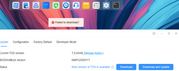
any idea what i am getting this error?
Re: TOS 7.0.0485 Beta (X86) is Released for Update
Minor thing so far and new to this update, changing the sort order for CPU and Memory stopped working. All other columns you can click on and switch between ascending or descending.
I tried this on all of my devices; in fact I rebooted the F4-425 Plus just to make sure it wasn't just a quirk.
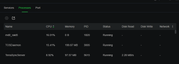
I tried this on all of my devices; in fact I rebooted the F4-425 Plus just to make sure it wasn't just a quirk.
F6-424 & F4-425 Plus at 7.0.1341
F4-424 Pro (x2) at 7.0.1341
D4-320 (Offline until I can afford more HDDs)
F4-424 Pro (x2) at 7.0.1341
D4-320 (Offline until I can afford more HDDs)
-
Nitrokalel

- Posts: 53
- Joined: 24 Apr 2024, 05:51

Re: TOS 7.0.0485 Beta (X86) is Released for Update
Successful update from 7.0.0465 here too.
Virtual MAchines ON
Dear TerraMaster Support Team,
Thank you very much for your update and for reintroducing VirtualBox.
I truly appreciate this decision. It demonstrates that user feedback is being taken seriously, and it gives us the opportunity to continue working in a more stable and controlled environment.
With VirtualBox available again, we can now properly test and validate migration scenarios toward VMS. This is very important, as it allows us to design a gradual transition process for clients who are not part of the beta program, ensuring that their experience is not affected.
Our goal is to help build a reliable and repeatable migration methodology—one that guarantees stability, preserves portability, and avoids any risk to production environments. Having both tools available during this phase makes it possible to refine and perfect this process before a full transition is required.
I fully support the evolution of your platform and will continue testing and providing feedback to help improve VMS until it reaches production-level reliability.
Thank you again for your responsiveness and commitment to improving the product.
Kind regards,
F8 SSD Plus (8x4TB NVMe, TRaid, 48GB, prod)
F8 SSD Plus (6x1TB+2x2TB, TRaid, 48GB, prod)
F4-424 Pro (2x22TB+2x10TB HDD +1TB+500GB NVMe, TRaid, 32GB, prod)
F2-423 (2x18TB, TRaid, 32GB, prod)
F2-221 (6TB+10TB, TRaid, 10GB, prod)
D1 SSD (2TB, prod)
F8 SSD Plus (6x1TB+2x2TB, TRaid, 48GB, prod)
F4-424 Pro (2x22TB+2x10TB HDD +1TB+500GB NVMe, TRaid, 32GB, prod)
F2-423 (2x18TB, TRaid, 32GB, prod)
F2-221 (6TB+10TB, TRaid, 10GB, prod)
D1 SSD (2TB, prod)
-
Nitrokalel
- Posts: 53
- Joined: 24 Apr 2024, 05:51
Re: TOS 7.0.0485 Beta (X86) is Released for Update
F8 SSD Plus (6x1TB+2x2TB, TRaid, 48GB, beta) update OK
F4-424 Pro (2x22TB+2x10TB HDD +1TB+500GB NVMe, TRaid, 32GB, beta) update OK
F2-423 (2x18TB, TRaid, 32GB, beta) update OK
F2-221 (6TB+10TB, TRaid, 10GB, beta) update OK
D1 SSD (2TB, prod) update OK
without any apparent problems or inconveniences
F4-424 Pro (2x22TB+2x10TB HDD +1TB+500GB NVMe, TRaid, 32GB, beta) update OK
F2-423 (2x18TB, TRaid, 32GB, beta) update OK
F2-221 (6TB+10TB, TRaid, 10GB, beta) update OK
D1 SSD (2TB, prod) update OK
without any apparent problems or inconveniences
F8 SSD Plus (8x4TB NVMe, TRaid, 48GB, prod)
F8 SSD Plus (6x1TB+2x2TB, TRaid, 48GB, prod)
F4-424 Pro (2x22TB+2x10TB HDD +1TB+500GB NVMe, TRaid, 32GB, prod)
F2-423 (2x18TB, TRaid, 32GB, prod)
F2-221 (6TB+10TB, TRaid, 10GB, prod)
D1 SSD (2TB, prod)
F8 SSD Plus (6x1TB+2x2TB, TRaid, 48GB, prod)
F4-424 Pro (2x22TB+2x10TB HDD +1TB+500GB NVMe, TRaid, 32GB, prod)
F2-423 (2x18TB, TRaid, 32GB, prod)
F2-221 (6TB+10TB, TRaid, 10GB, prod)
D1 SSD (2TB, prod)

Re: TOS 7.0.0485 Beta (X86) is Released for Update
Thanks a lot for your feedback! Insights from users like you are exactly what drive TOS to keep getting better.
To contact our team, please send email to following addresses, remember to replace (at) with @:
Support team: support(at)terra-master.com (for technical support only)
Support team: support(at)terra-master.com (for technical support only)