Guide to Adjusting BIOS Boot Order

About TNAS hardware
User avatar
TMnight
TM Support
Posts: 181
Joined: 30 Sep 2022, 16:40

Guide to Adjusting BIOS Boot Order

Post by TMnight »

Some new NAS devices use a customized USB drive to store the initboot initialization program. To help users understand how to handle this USB drive (including removal and disabling), the following provides detailed information, including the applicable models, USB drive appearance, and steps for adjusting the BIOS boot order.

Applicable Models
F2-425, F2-425 Plus, F4-425, F4-425 Plus, F4 SSD

Image

Note
As shown in the illustration, the new NAS devices use a customized internal USB drive.

Important Notes

1.The internal USB drive is used as the initboot system boot disk. Do not remove or replace it arbitrarily, as this may prevent the device from booting properly.

2.If you need to install a third-party operating system or adjust the boot sequence, you must enter the BIOS and modify the boot options by following the steps below.

Steps to Adjust BIOS Boot Order

1.After entering the BIOS interface, use the keyboard arrow keys to navigate to the Boot tab.

2.Select TOS Boot First and press Enter. Change its status from Enabled to Disabled, then press Enter again to confirm and return.

Image

3.Select Boot Option #1 and press Enter. Use the up/down arrow keys to choose the desired boot device, then press Enter to confirm and exit.

Image

Image
4.After confirming all settings are correct, press F4 to save and exit.
To contact our team, please send email to following addresses, remember to replace (at) with @:
Technical team: support(at)terra-master.com(for technical support)
Service team: service(at)terra-master.com(for purchasing, return, replacement, RMA service)
User avatar
Gremlin
Gold Member
Posts: 1625
Joined: 02 Dec 2022, 22:31
Great Britain

Re: Guide to Adjusting BIOS Boot Order

Post by Gremlin »

I must confess to being slightly confused when I came to set up my F2-425+ this week. Never
expecting to own such a device, I had not paid attention to the internals. I had to do a double
take when I did not see a usb drive in the expected slot! Was there another usb 'A' slot?? A little
research solved that conundrum! :roll:

Rather than "customised usb drive", maybe a term such as "USB-DOM" to clearly distinguish between
this and a standard flash drive.

Thanks for the post.
F5-221 TOS7.0.0777 - 4x4TB (Ironwolf) Traid
F2-424 TOS7.0.0777 - 2x500GB nvme (P3) Traid, 2x6TB HDD (HGST) Traid
F2-221 TOS7.0.0777 - 1x3TB Ext4, 1x4TB Btrfs
F2-425+ TOS7.0.0777 - 2x500GB nvme (P3) Traid, 2x6TB HDD (EXOS) Traid
User avatar
izedgrudged
Posts: 6
Joined: 29 Oct 2024, 17:36
United States of America

Re: Guide to Adjusting BIOS Boot Order

Post by izedgrudged »

Could you clarify if the F2-425+ uses a USB-DOM instead of a standard USB drive?
User avatar
Phil
TM Support
Posts: 91
Joined: 23 Feb 2026, 09:38
China

Re: Guide to Adjusting BIOS Boot Order

Post by Phil »

izedgrudged wrote: 25 Mar 2026, 14:49 Could you clarify if the F2-425+ uses a USB-DOM instead of a standard USB drive?geo dash
Your judgment is correct. Currently, F2-425+ is using USB-DOM.
User avatar
rfbjr
Silver Member
Posts: 400
Joined: 16 May 2024, 23:43
United States of America

Re: Guide to Adjusting BIOS Boot Order

Post by rfbjr »

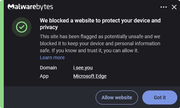
Very odd and so far only on this post, this is flagged. The images do not display on the original post, but this pops up for me.

Image
F6-424 & F4-425 Plus at 7.0.0777
F4-424 Pro also at 7.0.0777
D4-320
User avatar
Gremlin
Gold Member
Posts: 1625
Joined: 02 Dec 2022, 22:31
Great Britain

Re: Guide to Adjusting BIOS Boot Order

Post by Gremlin »

rfbjr wrote: 26 Mar 2026, 21:56
I don't use MS Edge, but I tried it - no issues with warnings. :cry: :lol: :|
F5-221 TOS7.0.0777 - 4x4TB (Ironwolf) Traid
F2-424 TOS7.0.0777 - 2x500GB nvme (P3) Traid, 2x6TB HDD (HGST) Traid
F2-221 TOS7.0.0777 - 1x3TB Ext4, 1x4TB Btrfs
F2-425+ TOS7.0.0777 - 2x500GB nvme (P3) Traid, 2x6TB HDD (EXOS) Traid
User avatar
rfbjr
Silver Member
Posts: 400
Joined: 16 May 2024, 23:43
United States of America

Re: Guide to Adjusting BIOS Boot Order

Post by rfbjr »

I'll try it with Firefox and Chrome, could be something I need to tweak within Malwarebytes.
F6-424 & F4-425 Plus at 7.0.0777
F4-424 Pro also at 7.0.0777
D4-320
User avatar
Sander
Posts: 4
Joined: 01 Jul 2026, 23:55
Sweden

Re: Guide to Adjusting BIOS Boot Order

Post by Sander »

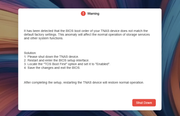
I'm stuck on this prompt after installing 2 x m.2 drives and moving system disk to those. It seems to boot up but I can't get further in the web interface. Mobile access seems to work so I don't know what I'm doing wrong.
Image
User avatar
EriChan
TM Support
Posts: 196
Joined: 06 Jan 2026, 12:27
United States of America

Re: Guide to Adjusting BIOS Boot Order

Post by EriChan »

Sander wrote: 02 Jul 2026, 00:18
May I ask what your device model is?
User avatar
Sander
Posts: 4
Joined: 01 Jul 2026, 23:55
Sweden

Re: Guide to Adjusting BIOS Boot Order

Post by Sander »

EriChan wrote: 02 Jul 2026, 17:24
Sander wrote: 02 Jul 2026, 00:18
May I ask what your device model is?
I have a F4-425 Plus with TOS 7.0.0765.

Everything works with accessing files, using mobile app etc but I can not use the web interface. It only has a button for Shut Down with no other options. Sounds like a software bug because it makes no sense. I did everything in the message but no change. I have restarted it multiple times.
Post Reply

Return to “Hardware”