

Hi All,
I have a terramaster f4-424 pro. My OS is installed on an M.2 and I have 4 drives in my raid array. When I restart the device, it goes into the new startup sequence again. It doesnt seem to keep my TOS5 setup.
Any idea why this could be happening?
[Help] Restart resulting in reinitialisation

Re: [Help] Restart resulting in reinitialisation
Hi.
TOS5 cannot be installed on individual drives alone. Instead, it must still be installed on each drive used for the storage pool.
For your F4-424 Pro, if you want to install TOS only on an SSD, you can refer to this guide on how to burn the NAS's built-in USB with a TOS6-specific version: viewtopic.php?t=6433.
Then reinstall TOS6 and choose the SSD as the only installation target.
TOS5 cannot be installed on individual drives alone. Instead, it must still be installed on each drive used for the storage pool.
For your F4-424 Pro, if you want to install TOS only on an SSD, you can refer to this guide on how to burn the NAS's built-in USB with a TOS6-specific version: viewtopic.php?t=6433.
Then reinstall TOS6 and choose the SSD as the only installation target.
To contact our team, please send email to following addresses, remember to replace (at) with @:
Technical team: support(at)terra-master.com (for technical support)
Service team: service(at)terra-master.com (for purchasing, return, replacement, RMA service)
Technical team: support(at)terra-master.com (for technical support)
Service team: service(at)terra-master.com (for purchasing, return, replacement, RMA service)


Re: [Help] Restart resulting in reinitialisation
It's an odd situation. Given that TOS5 is intended to be installed on all drives in Raid-1 configuration for the o/s PLUS it is not a good idea to install raid on a combination of nvme and hdd you really need to think about a complete re-install using TOS6.
F5-221 TOS7.0.1201 - 4x4TB (Ironwolf) Traid
F2-424 TOS7.0.1278 - 2x500GB nvme (P3) Traid, 2x6TB HDD (HGST) Traid
F2-221 TOS7.0.1278 - 1x3TB Ext4, 1x4TB Btrfs
F2-425+ TOS7.0.1278 - 2x500GB nvme (P3) Traid, 2x6TB HDD (EXOS) Traid
F2-424 TOS7.0.1278 - 2x500GB nvme (P3) Traid, 2x6TB HDD (HGST) Traid
F2-221 TOS7.0.1278 - 1x3TB Ext4, 1x4TB Btrfs
F2-425+ TOS7.0.1278 - 2x500GB nvme (P3) Traid, 2x6TB HDD (EXOS) Traid

Re: [Help] Restart resulting in reinitialisation
The BIOS of the F4-424 Pro product has the TOS Boot First feature enabled by default. When TOS is installed on the HDD, M.2 SSD, and USB device, the system will boot in the following order: HDD > M.2 > USB.
If you wish to change the boot order, you need to enter the BIOS interface, disable the TOS Boot First feature, and then set the M.2 SSD as the first boot priority.
If you wish to change the boot order, you need to enter the BIOS interface, disable the TOS Boot First feature, and then set the M.2 SSD as the first boot priority.
To contact our team, please send email to following addresses, remember to replace (at) with @
Technical team: support(at)terra-master.com (for technical support)
Service team: service(at)terra-master.com (for purchasing, return, replacement, RMA service)
Technical team: support(at)terra-master.com (for technical support)
Service team: service(at)terra-master.com (for purchasing, return, replacement, RMA service)
-
AvgJoe0007

- Posts: 2
- Joined: 07 Sep 2026, 01:25

Re: [Help] Restart resulting in reinitialisation
2nd time my TOS7 TerraMaster F4-424 Pro w/2x26T WD Red Pro's & 2x WD 500GB Red SN700 NVMe's has reinitialized after a simple reboot. The system was working great before both incidents. I can't get to lost logs to figure it out. What to do? I'm not comfortable with this setup anymore. Formatting the 2x26GTs to BTRFS takes 4k+ minutes. Painful. Is there a known fix, or should I abandon TOS7, or what?


Re: [Help] Restart resulting in reinitialisation
Please navigate to the Storage Management > Disk > System Disk page to confirm the current system disk.
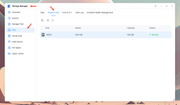
You can also generate a system report referring to the screenshots you shared, then send it to our technical support email (support(at)terra-master.com). We will analyze the report for you.
Please attach the link to this forum post in the body of your email.

To contact our team, please send email to following addresses, remember to replace (at) with @
Technical team: support(at)terra-master.com(for technical support)
Service team: service(at)terra-master.com(for purchasing, return, replacement, RMA service)
Technical team: support(at)terra-master.com(for technical support)
Service team: service(at)terra-master.com(for purchasing, return, replacement, RMA service)

Re: [Help] Restart resulting in reinitialisation
If you know a bit about how computers work, you'd understand that booting into the setup screen after restart means the boot partition on the drive is missing. That's typically a hardware failure or damaged boot files — it's not really a TOS 7 issue.
To contact our team, please send email to following addresses, remember to replace (at) with @:
Support team: support(at)terra-master.com (for technical support only)
Service team: service(at)terra-master.com (for purchasing, return, replacement, RMA service)
Support team: support(at)terra-master.com (for technical support only)
Service team: service(at)terra-master.com (for purchasing, return, replacement, RMA service)
-
AvgJoe0007
- Posts: 2
- Joined: 07 Sep 2026, 01:25
Re: [Help] Restart resulting in reinitialisation
@ CursaYang ---> Can I do that after getting: TNAS Initialization. Please initialize your TNAS by following the prompts .... ?
@ TMroy --> "it's not really a TOS 7 issue." Unless it is. The HDD drives are fine. Seems like lots of folks have similar experiences with this setup. I can't afford to waste 4K+ HDD formatting minutes to keep troubleshooting this. So.... back to TrueNAS? Like lots of other folks. Or what?
@ TMroy --> "it's not really a TOS 7 issue." Unless it is. The HDD drives are fine. Seems like lots of folks have similar experiences with this setup. I can't afford to waste 4K+ HDD formatting minutes to keep troubleshooting this. So.... back to TrueNAS? Like lots of other folks. Or what?
Re: [Help] Restart resulting in reinitialisation
If you do not mind, please book a remote session, we can help to check what happening there.
To contact our team, please send email to following addresses, remember to replace (at) with @:
Support team: support(at)terra-master.com (for technical support only)
Service team: service(at)terra-master.com (for purchasing, return, replacement, RMA service)
Support team: support(at)terra-master.com (for technical support only)
Service team: service(at)terra-master.com (for purchasing, return, replacement, RMA service)