Network UPS Tools (NUT) Failures continue

Discuss, seek assistance, and report issues related to hardware components, such as hardware platforms, memory, network ports, power supplies, UPS systems, and so on.
User avatar
Gremlin
Gold Member
Posts: 1629
Joined: 02 Dec 2022, 22:31
Great Britain

Network UPS Tools (NUT) Failures continue

Post by Gremlin »

TOS 6.0.750
Has been going on for a long time now:
Following represents a period of about 8 minutes following boot (continues remorselessly)

Code: Select all

TM-super1@NAS-T2:/var/log# cat messages | grep -i failed | grep -i ups
Jul 24 11:45:48 NAS-T2 kernel: [   19.709909] systemd-sysv-generator[278]: stat() failed on /etc/init.d/ups-monitor, ignoring: No such file or directory
Jul 24 11:45:57 NAS-T2 kernel: [   81.310942] systemd-sysv-generator[3841]: stat() failed on /etc/init.d/ups-monitor, ignoring: No such file or directory
Jul 24 11:46:11 NAS-T2 nut-monitor[4137]: upsnotify: failed to notify about state NOTIFY_STATE_READY_WITH_PID: no notification tech defined, will not spam more about it
Jul 24 11:46:11 NAS-T2 systemd[1]: Failed to start Network UPS Tools - power devices information server.
Jul 24 11:46:12 NAS-T2 systemd[1]: [email protected]: Failed with result 'exit-code'.
Jul 24 11:46:12 NAS-T2 systemd[1]: Failed to start Network UPS Tools - device driver for ups.
Jul 24 11:46:18 NAS-T2 kernel: [  101.901254] systemd-sysv-generator[4278]: stat() failed on /etc/init.d/ups-monitor, ignoring: No such file or directory
Jul 24 11:46:18 NAS-T2 kernel: [  102.371964] systemd-sysv-generator[4305]: stat() failed on /etc/init.d/ups-monitor, ignoring: No such file or directory
Jul 24 11:46:27 NAS-T2 systemd[1]: [email protected]: Failed with result 'exit-code'.
Jul 24 11:46:27 NAS-T2 systemd[1]: Failed to start Network UPS Tools - device driver for ups.
...
Jul 24 11:52:33 NAS-T2 systemd[1]: [email protected]: Failed with result 'exit-code'.
Jul 24 11:52:33 NAS-T2 systemd[1]: Failed to start Network UPS Tools - device driver for ups.
Jul 24 11:52:48 NAS-T2 nut-monitor[6077]: upsnotify: failed to notify about state NOTIFY_STATE_READY_WITH_PID: no notification tech defined, will not spam more about it
Jul 24 11:52:49 NAS-T2 systemd[1]: Failed to start Network UPS Tools - power devices information server.
TM-super1@NAS-T2:/var/log# 
@TMSupport received from me "debug logs" on another issue but noted in an email:
It {"abnormal shutdown issue"} is likely caused by a sudden power outage.
At the same time, we observed records of the UPS service restarting over 80,000 times and abnormal records for the WiN Server.
If you confirm that there was no power outage during this period, then we believe the automatic restart may be related to the UPS itself.
What model is your UPS? Can you try connecting it to the mains power to see if similar abnormalities occur?
{WINS server issue fixed}

Code: Select all

TM-super1@NAS-T2:/# systemctl status [email protected][email protected] - Network UPS Tools - device driver for ups
     Loaded: loaded (/lib/systemd/system/[email protected]; disabled; vendor preset: enabled)
     Active: inactive (dead)
       Docs: man:upsdrvsvcctl(8)
             https://www.networkupstools.org/historic/v2.8.3/docs/man/upsdrvsvcctl.html
             man:ups.conf(5)
             https://www.networkupstools.org/historic/v2.8.3/docs/man/ups.conf.html
             man:nut.conf(5)
             https://www.networkupstools.org/historic/v2.8.3/docs/man/nut.conf.html

Jul 24 11:52:33 NAS-T2 nut-driver@ups[6004]: Network UPS Tools upsdrvctl - UPS driver controller 2.8.3 release
Jul 24 11:52:33 NAS-T2 nut-driver@ups[6004]: Can't start /usr/lib/nut/(null): No such file or directory
Jul 24 11:52:33 NAS-T2 systemd[1]: [email protected]: Control process exited, code=exited, status=1/FAILURE
Jul 24 11:52:33 NAS-T2 systemd[1]: [email protected]: Failed with result 'exit-code'.
Jul 24 11:52:33 NAS-T2 systemd[1]: Failed to start Network UPS Tools - device driver for ups.
Jul 24 11:52:48 NAS-T2 systemd[1]: [email protected]: Scheduled restart job, restart counter is at 26.
Jul 24 11:52:48 NAS-T2 systemd[1]: Stopped Network UPS Tools - device driver for ups.
Jul 24 11:52:48 NAS-T2 systemd[1]: Starting Network UPS Tools - device driver for ups...
Jul 24 11:52:48 NAS-T2 systemd[1]: [email protected]: Deactivated successfully.
Jul 24 11:52:48 NAS-T2 systemd[1]: Stopped Network UPS Tools - device driver for ups.
TM-super1@NAS-T2:/# systemctl status [email protected][email protected] - Network UPS Tools - device driver for ups
     Loaded: loaded (/lib/systemd/system/[email protected]; disabled; vendor preset: enabled)
     Active: inactive (dead)
       Docs: man:upsdrvsvcctl(8)
             https://www.networkupstools.org/historic/v2.8.3/docs/man/upsdrvsvcctl.html
             man:ups.conf(5)
             https://www.networkupstools.org/historic/v2.8.3/docs/man/ups.conf.html
             man:nut.conf(5)
             https://www.networkupstools.org/historic/v2.8.3/docs/man/nut.conf.html

Jul 24 11:52:33 NAS-T2 nut-driver@ups[6004]: Network UPS Tools upsdrvctl - UPS driver controller 2.8.3 release
Jul 24 11:52:33 NAS-T2 nut-driver@ups[6004]: Can't start /usr/lib/nut/(null): No such file or directory
Jul 24 11:52:33 NAS-T2 systemd[1]: [email protected]: Control process exited, code=exited, status=1/FAILURE
Jul 24 11:52:33 NAS-T2 systemd[1]: [email protected]: Failed with result 'exit-code'.
Jul 24 11:52:33 NAS-T2 systemd[1]: Failed to start Network UPS Tools - device driver for ups.
Jul 24 11:52:48 NAS-T2 systemd[1]: [email protected]: Scheduled restart job, restart counter is at 26.
Jul 24 11:52:48 NAS-T2 systemd[1]: Stopped Network UPS Tools - device driver for ups.
Jul 24 11:52:48 NAS-T2 systemd[1]: Starting Network UPS Tools - device driver for ups...
Jul 24 11:52:48 NAS-T2 systemd[1]: [email protected]: Deactivated successfully.
Jul 24 11:52:48 NAS-T2 systemd[1]: Stopped Network UPS Tools - device driver for ups.
TM-super1@NAS-T2:/# 
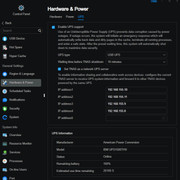
Tnas UPS server configuration: (Sample: IP address have changed since image}

Image

And the Client is as below which appears to work as it shows the active UPS data:
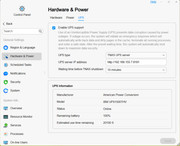
Image

SO, can anyone @TMSupport explain why all the errors? And how to fix it? Seems to me most of this began when UPS configuration moved to http port 8181 rather than the standard NUT port (which service is still available on nas).
F5-221 TOS7.0.0777 - 4x4TB (Ironwolf) Traid
F2-424 TOS7.0.0777 - 2x500GB nvme (P3) Traid, 2x6TB HDD (HGST) Traid
F2-221 TOS7.0.0777 - 1x3TB Ext4, 1x4TB Btrfs
F2-425+ TOS7.0.0777 - 2x500GB nvme (P3) Traid, 2x6TB HDD (EXOS) Traid
User avatar
CursaYang
TM Support
Posts: 740
Joined: 06 Jan 2025, 16:34
China

Re: Network UPS Tools (NUT) Failures continue

Post by CursaYang »

The default NUT port is 3493. According to your description, it may conflict with the http port 8181. You can try to temporarily modify the http port.
To contact our team, please send email to following addresses, remember to replace (at) with @

Technical team: support(at)terra-master.com(for technical support)
Service team: service(at)terra-master.com(for purchasing, return, replacement, RMA service)
User avatar
Gremlin
Gold Member
Posts: 1629
Joined: 02 Dec 2022, 22:31
Great Britain

Re: Network UPS Tools (NUT) Failures continue

Post by Gremlin »

I know very well the default port.
However, if you look at the config page WHILE SETTING UP, it clearly suggests 8181 as the port to use. I have asked the "why?" of that before, without response.

Why is TM playing games?
F5-221 TOS7.0.0777 - 4x4TB (Ironwolf) Traid
F2-424 TOS7.0.0777 - 2x500GB nvme (P3) Traid, 2x6TB HDD (HGST) Traid
F2-221 TOS7.0.0777 - 1x3TB Ext4, 1x4TB Btrfs
F2-425+ TOS7.0.0777 - 2x500GB nvme (P3) Traid, 2x6TB HDD (EXOS) Traid
User avatar
TMroy
TM Support
Posts: 3061
Joined: 10 Mar 2020, 14:04
China

Re: Network UPS Tools (NUT) Failures continue

Post by TMroy »

Gremlin wrote: 25 Jul 2025, 02:10
We will look into your issue. But why TM need to play games?
To contact our team, please send email to following addresses, remember to replace (at) with @:
Support team: support(at)terra-master.com (for technical support only)
Service team: service(at)terra-master.com (for purchasing, return, replacement, RMA service)
User avatar
JudeWu
TM Product Manager
Posts: 5
Joined: 23 Apr 2025, 10:25
China

Re: Network UPS Tools (NUT) Failures continue

Post by JudeWu »

Gremlin wrote: 24 Jul 2025, 19:28
We have received and reviewed your issue, but we need more information. Please follow the steps below to schedule a remote support session:

How to Schedule Remote Support:

Please contact TerraMaster Technical Support through the official website's live chat and include a link to this forum post. This will help our engineers quickly understand your issue.
User avatar
Gremlin
Gold Member
Posts: 1629
Joined: 02 Dec 2022, 22:31
Great Britain

Re: Network UPS Tools (NUT) Failures continue

Post by Gremlin »

TMroy wrote: 25 Jul 2025, 10:18
Gremlin wrote: 25 Jul 2025, 02:10
We will look into your issue.
Thank You.
But why TM need to play games?
Need? Definitely not ;)
It's mostly a guessing game currently from my point of view. And, it's the customers that are "playing".
Guessing if we will see documentation?
There is quite often a lack of detail information on changes to the o/s and functions. This UPS setup is a case in point (hence my focus) where no mention in the "manual" help page of some of the functions (SNMP) and no guidance on port(s). No info (e.g. when the setup page changed) on "WHY?" something is done. An explanation might eliminate the "Is that correct?" guess. Plus it states client and server must be on same UPS. While that is understandable from a control point of view, it was never a part of the NUT design philosophy from what I have read. Multiple UPS, multiple servers, multiple clients in data rooms, etc.
Guessing what will break in the next update.
Self explanatory. As it stands it appears from the outside that anything mentioned in a release note is a potential cause for concern AND when everything mentioned is working, what else may have been (unwittingly) modified and breaks.
Guessing what has been modified from the base linux release.
There are some people around this forum that are knowledgeable about linux (I do not include myself) and could help with issues, but the base o/s has been moved away from the linux "standard" for TM's commercial reasons (presumably) that it becomes harder and harder to understand the logic. As you will have observed several have abandoned TOS.
Guessing how something will be interpreted.
Again coming back to the UPS issue I refer back to the email from Support. (quoted earlier). Support identified UPS services "restarting 80,000 times". What I saw were UPS services FAILING TO START 80,000 times. If the service actually started and then failed we could look for a cause of failure. If it never starts, GUESS why?
F5-221 TOS7.0.0777 - 4x4TB (Ironwolf) Traid
F2-424 TOS7.0.0777 - 2x500GB nvme (P3) Traid, 2x6TB HDD (HGST) Traid
F2-221 TOS7.0.0777 - 1x3TB Ext4, 1x4TB Btrfs
F2-425+ TOS7.0.0777 - 2x500GB nvme (P3) Traid, 2x6TB HDD (EXOS) Traid
User avatar
Gremlin
Gold Member
Posts: 1629
Joined: 02 Dec 2022, 22:31
Great Britain

Re: Network UPS Tools (NUT) Failures continue

Post by Gremlin »

CursaYang wrote: 24 Jul 2025, 23:55 The default NUT port is 3493. According to your description, it may conflict with the http port 8181. You can try to temporarily modify the http port.
After further testing I can advise that whatever port is set in the UPS client configuration, it makes absolutely no difference to the collection of information from the ups server (as displayed in the lower portion of the config dialogue). I have used :8181, :3493 and random port such as :2020.

I am aware that the port (and other) info gets parsed into another file:
Client Side:

Code: Select all

 cat /etc/ups_v2.config
{
    "enabled": true,
    "type": 3,
    "time_conf": {
      "is_same_as_server": false,
      "time_mode": 1,
      "secs": 300
    },
    "enabled_listen": false,
    "allowed_ips": [],
    "server_addr": "192.168.155.7",
    "server_port": "3493",
    "snmp_conf": {
      "port": "",
      "mibs": "auto",
      "community": "public",
      "version": "v1"
    }
  }
Server Side
{NOTE: The server "address" below}

Code: Select all

TM-super1@NAS-T3:/# cat /etc/ups_v2.config
{
    "enabled": true,
    "type": 1,
    "time_conf": {
      "is_same_as_server": false,
      "time_mode": 1,
      "secs": 600
    },
    "enabled_listen": true,
    "allowed_ips": [
      "192.168.155.10",
      "192.168.155.11",
      "192.168.155.8",
      "192.168.155.3"
    ],
    "server_addr": "http://http://http://http://::::",  
    "server_port": "",
    "snmp_conf": {
      "port": "",
      "mibs": "auto",
      "community": "public",
      "version": "v1"
    }
  }
but how that might be used I do not know.
On the server side the TWO client machines can be observed communicating with the server.

Code: Select all

TM-super1@NAS-T3:/# systemctl status nut-server.service
● nut-server.service - Network UPS Tools - power devices information server
     Loaded: loaded (/lib/systemd/system/nut-server.service; disabled; vendor preset: enabled)
     Active: active (running) since Thu 2025-07-10 17:49:06 BST; 2 weeks 0 days ago
       Docs: man:upsd(8)
             https://www.networkupstools.org/historic/v2.8.3/docs/man/upsd.html
             man:ups.conf(5)
             https://www.networkupstools.org/historic/v2.8.3/docs/man/ups.conf.html
             man:upsd.conf(5)
             https://www.networkupstools.org/historic/v2.8.3/docs/man/upsd.conf.html
             man:upsd.users(5)
             https://www.networkupstools.org/historic/v2.8.3/docs/man/upsd.users.html
             man:nut.conf(5)
             https://www.networkupstools.org/historic/v2.8.3/docs/man/nut.conf.html
   Main PID: 1659 (upsd)
      Tasks: 1 (limit: 11695)
     Memory: 3.9M
        CPU: 3min 48.597s
     CGroup: /system.slice/nut-server.service
             └─1659 /lib/nut/upsd -F

Jul 25 11:42:41 NAS-T3 nut-server[1659]: User [email protected] logged into UPS [ups]
Jul 25 11:42:41 NAS-T3 upsd[1659]: User [email protected] logged into UPS [ups]
Jul 25 11:42:52 NAS-T3 nut-server[1659]: User [email protected] logged out from UPS [ups]
Jul 25 11:42:52 NAS-T3 upsd[1659]: User [email protected] logged out from UPS [ups]
Jul 25 11:43:16 NAS-T3 nut-server[1659]: User [email protected] logged into UPS [ups]
Jul 25 11:43:16 NAS-T3 upsd[1659]: User [email protected] logged into UPS [ups]
Jul 25 11:44:02 NAS-T3 nut-server[1659]: User [email protected] logged out from UPS [ups]
Jul 25 11:44:02 NAS-T3 upsd[1659]: User [email protected] logged out from UPS [ups]
Jul 25 11:44:22 NAS-T3 nut-server[1659]: User [email protected] logged into UPS [ups]
Jul 25 11:44:22 NAS-T3 upsd[1659]: User [email protected] logged into UPS [ups]
However, none of this makes any difference to the "failures" seen on the client side.
F5-221 TOS7.0.0777 - 4x4TB (Ironwolf) Traid
F2-424 TOS7.0.0777 - 2x500GB nvme (P3) Traid, 2x6TB HDD (HGST) Traid
F2-221 TOS7.0.0777 - 1x3TB Ext4, 1x4TB Btrfs
F2-425+ TOS7.0.0777 - 2x500GB nvme (P3) Traid, 2x6TB HDD (EXOS) Traid
User avatar
TMeric
TM Product Manager
Posts: 227
Joined: 03 Jul 2023, 11:01

Re: Network UPS Tools (NUT) Failures continue

Post by TMeric »

This log appears to be from the client side, and the server is functioning normally. When the client connects via TNAS Server, the nut-driver doesn't need to be active and should be stopped. Did you manually start the nut-driver on the client side using a command?
To contact our team, please send email to following addresses, remember to replace (at) with @:

Technical team: support(at)terra-master.com(for technical support)
Service team: service(at)terra-master.com(for purchasing, return, replacement, RMA service)
User avatar
Gremlin
Gold Member
Posts: 1629
Joined: 02 Dec 2022, 22:31
Great Britain

Re: Network UPS Tools (NUT) Failures continue

Post by Gremlin »

TMeric wrote: 25 Jul 2025, 19:35 Did you manually start the nut-driver on the client side using a command?
No, that's as it comes "out of the box". I have one client on .750, one client on .694 and server side is .694. The "failure log" is certainly from client side but is similar for both clients regardless of o/s version.

This segment may be worthy of a longer look:

Jul 24 11:52:33 NAS-T2 nut-driver@ups[6004]: Can't start /usr/lib/nut/(null): No such file or directory
Jul 24 11:52:33 NAS-T2 systemd[1]: [email protected]: Control process exited, code=exited, status=1/FAILURE
F5-221 TOS7.0.0777 - 4x4TB (Ironwolf) Traid
F2-424 TOS7.0.0777 - 2x500GB nvme (P3) Traid, 2x6TB HDD (HGST) Traid
F2-221 TOS7.0.0777 - 1x3TB Ext4, 1x4TB Btrfs
F2-425+ TOS7.0.0777 - 2x500GB nvme (P3) Traid, 2x6TB HDD (EXOS) Traid
User avatar
RyanYang
TM Support
Posts: 1141
Joined: 01 Dec 2020, 11:50
China

Re: Network UPS Tools (NUT) Failures continue

Post by RyanYang »

Gremlin wrote: 25 Jul 2025, 21:31
TMeric wrote: 25 Jul 2025, 19:35 Did you manually start the nut-driver on the client side using a command?
No, that's as it comes "out of the box". I have one client on .750, one client on .694 and server side is .694. The "failure log" is certainly from client side but is similar for both clients regardless of o/s version.

This segment may be worthy of a longer look:

Jul 24 11:52:33 NAS-T2 nut-driver@ups[6004]: Can't start /usr/lib/nut/(null): No such file or directory
Jul 24 11:52:33 NAS-T2 systemd[1]: [email protected]: Control process exited, code=exited, status=1/FAILURE
Thank you for your reminder. I've forwarded this to the relevant project team.
To contact our team, please send email to following addresses, remember to replace (at) with @
Technical team: support(at)terra-master.com (for technical support)
Service team: service(at)terra-master.com (for purchasing, return, replacement)
Post Reply

Return to “Hardware, Power and Accessories”

