

Sorry, I didn't notice your model earlier.
If you followed the previous instructions, will there still be issues if you follow the on-screen prompts now?
Could you please provide a screenshot?
[Help] f4-210 no longer recognizes hard drives
Re: [Help] f4-210 no longer recognizes hard drives
To contact our team, please send email to following addresses, remember to replace (at) with @
Technical team: support(at)terra-master.com(for technical support)
Service team: service(at)terra-master.com(for purchasing, return, replacement, RMA service)
Technical team: support(at)terra-master.com(for technical support)
Service team: service(at)terra-master.com(for purchasing, return, replacement, RMA service)
-
quesadilla79

- Posts: 13
- Joined: 04 Apr 2024, 18:45

Re: [Help] f4-210 no longer recognizes hard drives
No worries. I haven't been able to SSH in, unfortunately. I keep receiving a network error: connection refused when trying to access the NAS via SSH (puTTy and MobaXtrem).
Re: [Help] f4-210 no longer recognizes hard drives
The device defaults to enabling SSH, with the default port being 9222.
Have you manually disabled it?
For methods to log in via SSH, you can refer to: viewtopic.php?f=78&t=2350
Have you manually disabled it?
For methods to log in via SSH, you can refer to: viewtopic.php?f=78&t=2350
To contact our team, please send email to following addresses, remember to replace (at) with @
Technical team: support(at)terra-master.com(for technical support)
Service team: service(at)terra-master.com(for purchasing, return, replacement, RMA service)
Technical team: support(at)terra-master.com(for technical support)
Service team: service(at)terra-master.com(for purchasing, return, replacement, RMA service)
-
quesadilla79
- Posts: 13
- Joined: 04 Apr 2024, 18:45
Re: [Help] f4-210 no longer recognizes hard drives
No, I don't know why port 9222 would be blocked. That PuTTy security alert pop up doesn't appear, I get the connection error instead. Do I need a specific admin login and pw as part of the session? I've tried my login and password and what I though was the default but neither seemed to work.CursaYang wrote: ↑02 Jul 2025, 14:12 The device defaults to enabling SSH, with the default port being 9222.
Have you manually disabled it?
For methods to log in via SSH, you can refer to: viewtopic.php?f=78&t=2350
Re: [Help] f4-210 no longer recognizes hard drives
Please log in using the username and password you created when initializing the NAS. Regarding the connection error you mentioned, you can provide us with a screenshot.
If you need remote technical support, you can schedule it through the live chat on our official website, and attach the link to this forum post when scheduling.
If you need remote technical support, you can schedule it through the live chat on our official website, and attach the link to this forum post when scheduling.
To contact our team, please send email to following addresses, remember to replace (at) with @
Technical team: support(at)terra-master.com(for technical support)
Service team: service(at)terra-master.com(for purchasing, return, replacement, RMA service)
Technical team: support(at)terra-master.com(for technical support)
Service team: service(at)terra-master.com(for purchasing, return, replacement, RMA service)
-
quesadilla79
- Posts: 13
- Joined: 04 Apr 2024, 18:45
Re: [Help] f4-210 no longer recognizes hard drives
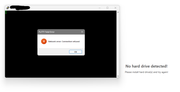
Here is a screenshot of the error:
-
quesadilla79
- Posts: 13
- Joined: 04 Apr 2024, 18:45
Re: [Help] f4-210 no longer recognizes hard drives
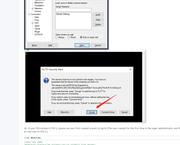
Also, if useful, both my desktop and NAS are connected via ethernet (cat 5) to a switch that connects via ethernet to my home network. I am getting the connection refused error instead of the puTTy key message shown on the instruction thread, viewtopic.php?f=78&t=2350

Re: [Help] f4-210 no longer recognizes hard drives
Please disable SSH, enable it again then check if you can connect via putty
To contact our team, please send email to following addresses, remember to replace (at) with @
Technical team: support(at)terra-master.com(for technical support)
Service team: service(at)terra-master.com(for purchasing, return, replacement, RMA service)
Technical team: support(at)terra-master.com(for technical support)
Service team: service(at)terra-master.com(for purchasing, return, replacement, RMA service)
-
quesadilla79
- Posts: 13
- Joined: 04 Apr 2024, 18:45
Re: [Help] f4-210 no longer recognizes hard drives
Hello, I've disabled and re enabled SSH and run several tests. I can ping the NAS but it is refusing connection attempts at port 9222.
Re: [Help] f4-210 no longer recognizes hard drives
You can schedule remote technical support through the live chat on our official website, and attach the link to this forum post when scheduling.
To contact our team, please send email to following addresses, remember to replace (at) with @
Technical team: support(at)terra-master.com(for technical support)
Service team: service(at)terra-master.com(for purchasing, return, replacement, RMA service)
Technical team: support(at)terra-master.com(for technical support)
Service team: service(at)terra-master.com(for purchasing, return, replacement, RMA service)