TOS 6.0.694 (X86) is Released for Update


Re: TOS 6.0.694 (X86) is Released for Update
It was TOS 6 to begin with but not sure which version. Current version is 6.0.694-00165. System config backup was made Sunday morning before doing the update shown, but was unable to access server after the update. Server wasn't even showing in my router. This was the bad gateway error. After removing hard drives including SSD's was able reinitialize. But TNAS for PC still does not see local servers. Mobile app does see the server without issue. Can add server manually to PC app. But why wouldn't PC app be able to see the local server? It is on my network and is even accessible from windows file explorer.


Re: TOS 6.0.694 (X86) is Released for Update
Your question has already been answered in the first post; please refer to the response.
To contact our team, please send email to following addresses. "(at)" = "@"
Technical team: support(at)terra-master.com
Service team: service(at)terra-master.com
Technical team: support(at)terra-master.com
Service team: service(at)terra-master.com


Re: TOS 6.0.694 (X86) is Released for Update
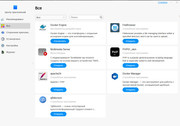
After the update, the selection of programs to install in the application center no longer appears. Now only installed programs are displayed. TOS 6.0.694, Model F4-424

Re: TOS 6.0.694 (X86) is Released for Update
I confirm. It's all the same. Model F4-423, TOS 6.0.694. After the update, the selection of programs to install in the application center no longer appears. Now only installed programs are displayed.
F2-423 | TOS 7.0.xx | 8Gb Ram | 1x500GB nvme (system), 2x4TB HDD Traid
F4-423 | TOS 6.0.xx | 16Gb Ram | 1x500GB nvme (system), 2x1TB HDD Traid, 2x2TB HDD Single
F4-423 | TOS 6.0.xx | 16Gb Ram | 1x500GB nvme (system), 2x1TB HDD Traid, 2x2TB HDD Single


Re: TOS 6.0.694 (X86) is Released for Update
That's just weird. My F5-221 appears to show all the apps, but the others only show installed apps.
F5-221 TOS7.0.1163 - 4x4TB (Ironwolf) Traid
F2-424 TOS7.0.1130 - 2x500GB nvme (P3) Traid, 2x6TB HDD (HGST) Traid
F2-221 TOS7.0.1130 - 1x3TB Ext4, 1x4TB Btrfs
F2-425+ TOS7.0.1163 - 2x500GB nvme (P3) Traid, 2x6TB HDD (EXOS) Traid
F2-424 TOS7.0.1130 - 2x500GB nvme (P3) Traid, 2x6TB HDD (HGST) Traid
F2-221 TOS7.0.1130 - 1x3TB Ext4, 1x4TB Btrfs
F2-425+ TOS7.0.1163 - 2x500GB nvme (P3) Traid, 2x6TB HDD (EXOS) Traid

Re: TOS 6.0.694 (X86) is Released for Update
Sorry that there is an issue with app center at the moment, please try again tomorrow
To contact our team, please send email to following addresses, remember to replace (at) with @
Technical team: support(at)terra-master.com(for technical support)
Service team: service(at)terra-master.com(for purchasing, return, replacement, RMA service)
Technical team: support(at)terra-master.com(for technical support)
Service team: service(at)terra-master.com(for purchasing, return, replacement, RMA service)
Re: TOS 6.0.694 (X86) is Released for Update
It's tomorrow, today
 and it seems to be working again.
F5-221 TOS7.0.1163 - 4x4TB (Ironwolf) Traid
F2-424 TOS7.0.1130 - 2x500GB nvme (P3) Traid, 2x6TB HDD (HGST) Traid
F2-221 TOS7.0.1130 - 1x3TB Ext4, 1x4TB Btrfs
F2-425+ TOS7.0.1163 - 2x500GB nvme (P3) Traid, 2x6TB HDD (EXOS) Traid
F2-424 TOS7.0.1130 - 2x500GB nvme (P3) Traid, 2x6TB HDD (HGST) Traid
F2-221 TOS7.0.1130 - 1x3TB Ext4, 1x4TB Btrfs
F2-425+ TOS7.0.1163 - 2x500GB nvme (P3) Traid, 2x6TB HDD (EXOS) Traid
Re: TOS 6.0.694 (X86) is Released for Update
Sorry for the late notice! The issue was resolved this morning. You just need to refresh your browser after opening the app center to use it normally.
To contact our team, please send email to following addresses. "(at)" = "@"
Technical team: support(at)terra-master.com
Service team: service(at)terra-master.com
Technical team: support(at)terra-master.com
Service team: service(at)terra-master.com


Re: TOS 6.0.694 (X86) is Released for Update
Not recommended by me - I have a V17 so it was good to go. Or so I thought. First issue was internal USB drive being too small - bricked machine requiring disassembly to swap internal thumb drive to a larger one. Had to remake all my backed up data as Raid pools were lost. OpenVPN is broken on TOS 6. I have had it running for a week and everything else seems stable to run SMB.Chelya wrote: ↑27 May 2025, 15:53 Hello, everyone. I have an F5-221 model. Currently, it’s running TOS 5.1.67 with BIOS version MAPL0304V22. Up until now, I’ve hesitated to update the system to TOS 6.0. The control panel indicates that the latest version is already installed, but given the potential limitations for the F5-221 mentioned in other threads—even though MAPL0304V22 doesn’t seem to have hardware restrictions—I still didn’t risk upgrading.
Now, however, I’m thinking it might finally be time to update. But I’m really concerned about ending up with a bricked device if something goes wrong (especially since, as I understand it, the entire previous root filesystem is wiped—I’d hate for it to be erased only for the new system to fail due to hardware limitations).
So, my question for the experts is: How safe is it to upgrade to TOS 6 with my current hardware? And are there any recovery methods in case the update doesn’t go as planned?


Re: TOS 6.0.694 (X86) is Released for Update
I'm not an expert, except for encountering the issues that come with this (and previous) version(s).Chelya wrote: ↑27 May 2025, 15:53 Hello, everyone. I have an F5-221 model. Currently, it’s running TOS 5.1.67 with BIOS version MAPL0304V22. Up until now, I’ve hesitated to update the system to TOS 6.0. The control panel indicates that the latest version is already installed, but given the potential limitations for the F5-221 mentioned in other threads—even though MAPL0304V22 doesn’t seem to have hardware restrictions—I still didn’t risk upgrading.
Now, however, I’m thinking it might finally be time to update. But I’m really concerned about ending up with a bricked device if something goes wrong (especially since, as I understand it, the entire previous root filesystem is wiped—I’d hate for it to be erased only for the new system to fail due to hardware limitations).
So, my question for the experts is: How safe is it to upgrade to TOS 6 with my current hardware? And are there any recovery methods in case the update doesn’t go as planned?
Upgrading can be and was pain in the @## resulting in bricked boxes. In my case a F2-221 and F5-221.
I had to download an initboot-stick and freshly install the OS.
Luckily, my data, was not affected, but i had to define users, groups and all that stuff again.
The risk is minimal (in my case anyway) but the effort can be huge and an extra backup is always recommended. Just you need an extra NAS for that...
F5-221 - TOS7.0.1140 - 5x4TB TRAID - 1x4TB Single USB - 2x4TB HwRAID1 USB
F2-221 - TOS7.0.1140 - 2x3TB JBOD - 1x4TB Single USB
F2-221 - TOS7.0.1140 - 2x3TB JBOD - 1x4TB Single USB