[Help] F2-223 name display and  [SOLVED]

IPv4/6, Port, VPN, proxy, SSH, remote access and more.
Post Reply
User avatar
Sc00ter
Posts: 7
Joined: 05 Jun 2025, 19:46
Canada

[Help] F2-223 name display and  [SOLVED]

Post by Sc00ter »

Hi all
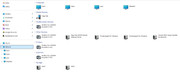
I recently installed a Terramaster F2-223 NAS on my home network with 2 10 TB WD RED drives. So far it is working great but I do have a couple of very minor issues that I can't figure out what the cause is and I'm hoping someone here can point me in the right direction. First issue is I named it NAS3(uppercase) during setup but my pcs all display it as nas3(lowercase). Second issue is that the NAS is not appearing as a network storage device when I look at my network connections in explorer. I am running Windows 11 on all my PCs. Please see the attached picture to see what I am talking about.
Thanks
Image
User avatar
TMzethar
TM Support
Posts: 2815
Joined: 27 Oct 2020, 16:43

Re: [Help] F2-223 name display and

Post by TMzethar »

1.On Windows shared folders are always displayed in lowercase.
2.You can achieve this by enabling 'UPnP Discovery'.(TOS Web > Control Panel > Network Services > Discovery Service)
To contact our team, please send email to following addresses, remember to replace (at) with @:
Technical team: support(at)terra-master.com (for technical support)
Service team: service(at)terra-master.com (for purchasing, return, replacement, RMA service)
User avatar
Sc00ter
Posts: 7
Joined: 05 Jun 2025, 19:46
Canada

Re: [Help] F2-223 name display and

Post by Sc00ter »

TMzethar
Your solutions worked great for me, your assistance is much appreciated.
Thabks
Post Reply

Return to “Network”