

I setup a new TNAS ID and that didn't solve the issue either.
TOS 6.0.694 (X86) is Released for Update
Re: TOS 6.0.694 (X86) is Released for Update
Current System:
F4-424 Pro
40TB storage.
TOS- 7.0.0746
F4-424 Pro
40TB storage.
TOS- 7.0.0746
Re: TOS 6.0.694 (X86) is Released for Update
One other thing that has now happened twice since the update. My NAS has powered down. For no reason that I can find. First time was Thursday morning while I was watching something on Plex and then today but I don't know when it shut down.
I have no scheduled task running around either of the times it has happened. I also have auto power on turned on if there is a power outage.
I am also hooked up to a UPS with new batteries that are about two months old.
The room has good air conditioning peak temp in the room was 77F today.
I have no scheduled task running around either of the times it has happened. I also have auto power on turned on if there is a power outage.
I am also hooked up to a UPS with new batteries that are about two months old.
The room has good air conditioning peak temp in the room was 77F today.
Current System:
F4-424 Pro
40TB storage.
TOS- 7.0.0746
F4-424 Pro
40TB storage.
TOS- 7.0.0746


Re: TOS 6.0.694 (X86) is Released for Update
Hello, we have confirmed that the auto power-on function is feasible. I have reported this issue to the relevant team. We will conduct comprehensive and detailed verification of this version's auto power-on function, and will reply to you again when we have results. This process will take about 2-3 days, as today is a traditional Chinese holiday and our technical staff are on leave. Finally, I wish you a pleasant weekend.
To contact our team, please send email to following addresses, remember to replace (at) with @:
Support team: support(at)terra-master.com (for technical support only)
Support team: support(at)terra-master.com (for technical support only)
Re: TOS 6.0.694 (X86) is Released for Update
Other little things are popping up now that I've had more time to mess around.
1. When an app gets updated it no longer goes back on the desktop like before.
2. UPS disconnected and notification shows that I plug it in but the UPS page stills says no UPS connected. This was working fine on the last update.
3. Network Interface page: Nothing ever populates.
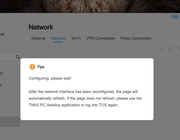
EDIT: Can somebody recommend a logging app? Looking for something like Windows event viewer. Want to see what is going on around the power downs and such.
1. When an app gets updated it no longer goes back on the desktop like before.
2. UPS disconnected and notification shows that I plug it in but the UPS page stills says no UPS connected. This was working fine on the last update.
3. Network Interface page: Nothing ever populates.
EDIT: Can somebody recommend a logging app? Looking for something like Windows event viewer. Want to see what is going on around the power downs and such.
Current System:
F4-424 Pro
40TB storage.
TOS- 7.0.0746
F4-424 Pro
40TB storage.
TOS- 7.0.0746

Re: TOS 6.0.694 (X86) is Released for Update
During application updates, the program will temporarily disappear from your desktop as it needs to deactivate first before updating. This is normal behavior. You can recreate the desktop shortcut afterward
Regarding the network and UPS display issues, we recommend performing a system reboot first, then verify if the problems persist.
To view log events, please go to the Support & Help page and enable debug mode.
The system will automatically generate relevant diagnostic logs when the issue recurs.
Hope this helps. Wishing you a great day!
To contact our team, please send email to following addresses, remember to replace (at) with @
Technical team: support(at)terra-master.com (for technical support)
Service team: service(at)terra-master.com (for purchasing, return, replacement, RMA service)
Technical team: support(at)terra-master.com (for technical support)
Service team: service(at)terra-master.com (for purchasing, return, replacement, RMA service)
Re: TOS 6.0.694 (X86) is Released for Update
Thank you for the help.
One other thing I noticed. On the Disk tab there is no longer an option for system disk.
I have 4 HDD's installed and 2 NVME and all are recognized.
Current System:
F4-424 Pro
40TB storage.
TOS- 7.0.0746
F4-424 Pro
40TB storage.
TOS- 7.0.0746


Re: TOS 6.0.694 (X86) is Released for Update
I had the same issues as you describe, "systemdisk", "networkinterface" after i updated form 688beta to 694. The result is a kind of zombie version, as TM stated.
I had then a clean new installation of 694 and those problems were gone. But furthermore systemconfiguration backups done with the zombieversion will not load.


Re: TOS 6.0.694 (X86) is Released for Update
Notifications worked on the previous version, but in this was broken again )
F4-424 MAX TOS 7
Re: TOS 6.0.694 (X86) is Released for Update
May I ask what events you are talking about where the notifications did not take effect? Go to Control Panel - General Settings - Notification Module and reset it, will it still be a problem?
To contact our team, please send email to following addresses, remember to replace (at) with @
Technical team: support(at)terra-master.com (for technical support)
Service team: service(at)terra-master.com (for purchasing, return, replacement, RMA service)
Technical team: support(at)terra-master.com (for technical support)
Service team: service(at)terra-master.com (for purchasing, return, replacement, RMA service)