

I bought a D4-320 Enclosure recently intending it to be used with Ubuntu Server 24.04.2 LTS (Kernel version: 6.8.0-60-generic)
I am however at a point where I am at a loss what to do next.
I have 4 x drives.. 2 x Western Digital and 2 x Seagate
When it's working.. dmesg clearly shows that the drive is recognised with an assigned drive (e.g. /dev/sdf):
[ 4991.558657] usb 2-3.1.4: Product: TDAS
[ 4991.558665] usb 2-3.1.4: Manufacturer: TerraMaster
[ 4991.558672] usb 2-3.1.4: SerialNumber: ZL2HB6XD
[ 4991.567223] scsi host6: uas
[ 4991.568640] scsi 6:0:0:0: Direct-Access TerraMas TDAS 0 PQ: 0 ANSI: 6
[ 4991.571927] sd 6:0:0:0: Attached scsi generic sg5 type 0
[ 4991.588558] sd 6:0:0:0: [sdf] 31251759104 512-byte logical blocks: (16.0 TB/14.6 TiB)
[ 4991.588571] sd 6:0:0:0: [sdf] 4096-byte physical blocks
[ 4991.588729] sd 6:0:0:0: [sdf] Write Protect is off
[ 4991.588738] sd 6:0:0:0: [sdf] Mode Sense: 43 00 00 00
[ 4991.589009] sd 6:0:0:0: [sdf] Write cache: enabled, read cache: enabled, doesn't support DPO or FUA
[ 4991.615888] sd 6:0:0:0: [sdf] Preferred minimum I/O size 4096 bytes
[ 4991.615899] sd 6:0:0:0: [sdf] Optimal transfer size 33553920 bytes not a multiple of preferred minimum block size (4096 bytes)
[ 4991.622977] sd 6:0:0:0: [sdf] Attached SCSI disk
But when it FAILS.. , i simply get
[ 6462.983425] usb 2-3.1.4: new SuperSpeed USB device number 10 using xhci_hcd
[ 6473.269971] usb 2-3.1.4: New USB device found, idVendor=174c, idProduct=235c, bcdDevice= 1.00
[ 6473.269994] usb 2-3.1.4: New USB device strings: Mfr=2, Product=3, SerialNumber=1
[ 6473.270005] usb 2-3.1.4: Product: TDAS
[ 6473.270012] usb 2-3.1.4: Manufacturer: TerraMaster
[ 6478.390431] usb 2-3.1.4: can't set config #1, error -110
The 2 x Western Digital drives are recognised fine most of the time on connect/disconnect (say 8 out of 10 times).
But the 2 x Seagate drives fails with above "can't set config #1" error 9 out of 10 times.
Sometimes, a complete reboot of the server works. But most of the time.. the Seagate enterprise drives are not recognised.
I have done the rounds with support and getting nowhere:
1. Cable -> I am using the original USB-C to USB-C cable, and have tried USB-A to USB-C cable. Same error
2. Windows -> I have tried connecting to Windows server. It works in Windows (drive recognised in disk management, drive letter assigned)
3. Slots -> I have tried different slots. It makes no difference.
4. HDD Problem -> All disks work fine with a cheap Ugreen 5G USB adapter. It's not the HDD
5. Chipset driver -> I've been asked to "update" to latest chipset driver. But chipset driver is part of the LInux kernel. I have tried with latest Linux Kernel on Arch Linux desktop (Kernel version 6.14.5-3), and the same error still occurs
This to me is a compatibility issue with Linux and the firmware in D4-320.
Is anyone else having this problem?
[Help] D4-320 Failing To Register Drive on Linux


Re: [Help] D4-320 Failing To Register Drive on Linux
Hello Awonglk, regarding the issue you reported, we have arranged the following verification steps:
First, we will upgrade the D4-320 to the firmware version on the official forum to verify the issue:
Firmware Version: FW: 210830_D1_63_F7
viewtopic.php?t=7111
Conditions for using Ubuntu
Ubuntu 22.04.5 LTS
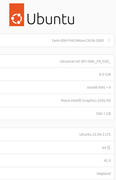
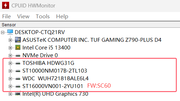
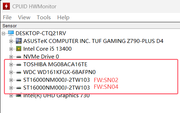
8 hard disks of various brands are used; the following commands are executed:
Sudo dmesg | grep -i 'usb'
First verification: 4 hard disks are used.
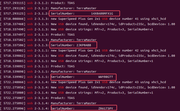
Second verification: Another 4 hard disks are used.
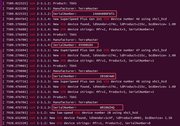
Regarding the error "usb 2-3.1.4: can't set config #1, error -110", this is a common USB device configuration error in the Linux system, indicating that the device timed out during the configuration phase (the timeout period is typically 10 seconds).
Recommended kernel parameter adjustments:

Temporarily increase the USB timeout (requires root privileges)
echo 20 > /sys/module/usbcore/parameters/usbfs_memory_mb
To contact our team, please send email to following addresses. "(at)" = "@"
Technical team: support(at)terra-master.com
Service team: service(at)terra-master.com
Technical team: support(at)terra-master.com
Service team: service(at)terra-master.com
Re: [Help] D4-320 Failing To Register Drive on Linux
Yes, I did follow support team's instruction to upgrade the firmware already.
I have tried the USB timeout increase, and changed it to 20
❯ cat /sys/module/usbcore/parameters/usbfs_memory_mb
20
However, this did not appear to make a difference to me. Still getting the same error
[349242.977603] usb 2-3.1.4: new SuperSpeed USB device number 11 using xhci_hcd
[349253.522162] usb 2-3.1.4: New USB device found, idVendor=174c, idProduct=235c, bcdDevice= 1.00
[349253.522186] usb 2-3.1.4: New USB device strings: Mfr=2, Product=3, SerialNumber=1
[349253.522195] usb 2-3.1.4: Product: TDAS
[349253.522203] usb 2-3.1.4: Manufacturer: TerraMaster
[349258.642816] usb 2-3.1.4: can't set config #1, error -110
I have tried the USB timeout increase, and changed it to 20
❯ cat /sys/module/usbcore/parameters/usbfs_memory_mb
20
However, this did not appear to make a difference to me. Still getting the same error
[349242.977603] usb 2-3.1.4: new SuperSpeed USB device number 11 using xhci_hcd
[349253.522162] usb 2-3.1.4: New USB device found, idVendor=174c, idProduct=235c, bcdDevice= 1.00
[349253.522186] usb 2-3.1.4: New USB device strings: Mfr=2, Product=3, SerialNumber=1
[349253.522195] usb 2-3.1.4: Product: TDAS
[349253.522203] usb 2-3.1.4: Manufacturer: TerraMaster
[349258.642816] usb 2-3.1.4: can't set config #1, error -110
Re: [Help] D4-320 Failing To Register Drive on Linux
If it helps you narrow down this issue, all 4 x disk are recognised properly if I reboot Linux server WITH the disks already plugged into the enclosure.
It fails consistently when I unplug and plug the Seagate drives back in.
Could you see if you can replicate this issue by hotplugging the disks?
It fails consistently when I unplug and plug the Seagate drives back in.
Could you see if you can replicate this issue by hotplugging the disks?
Re: [Help] D4-320 Failing To Register Drive on Linux
We have tested and verified three 16TB hard disks with multiple versions, and the results show that they are running normally. It is recommended that you first try to replace the hard disk to troubleshoot the current problem.
To contact our team, please send email to following addresses. "(at)" = "@"
Technical team: support(at)terra-master.com
Service team: service(at)terra-master.com
Technical team: support(at)terra-master.com
Service team: service(at)terra-master.com
-
highlander

- Posts: 2
- Joined: 11 Oct 2025, 17:08

Re: [Help] D4-320 Failing To Register Drive on Linux
Same error here on a TerraMaster D6-320
Hot inserting a disk gives the following error:
10:57:07 laptop kernel: usb 2-1.2.3.1: new SuperSpeed Plus Gen 2x1 USB device number 21 using xhci_hcd
10:57:18 laptop kernel: usb 2-1.2.3.1: New USB device found, idVendor=174c, idProduct=235c, bcdDevice= 1.00
10:57:18 laptop kernel: usb 2-1.2.3.1: New USB device strings: Mfr=2, Product=3, SerialNumber=1
10:57:18 laptop kernel: usb 2-1.2.3.1: Product: TDAS
10:57:18 laptop kernel: usb 2-1.2.3.1: Manufacturer: TerraMaster
10:57:23 laptop kernel: usb 2-1.2.3.1: can't set config #1, error -110
It fails with 3 Seagate IronWolf NAS 8TB ST8000VN004-2M2101
It fails with 1 Seagate IronWolf NAS 8TB ST8000VN0022-2EL112
But it works with 2 Seagate NAS HDD 4TB ST4000VN000-1H4168
It also works with all disk types if I power cycle the Terramaster with the disks inserted.
Hot inserting a disk gives the following error:
10:57:07 laptop kernel: usb 2-1.2.3.1: new SuperSpeed Plus Gen 2x1 USB device number 21 using xhci_hcd
10:57:18 laptop kernel: usb 2-1.2.3.1: New USB device found, idVendor=174c, idProduct=235c, bcdDevice= 1.00
10:57:18 laptop kernel: usb 2-1.2.3.1: New USB device strings: Mfr=2, Product=3, SerialNumber=1
10:57:18 laptop kernel: usb 2-1.2.3.1: Product: TDAS
10:57:18 laptop kernel: usb 2-1.2.3.1: Manufacturer: TerraMaster
10:57:23 laptop kernel: usb 2-1.2.3.1: can't set config #1, error -110
It fails with 3 Seagate IronWolf NAS 8TB ST8000VN004-2M2101
It fails with 1 Seagate IronWolf NAS 8TB ST8000VN0022-2EL112
But it works with 2 Seagate NAS HDD 4TB ST4000VN000-1H4168
It also works with all disk types if I power cycle the Terramaster with the disks inserted.
-
highlander
- Posts: 2
- Joined: 11 Oct 2025, 17:08
Re: [Help] D4-320 Failing To Register Drive on Linux
To clarify some more:
- powering up the TerraMaster with all 6 disks inserted: all disks ok
- powering up the TerraMaster with no disk inserted, then inserting disks one by one: all disks ok
- while powered up, removing a working disk, then re-inserting it into the same bay: both 4TB disks work, all of 4 8TB disks do NOT work