Is something rotten in the state of "Update"?

The discussion here is limited to topics related to the system update itself. Please post the functional issues after the system update to the corresponding other forums.
User avatar
Gremlin
Gold Member
Posts: 1392
Joined: 02 Dec 2022, 22:31
Great Britain

Is something rotten in the state of "Update"?

Post by Gremlin »

With apologies to Will Shakespeare (or whomever wrote that stuff) ...

Twice now I have hit the same issue while updating F2/5-221 from Tos 5.1.45 to tos 6.0.530 (.530 as the intermediate step to latest)

The main bug (as I see it) is that the usb init-boot fails to be re-written correctly. for the (future) Tos6 installations/re-installations.
I know this since I just decided to reset to factory default my F5-221 after several system errors* started showing up (following update).

Having reset I realised I was not able to reboot my device. In case no-one else has noticed, the "old" legacy iinitboot has a typo which shows up on console monitor as:
"Booting form ...... disk"
and, in this case, that was as far as it went.

Previously I had updated F2-221 and similar issue showed up when doing something similar but I wrote that off as a fluke. (In that case a re-install reverted to Tos5.1 which it should not have done.)

In both cases I felt obliged to prepare new usb drives with the appropriate image file(s). In the case of the recent F5-221, having removed the case, replaced the usb and refitted the case the re-install went directly to Tos6.0.648.

*I have downloaded an error report and that has gone to @TMSupport.
content = """Notification email: test email generates "logout", but click on screen re-instates. Cannot set new email (custom) attributes.
Lan aggregation (active backup) does not survive reboot.
That is just 2 things found so far."""
F5-221 TOS6.0.794 - 4x4TB Traid (TNAS UPS Server :?: Broken :?: )
F2-424 TOS7.0.0392 {BETA} - 2x500GB nvme (P3) Traid, 2x6T HDD Traid
F2-221 TOS7.0.0364 - 1x3TB Ext4, 1x4TB Ext4 [Test system]
Gremlin is in 'Listening' mode
User avatar
Gremlin
Gold Member
Posts: 1392
Joined: 02 Dec 2022, 22:31
Great Britain

Re: Is something rotten in the state of "Update"?

Post by Gremlin »

To make matters (somewhat) worse:

Even after a successful (it seemed) re-install yesterday, on this morning's re-start (automated) the "Active Backup" LAG failed again. Eth0 failed to get it's IP setting from DHCP
(eliciting default 169.254.n.n). output from 'ifconfig':

Code: Select all

eth0: flags=4163<UP,BROADCAST,RUNNING,MULTICAST>  mtu 1500
        inet 169.254.0.1  netmask 255.255.0.0  broadcast 169.254.255.255
        ether 6c:bf:b5:02:5f:b2  txqueuelen 1000  (Ethernet)
        RX packets 7393  bytes 680760 (680.7 KB)
        RX errors 0  dropped 0  overruns 0  frame 0
        TX packets 133  bytes 44160 (44.1 KB)
        TX errors 0  dropped 0 overruns 0  carrier 0  collisions 0

eth1: flags=4163<UP,BROADCAST,RUNNING,MULTICAST>  mtu 1500
        inet 192.168.155.17  netmask 255.255.255.0  broadcast 192.168.155.255
        inet6 fe80::158c:915b:335b:2f87  prefixlen 64  scopeid 0x20<link>
        ether 6c:bf:b5:02:5f:b3  txqueuelen 1000  (Ethernet)
        RX packets 15515  bytes 2203401 (2.2 MB)
        RX errors 0  dropped 0  overruns 0  frame 0
        TX packets 10824  bytes 9417287 (9.4 MB)
        TX errors 0  dropped 0 overruns 0  carrier 0  collisions 0

lo: flags=73<UP,LOOPBACK,RUNNING>  mtu 65536
        inet 127.0.0.1  netmask 255.0.0.0
        inet6 ::1  prefixlen 128  scopeid 0x10<host>
        loop  txqueuelen 1000  (Local Loopback)
        RX packets 44744  bytes 19893544 (19.8 MB)
        RX errors 0  dropped 0  overruns 0  frame 0
        TX packets 44744  bytes 19893544 (19.8 MB)
        TX errors 0  dropped 0 overruns 0  carrier 0  collisions 0
Connection was possible on eth1 with DHCP assigned IP and used:

Code: Select all

systemctl restart NetworkManager.service
via terminal which restored LAG

Code: Select all

ME@NAS-T3:/# systemctl restart NetworkManager.service
ME@NAS-T3:/# ifconfig
bond0: flags=5187<UP,BROADCAST,RUNNING,MASTER,MULTICAST>  mtu 1500
        inet 192.168.155.16  netmask 255.255.255.0  broadcast 192.168.155.255
        inet6 fe80::cb2:f6cb:78cb:9fb3  prefixlen 64  scopeid 0x20<link>
        ether 6c:bf:b5:02:5f:b2  txqueuelen 1000  (Ethernet)
        RX packets 128  bytes 86367 (86.3 KB)
        RX errors 0  dropped 0  overruns 0  frame 0
        TX packets 29  bytes 11698 (11.6 KB)
        TX errors 0  dropped 0 overruns 0  carrier 0  collisions 0

eth0: flags=6211<UP,BROADCAST,RUNNING,SLAVE,MULTICAST>  mtu 1500
        ether 6c:bf:b5:02:5f:b2  txqueuelen 1000  (Ethernet)
        RX packets 8025  bytes 805139 (805.1 KB)
        RX errors 0  dropped 0  overruns 0  frame 0
        TX packets 174  bytes 59296 (59.2 KB)
        TX errors 0  dropped 0 overruns 0  carrier 0  collisions 0

eth1: flags=4163<UP,BROADCAST,RUNNING,MULTICAST>  mtu 1500
        inet 192.168.155.17  netmask 255.255.255.0  broadcast 192.168.155.255
        inet6 fe80::158c:915b:335b:2f87  prefixlen 64  scopeid 0x20<link>
        ether 6c:bf:b5:02:5f:b3  txqueuelen 1000  (Ethernet)
        RX packets 17171  bytes 2416570 (2.4 MB)
        RX errors 0  dropped 0  overruns 0  frame 0
        TX packets 12207  bytes 9886779 (9.8 MB)
        TX errors 0  dropped 0 overruns 0  carrier 0  collisions 0

lo: flags=73<UP,LOOPBACK,RUNNING>  mtu 65536
        inet 127.0.0.1  netmask 255.0.0.0
        inet6 ::1  prefixlen 128  scopeid 0x10<host>
        loop  txqueuelen 1000  (Local Loopback)
        RX packets 50385  bytes 20635918 (20.6 MB)
        RX errors 0  dropped 0  overruns 0  frame 0
        TX packets 50385  bytes 20635918 (20.6 MB)
        TX errors 0  dropped 0 overruns 0  carrier 0  collisions 0
Nothing obvious in 'dmesg' that I could see at first glance.
:idea: Maybe start putting this basic reset stuff in automated tasks at startup. :idea:
F5-221 TOS6.0.794 - 4x4TB Traid (TNAS UPS Server :?: Broken :?: )
F2-424 TOS7.0.0392 {BETA} - 2x500GB nvme (P3) Traid, 2x6T HDD Traid
F2-221 TOS7.0.0364 - 1x3TB Ext4, 1x4TB Ext4 [Test system]
Gremlin is in 'Listening' mode
User avatar
TMzethar
TM Support
Posts: 2574
Joined: 27 Oct 2020, 16:43

Re: Is something rotten in the state of "Update"?

Post by TMzethar »

Regarding the USB Initboot rewrite issue when upgrading from TOS5 to TOS6, it typically requires two full reboots to achieve complete rewriting. If you find that it has not been replicated, you may try restarting again.
Concerning the mentioned spelling error, we have not detected it for now but will continue to monitor.
As for the two issues you sent to the technical support email, our engineers are currently analyzing them.
If I understand correctly, you are indicating that both your F5-221 and F2-221 have encountered similar issues, correct?
To contact our team, please send email to following addresses, remember to replace (at) with @:
Technical team: support(at)terra-master.com (for technical support)
Service team: service(at)terra-master.com (for purchasing, return, replacement, RMA service)
User avatar
Gremlin
Gold Member
Posts: 1392
Joined: 02 Dec 2022, 22:31
Great Britain

Re: Is something rotten in the state of "Update"?

Post by Gremlin »

TMzethar wrote: 11 Mar 2025, 22:30
Correct.
F5-221 TOS6.0.794 - 4x4TB Traid (TNAS UPS Server :?: Broken :?: )
F2-424 TOS7.0.0392 {BETA} - 2x500GB nvme (P3) Traid, 2x6T HDD Traid
F2-221 TOS7.0.0364 - 1x3TB Ext4, 1x4TB Ext4 [Test system]
Gremlin is in 'Listening' mode
User avatar
Gremlin
Gold Member
Posts: 1392
Joined: 02 Dec 2022, 22:31
Great Britain

Re: Is something rotten in the state of "Update"?

Post by Gremlin »

TMzethar wrote: 11 Mar 2025, 22:30 Regarding the USB Initboot rewrite issue when upgrading from TOS5 to TOS6, it typically requires two full reboots to achieve complete rewriting.
When was that announced? I do not recall it being mentioned anywhere. In which case does that mean the user has to reboot twice after update is "complete". Or is the reboot from the update counted as "one"?
F5-221 TOS6.0.794 - 4x4TB Traid (TNAS UPS Server :?: Broken :?: )
F2-424 TOS7.0.0392 {BETA} - 2x500GB nvme (P3) Traid, 2x6T HDD Traid
F2-221 TOS7.0.0364 - 1x3TB Ext4, 1x4TB Ext4 [Test system]
Gremlin is in 'Listening' mode
User avatar
TMzethar
TM Support
Posts: 2574
Joined: 27 Oct 2020, 16:43

Re: Is something rotten in the state of "Update"?

Post by TMzethar »

Gremlin wrote: 12 Mar 2025, 01:02 When was that announced? I do not recall it being mentioned anywhere. In which case does that mean the user has to reboot twice after update is "complete". Or is the reboot from the update counted as "one"?
This mentions the need for sufficient waiting time. However, this may indeed lack specificity and clarity. We will add 'restart twice' for further clarification.
viewtopic.php?t=6809
3.The entire update process will take approximately 10-20 minutes. Please be patient and do not forcibly shut down or unplug the power during the update.
To contact our team, please send email to following addresses, remember to replace (at) with @:
Technical team: support(at)terra-master.com (for technical support)
Service team: service(at)terra-master.com (for purchasing, return, replacement, RMA service)
User avatar
Gremlin
Gold Member
Posts: 1392
Joined: 02 Dec 2022, 22:31
Great Britain

Re: Is something rotten in the state of "Update"?

Post by Gremlin »

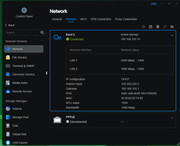
These are my network settings as of 11/03/25:

Image
Note that in T2, above, the bond has taken the LAN 2 MAC and speed (1Gbe) instead of the LAN 1 BUT with the LAN1 IP (and expressed in Service Order (if that means anything.)

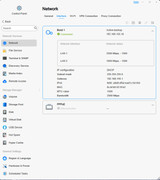
Image
In this case T3 is using the LAN1 MAC and speed as intended.

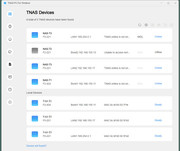
This is network state this morning after T2 and T3 both restarted:

Image
Note that T3 LAN1 has gone walkabout; Bonds have switched ports so other devices loose connections (or cannot reconnect). T2 appears to be offline but has actually moved to LAN2 IP and is accessible.

All devices are currently set to use default DHCP mode with DHCP reservations in the router
NAS-T1 (no image) has 2x2.5Gbe, reports 5Gbe bandwith but took LAN2 port as BOND in Balance-alb mode
NAS-T2 was updated to 6.0.650 yesterday but nothing has changed.

If the "consistent inconsistency" of the LAG setup can be explained, I would be very grateful :(
F5-221 TOS6.0.794 - 4x4TB Traid (TNAS UPS Server :?: Broken :?: )
F2-424 TOS7.0.0392 {BETA} - 2x500GB nvme (P3) Traid, 2x6T HDD Traid
F2-221 TOS7.0.0364 - 1x3TB Ext4, 1x4TB Ext4 [Test system]
Gremlin is in 'Listening' mode
User avatar
TMlinda
TM Support
Posts: 276
Joined: 13 Jun 2022, 16:57

Re: Is something rotten in the state of "Update"?

Post by TMlinda »

Gremlin wrote: 12 Mar 2025, 19:03
We will verify this issue in our lab.
To contact our team, please send email to following addresses, remember to replace (at) with @
Technical team: support(at)terra-master.com (for technical support)
Service team: service(at)terra-master.com (for purchasing, return, replacement, RMA service)
User avatar
Gremlin
Gold Member
Posts: 1392
Joined: 02 Dec 2022, 22:31
Great Britain

Re: Is something rotten in the state of "Update"?

Post by Gremlin »

TMlinda wrote: 12 Mar 2025, 19:37
Thank you.
F5-221 TOS6.0.794 - 4x4TB Traid (TNAS UPS Server :?: Broken :?: )
F2-424 TOS7.0.0392 {BETA} - 2x500GB nvme (P3) Traid, 2x6T HDD Traid
F2-221 TOS7.0.0364 - 1x3TB Ext4, 1x4TB Ext4 [Test system]
Gremlin is in 'Listening' mode
User avatar
Gremlin
Gold Member
Posts: 1392
Joined: 02 Dec 2022, 22:31
Great Britain

Re: Is something rotten in the state of "Update"?

Post by Gremlin »

TMlinda wrote: 12 Mar 2025, 19:37
Just as a note fyi: I noticed that during the startup this appears:

Code: Select all

Netscript ifup eth1
Netscript ifup eth0
In that order. So, presume this was designed to start LAN2 before LAN1 so that may be an explanation for the LAG/Bond behaviour.
F5-221 TOS6.0.794 - 4x4TB Traid (TNAS UPS Server :?: Broken :?: )
F2-424 TOS7.0.0392 {BETA} - 2x500GB nvme (P3) Traid, 2x6T HDD Traid
F2-221 TOS7.0.0364 - 1x3TB Ext4, 1x4TB Ext4 [Test system]
Gremlin is in 'Listening' mode
Post Reply

Return to “System Update”