

Hello,
I have tried on to different NAS initalizeon on TOS6 latest build which failed by creating superuser.
I create username and password, after that it come to setup email and verification code.
pressing "send code" says that can not send email and everything stop. when go back it says that this username already exist.
trying to login is says wrong username or password.
than I must reset to factory.
Initačize TOS6 fail

Re: Initačize TOS6 fail
You can try reinstalling the TOS6 system to see if it resolves the issue.
To contact our team, please send email to following addresses, remember to replace (at) with @:
Technical team: support(at)terra-master.com(for technical support)
Service team: service(at)terra-master.com(for purchasing, return, replacement, RMA service)
Technical team: support(at)terra-master.com(for technical support)
Service team: service(at)terra-master.com(for purchasing, return, replacement, RMA service)
-
000joshua000

- Posts: 9
- Joined: 21 Sep 2024, 13:49

Re: Initačize TOS6 fail
I have exactly the same problem. I have reinstalled several times, used various names or passwords, the email never leaves, and I can't log in, it tells me that the password is wrong. In addition, the NAS is never visible in TNAS PC.
>> F8 SSD Plus - 6.5.500-00120
>> F8 SSD Plus - 6.5.500-00120


Re: Initačize TOS6 fail
You could try skipping the 'verification email' section. Click on the 'skip' button (you may have to do that twice, I have found) then you don't have to worry about the verification code.
I do agree that, when I last did a clean install, I tried the verification code and it "failed to send" email(?) request. I'm thinking this might be aligned with the problems experienced with the default 'local' email notification issues some (many?) have experienced.
I do agree that, when I last did a clean install, I tried the verification code and it "failed to send" email(?) request. I'm thinking this might be aligned with the problems experienced with the default 'local' email notification issues some (many?) have experienced.
F5-221 TOS7.0.1201 - 4x4TB (Ironwolf) Traid
F2-424 TOS7.0.1278 - 2x500GB nvme (P3) Traid, 2x6TB HDD (HGST) Traid
F2-221 TOS7.0.1278 - 1x3TB Ext4, 1x4TB Btrfs
F2-425+ TOS7.0.1278 - 2x500GB nvme (P3) Traid, 2x6TB HDD (EXOS) Traid
F2-424 TOS7.0.1278 - 2x500GB nvme (P3) Traid, 2x6TB HDD (HGST) Traid
F2-221 TOS7.0.1278 - 1x3TB Ext4, 1x4TB Btrfs
F2-425+ TOS7.0.1278 - 2x500GB nvme (P3) Traid, 2x6TB HDD (EXOS) Traid
-
000joshua000
- Posts: 9
- Joined: 21 Sep 2024, 13:49
Re: Initačize TOS6 fail
I've already tried. It goes back to the "fake root" user creation page, I try again, and it tells me that the name is reserved by the system. If I try again, same result. If I open another window next to it by going to my IP, it switches to xxx.xxx.xxx.xxx:8181/tos/#/, and when I scan the network, I see my IP with the new name that I gave to my F8, so the procedure was done correctly (well, almost), but I STILL get this message when I try to log in:

I specify that I am absolutely sure of the credentials, I made screenshots at each step!!
I specify that I am absolutely sure of the credentials, I made screenshots at each step!!
Re: Initačize TOS6 fail
Sorry, I just did a fresh install (using download option) on a clean drive and did not see the behaviour that you are describing. (and, for the benefit of @TMsupport got v6.0.500 on my F2-424)000joshua000 wrote: ↑27 Sep 2024, 20:32 I've already tried. It goes back to the "fake root" user creation page,
After clicking on 'skip verification' and then following the normal process ("Next") the installation continues (normally).
Bien sûr, l'appareil vous parlera dans votre langue maternelle, mais j'espère que vous comprendrez les invites. (Google translate)
F5-221 TOS7.0.1201 - 4x4TB (Ironwolf) Traid
F2-424 TOS7.0.1278 - 2x500GB nvme (P3) Traid, 2x6TB HDD (HGST) Traid
F2-221 TOS7.0.1278 - 1x3TB Ext4, 1x4TB Btrfs
F2-425+ TOS7.0.1278 - 2x500GB nvme (P3) Traid, 2x6TB HDD (EXOS) Traid
F2-424 TOS7.0.1278 - 2x500GB nvme (P3) Traid, 2x6TB HDD (HGST) Traid
F2-221 TOS7.0.1278 - 1x3TB Ext4, 1x4TB Btrfs
F2-425+ TOS7.0.1278 - 2x500GB nvme (P3) Traid, 2x6TB HDD (EXOS) Traid


Re: Initačize TOS6 fail
It seems the system is only half finished install. please follow the step to reinstall the system.000joshua000 wrote: ↑27 Sep 2024, 12:33 I have exactly the same problem. I have reinstalled several times, used various names or passwords, the email never leaves, and I can't log in, it tells me that the password is wrong. In addition, the NAS is never visible in TNAS PC.
>> F8 SSD Plus - 6.5.500-00120
1. shut down your device;
2. power on your device and at the same time, keep press the RESET button for 20 seconds to totally wipe the previouse system;
3. search the device with the TNAC PC client again;
4. follow the guide to complete the installation;
To contact our team, please send email to following addresses, remember to replace (at) with @:
Support team: support(at)terra-master.com (for technical support only)
Service team: service(at)terra-master.com (for purchasing, return, replacement, RMA service)
Support team: support(at)terra-master.com (for technical support only)
Service team: service(at)terra-master.com (for purchasing, return, replacement, RMA service)
-
000joshua000
- Posts: 9
- Joined: 21 Sep 2024, 13:49
Re: Initačize TOS6 fail
Nope...
Same result...
It starts in "raid recovery" and returns to the same state. It does not reinstall.
The day before yesterday, I tried to delete the partitions of my 2 SSDs to force the reinstallation, it reinstalled, but to arrive at the same blocking result.
In any case, I never saw the F8 in TNAS PC.
However, I set the DHCP to the MAC address of the F8, and it always retrieves the same IP (192.168.88.23) on the same range as my PC.
I thought for a moment that the SSDs might have errors, but I did a test in the F8 bios on the SSDs and they are both in "PASS" in the complete verification. Of course, when I deleted the partitions by plugging the SSDs into my PC I also did a test and they are both good (the SSDs are new, they are Samsung SSD 990 Pro 4TB).
Same result...
It starts in "raid recovery" and returns to the same state. It does not reinstall.
The day before yesterday, I tried to delete the partitions of my 2 SSDs to force the reinstallation, it reinstalled, but to arrive at the same blocking result.
In any case, I never saw the F8 in TNAS PC.
However, I set the DHCP to the MAC address of the F8, and it always retrieves the same IP (192.168.88.23) on the same range as my PC.
I thought for a moment that the SSDs might have errors, but I did a test in the F8 bios on the SSDs and they are both in "PASS" in the complete verification. Of course, when I deleted the partitions by plugging the SSDs into my PC I also did a test and they are both good (the SSDs are new, they are Samsung SSD 990 Pro 4TB).
-
000joshua000
- Posts: 9
- Joined: 21 Sep 2024, 13:49
Re: Initačize TOS6 fail
I also thought that my antivirus was blocking the discovery responses sent by TNAS PC in broadcast, but no, even without a firewall and antivirus the F8 is never seen by TNAS PC.
I also tried to connect the F8 in TNAS PC manually using "root" as user and the password displayed by the broadcast request, but no, it refuses. I also tried to use the user and password that I had defined but it also refuses.
I also tried to connect the F8 in TNAS PC manually using "root" as user and the password displayed by the broadcast request, but no, it refuses. I also tried to use the user and password that I had defined but it also refuses.
-
000joshua000
- Posts: 9
- Joined: 21 Sep 2024, 13:49
Re: Initačize TOS6 fail
Bios version: MADN0301.V01
actual state of boot priority:
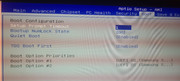
actual state of boot priority: