On 6.0.229 and been trying to update to 6.0.420 but it continually fails, it either says failed or does nothing, downloaded it multiple times and have tried from the laptop and from the onboard drive with the same result.
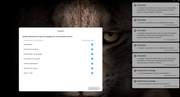
I had a power outage but I did not receive any notification email.
my test email nevertheless works correctly.
All checkmarks are activated in notifications.
I have been seeing some issues with ups services failing to start on boot (6.1.436) - have to do a bit more checking Something about checking 'systemctr status ......' although my network ups device is "seen"
Re UPS configuration and implementation, here is some of the info:
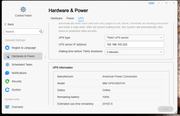
UPS is configured:
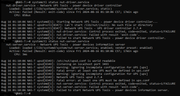
Output of systtemctr status commands:
The latter implies ups is not configured or the config files are not correctly reflecting the configuration. If this means anything to anyone, perhaps they will inform.
Tricky wrote: ↑15 Aug 2024, 21:40
On 6.0.229 and been trying to update to 6.0.420 but it continually fails, it either says failed or does nothing, downloaded it multiple times and have tried from the laptop and from the onboard drive with the same result.
Hello, could you please confirm if your TNAS model meets the update requirements? If it does meet the requirements, please contact the official website's customer service to schedule a technical engineer to assist you remotely.
To contact our team, please send email to following addresses, remember to replace (at) with @:
Support team: support(at)terra-master.com (for technical support only)
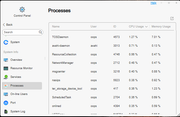
Here you can monitor and understand the CPU usage in real time in more detail, and find out the processes with high utilization by reverse order.
Control Panel - System Info - Processes
To contact our team, please send email to following addresses, remember to replace (at) with @:
Technical team: support(at)terra-master.com (for technical support)
Service team: service(at)terra-master.com (for purchasing, return, replacement, RMA service)
Use this menu to set desktop message notifications only. To configure email notifications, go to 'Control Panel > General Settings > Notifications'.
To contact our team, please send email to following addresses, remember to replace (at) with @:
Support team: support(at)terra-master.com (for technical support only)
Service team: service(at)terra-master.com (for purchasing, return, replacement, RMA service)
fcs001fcs wrote: ↑09 Aug 2024, 00:21
I am on TOS 6.0.436 Beta and noticed that in Docker Manager the CPU percent indication is zero for all my 10 containers listed. They should always read a slight % usage and, if the container is working hard, a much higher percentage.
It did work on prior TOS versions, and I think it worked on TOS 6.0.420, but I am not 100% sure on that.
I uninstalled Docker Engine and Docker Manager and the re-installed both apps after a NAS reboot, but I have the same problem.
Question to TM: Is this the issue that TM has stated before about other Apps that the Docker Manager App needs to be updated to work with the new TOS 4.0.436?
I noticed that an update for Docker Manager was available and hoped that the CPU % issue would be fixed.
I upgraded Docker Manager from 2.0.16 to 2.0.17 via the GUI and rebooted the NAS twice but, unfortunately, the problem still persists.
Since Terramaster mail support cannot help me, what happens if i do a factory reset with TOS 6 436 in? What version of TOS will I get?
Will I retain my data?