

How reset password.
I update system. It request username and password. System cant send email. I push skip this. It request update page. I refresh page in browser. And i see login screen. But password not work.
TOS 6.0.420 Beta Is Available for Testing

Re: TOS 6.0.420 Beta Is Available for Testing
I had the same thing, but rebooting the NAS helped me, after that the password was accepted.


Re: TOS 6.0.420 Beta Is Available for Testing
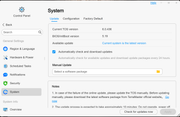
The .436 update showed up in my "Control Panel-System-Update" and I updated via the GUI.
F4-423 - 2 x12TB & 1x14TB & 1x16TB - BTRFS TRAID
Re: TOS 6.0.420 Beta Is Available for Testing
I did some moving of Shares to Volume 2 then wiped the disks for Volume 1 and then moved back the Shares to Volume 1 after all was rebuilt and resynchronized.
The issue I have now is that the "homes" folder for all the users are now on Volume 2 and I want them back to Volume 1.
How to I move the "homes" folder from Volume 2 to Volume 1?
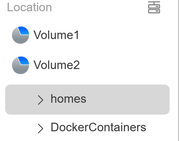
The issue I have now is that the "homes" folder for all the users are now on Volume 2 and I want them back to Volume 1.
How to I move the "homes" folder from Volume 2 to Volume 1?
F4-423 - 2 x12TB & 1x14TB & 1x16TB - BTRFS TRAID
-
terraNASty

- Posts: 0
- Joined: 07 Aug 2024, 07:34

Re: TOS 6.0.420 Beta Is Available for Testing
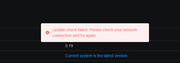
Sadly, after having to use an HDMI cable and a keyboard to go in with nmcli and remove the network bond, I now only get the attached message when checking for an update. All network functionality is working fine minus checking for update.
Re: TOS 6.0.420 Beta Is Available for Testing
Seems to be a question for TM Helpdesk. Sorry I can't help, as mine is working fine with the Bond active with .436.terraNASty wrote: ↑08 Aug 2024, 00:48Sadly, after having to use an HDMI cable and a keyboard to go in with nmcli and remove the network bond, I now only get the attached message when checking for an update. All network functionality is working fine minus checking for update.
F4-423 - 2 x12TB & 1x14TB & 1x16TB - BTRFS TRAID
Re: TOS 6.0.420 Beta Is Available for Testing
I updated to TOS 6.0.436 yesterday and since then I have some problems with SFTP displaying the Shares.
When I use FileZilla with the same setup I had in the TOS 6.0.420 prior version, it does not display all the shares as it should. I am using the "SuperUser" login, so all shares should be visible as they were on TOS 6.0.420.
It seems that older Shares created with TOS 6.0.420 are displayed but new Shares created today under TOS 6.0.436 are not displayed.
I have checked and re-check all Users, Groups, and Applications (SFTP) permissions and all are OK.
I have 4 Shares, 3 were created under .420 and 1 under .436. When in FileZilla, logged in as a SuperUser, the 3 older ones are displayed but the .436 created Share is not displayed.
When in FileZilla, logged in as a SuperUser, I manually enter the Share name that is missing (in "Remote site:" input box), it correctly displays the sub-folder hierarchy and files of that non-displayed Share.
Question for TM: Is this a bug in TOS 6.0.436 for SFTP and is there a workaround I could use to fix the issue until the next version?
When I use FileZilla with the same setup I had in the TOS 6.0.420 prior version, it does not display all the shares as it should. I am using the "SuperUser" login, so all shares should be visible as they were on TOS 6.0.420.
It seems that older Shares created with TOS 6.0.420 are displayed but new Shares created today under TOS 6.0.436 are not displayed.
I have checked and re-check all Users, Groups, and Applications (SFTP) permissions and all are OK.
I have 4 Shares, 3 were created under .420 and 1 under .436. When in FileZilla, logged in as a SuperUser, the 3 older ones are displayed but the .436 created Share is not displayed.
When in FileZilla, logged in as a SuperUser, I manually enter the Share name that is missing (in "Remote site:" input box), it correctly displays the sub-folder hierarchy and files of that non-displayed Share.
Question for TM: Is this a bug in TOS 6.0.436 for SFTP and is there a workaround I could use to fix the issue until the next version?
F4-423 - 2 x12TB & 1x14TB & 1x16TB - BTRFS TRAID
Re: TOS 6.0.420 Beta Is Available for Testing
Question to TM: How can I fix this problem?fcs001fcs wrote: ↑08 Aug 2024, 00:43 I did some moving of Shares to Volume 2 then wiped the disks for Volume 1 and then moved back the Shares to Volume 1 after all was rebuilt and resynchronized.
The issue I have now is that the "homes" folder for all the users are now on Volume 2 and I want them back to Volume 1.
How to I move the "homes" folder from Volume 2 to Volume 1?
F4-423 - 2 x12TB & 1x14TB & 1x16TB - BTRFS TRAID
-
thierrys73

- Posts: 36
- Joined: 23 Jul 2022, 19:57

Re: TOS 6.0.420 Beta Is Available for Testing
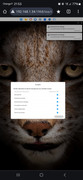
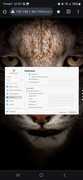
Hello is it what you want ?
Tnas T6-423
Tnas F2-221
Tnas F2-221