TOS 6.0.535 (X86) is Released for Update


Re: TOS 6.0.535 (X86) is Released for Update
'Replace permissions of all subdirectories with permissions of the folder' ius not a permanent setting, it is transitory. It applies at the time to changes being made to existing files and will (hopefully?) be remembered as part of the acl settings for future entries.
F5-221 TOS7.0.1278 - 4x4TB (Ironwolf) Traid
F2-424 TOS7.0.1278 - 2x500GB nvme (P3) Traid, 2x6TB HDD (HGST) Traid
F2-221 TOS7.0.1278 - 1x3TB Ext4, 1x4TB Btrfs
F2-425+ TOS7.0.1278 - 2x500GB nvme (P3) Traid, 2x6TB HDD (EXOS) Traid
F2-424 TOS7.0.1278 - 2x500GB nvme (P3) Traid, 2x6TB HDD (HGST) Traid
F2-221 TOS7.0.1278 - 1x3TB Ext4, 1x4TB Btrfs
F2-425+ TOS7.0.1278 - 2x500GB nvme (P3) Traid, 2x6TB HDD (EXOS) Traid


Re: TOS 6.0.535 (X86) is Released for Update
Thanks for the info. I didn't know that. However, I still don't have access to the media folders. I even tried to restore to factory defaults, without success.'Replace permissions of all subdirectories with permissions of the folder' ius not a permanent setting, it is transitory. It applies at the time to changes being made to existing files and will (hopefully?) be remembered as part of the acl settings for future entries.
F4-423

Re: TOS 6.0.535 (X86) is Released for Update
My NAS is currently checking the Raid-5 (6 x 4Tb Ironwolf, it takes around 10h if it doesn't hang again in the process) and then I will launch a btrfs scrub. I had a tough time just deleting the LVM cache - and it does not make sense since it was balance mode, and not write through - since it was trying to empty the cache before deleting it, with the raid scrubbing and the reboots in the middle.
It is offering me again a 1.4Tb cache, I will put the screenshots (again , 16Gb of Ram installed)
Half of the hangs could be the lack of memory, and the accumulation of IO with the lvm cache dropping, the raid checking... The dump points to Samba and ACLs.
Once I manage to stabilize it, I had still to run a btrfs scrub and saving the most important data to an external usb disk just in case. It will take time...
IT Infrastructure/SRE
XT9 Mesh, HomeLab, Syn DS920+, Terramaster T6-423,F4-424Pro, MacBook, HyperOptic 1Gb ipv6.
XT9 Mesh, HomeLab, Syn DS920+, Terramaster T6-423,F4-424Pro, MacBook, HyperOptic 1Gb ipv6.


Re: TOS 6.0.535 (X86) is Released for Update
You are correct. I have been able to get TOS 5.x to work on it, and it will have to stay on it. I suspect the issue with TOS 6 is (guessing here) that it must require an EFI type of BIOS, and the older F4-220 used the older legacy BIOS type.Gremlin wrote: ↑30 Nov 2024, 02:38Not much to go on there.
But, I think you are out of luck at the moment. The latest version for an F4-210 is Tos4.2.44 available here:
https://support.terra-master.com/downlo ... uct=F4-210
although, I suspect you already know that.
Glad I purchased the F4-424 Pro (but not realized I really needed an 8-drive solution). Life moves on I guess.

Re: TOS 6.0.535 (X86) is Released for Update
I am thinking that perhaps I have a bad installation after the upgrade.
Just starting the NAS now (hanged this night copying to usb external drive...) I saw the new update notice and I upgraded, and I will check but I have strange things that consider the upgrade was failed
- On the shares, the smb was empty. I put '*' as it was before. I ran testparm and it looks good (sorry I should have run testparm BEFORE)
- On the groups, the default user (Admin and guest) does not have the text pulled in
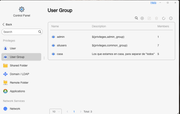
- When I try to apply permissions to user or group, it shows a blank window
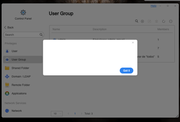
- Creating a bond fails
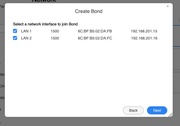
- Diks information is empty...
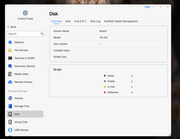
I am not going to spend more time and check how to reinstall the OS without loosing the data (the copy to the external drive never ends)
Just starting the NAS now (hanged this night copying to usb external drive...) I saw the new update notice and I upgraded, and I will check but I have strange things that consider the upgrade was failed
- On the shares, the smb was empty. I put '*' as it was before. I ran testparm and it looks good (sorry I should have run testparm BEFORE)
- On the groups, the default user (Admin and guest) does not have the text pulled in
- When I try to apply permissions to user or group, it shows a blank window
- Creating a bond fails
- Diks information is empty...
I am not going to spend more time and check how to reinstall the OS without loosing the data (the copy to the external drive never ends)
IT Infrastructure/SRE
XT9 Mesh, HomeLab, Syn DS920+, Terramaster T6-423,F4-424Pro, MacBook, HyperOptic 1Gb ipv6.
XT9 Mesh, HomeLab, Syn DS920+, Terramaster T6-423,F4-424Pro, MacBook, HyperOptic 1Gb ipv6.
Re: TOS 6.0.535 (X86) is Released for Update
Showing 1.5Tb of hyper-cache with 16Gb of Ram. There is no way to reduce, so I am going to order 512Gb ones or 1Tb - not sure yet. I have at this point in time vol1 with just 8Tb, but I have 6x4Tb disks with 18.14Tb net space.
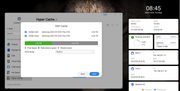
Just reinstalled the OS, the two "problems" above regarding groups, bonds, disks... are gone.
Happy that it could be the problem. Too soon to be sure though.
Just reinstalled the OS, the two "problems" above regarding groups, bonds, disks... are gone.
Happy that it could be the problem. Too soon to be sure though.
IT Infrastructure/SRE
XT9 Mesh, HomeLab, Syn DS920+, Terramaster T6-423,F4-424Pro, MacBook, HyperOptic 1Gb ipv6.
XT9 Mesh, HomeLab, Syn DS920+, Terramaster T6-423,F4-424Pro, MacBook, HyperOptic 1Gb ipv6.
Re: TOS 6.0.535 (X86) is Released for Update
LoL
After some reboots, mimimal changes to test stability
- Disks are not shown anymore
- Samba shares are not working properly. Only home and public are shown. The smb.conf has not "valid users" or "write users"
- Just connecting my external usb disk the system hang. Now it shows (partial dump since it was too fast on the screen) the cyptsetup, crypto_simd and aesni_intel
Is there a way to come back to TOS 6.0.229?
Note that I reset the system using "Restore to factory default"
Thanks...
After some reboots, mimimal changes to test stability
- Disks are not shown anymore
- Samba shares are not working properly. Only home and public are shown. The smb.conf has not "valid users" or "write users"
- Just connecting my external usb disk the system hang. Now it shows (partial dump since it was too fast on the screen) the cyptsetup, crypto_simd and aesni_intel
Is there a way to come back to TOS 6.0.229?
Note that I reset the system using "Restore to factory default"
Thanks...
IT Infrastructure/SRE
XT9 Mesh, HomeLab, Syn DS920+, Terramaster T6-423,F4-424Pro, MacBook, HyperOptic 1Gb ipv6.
XT9 Mesh, HomeLab, Syn DS920+, Terramaster T6-423,F4-424Pro, MacBook, HyperOptic 1Gb ipv6.
Re: TOS 6.0.535 (X86) is Released for Update
Ok, makes sense
Reboot with the usb disk connected: ok.
Accessing the share, the usb disk is shared by default -> hang again
My external usb disk is a Seagate One Touch 4Tb, is not a crappy/unknown one on a crappy/unknown enclosure.
Reboot with the usb disk connected: ok.
Accessing the share, the usb disk is shared by default -> hang again
My external usb disk is a Seagate One Touch 4Tb, is not a crappy/unknown one on a crappy/unknown enclosure.
IT Infrastructure/SRE
XT9 Mesh, HomeLab, Syn DS920+, Terramaster T6-423,F4-424Pro, MacBook, HyperOptic 1Gb ipv6.
XT9 Mesh, HomeLab, Syn DS920+, Terramaster T6-423,F4-424Pro, MacBook, HyperOptic 1Gb ipv6.


Re: TOS 6.0.535 (X86) is Released for Update
You can go to the TOS desktop and enable Debug Mode in the Support and Help section. After the issue occurs, please send the logs to us.
To contact our team, please send email to following addresses, remember to replace (at) with @
Technical team: support(at)terra-master.com (for technical support)
Service team: service(at)terra-master.com (for purchasing, return, replacement)
Technical team: support(at)terra-master.com (for technical support)
Service team: service(at)terra-master.com (for purchasing, return, replacement)
Re: TOS 6.0.535 (X86) is Released for Update
Update:However, I still don't have access to the media folders. I even tried to restore to factory defaults, without success.
I have and had (!) full access to the media folders on Volume 2, though! Emby Server App can't find media folders. So I installed PLEX for testing. And I have full access to media folders on my NAS when I create a new library on PLEX Server. Seems Emby is buggy.
F4-423