
Why does the IP address of my TNAS appear as 169.254.x.x and is inaccessible?

Network connection, configuration, remote access
Post Reply
User avatar
TMSupport
TM Support
Posts: 2308
Joined: 13 Dec 2019, 15:15

Why does the IP address of my TNAS appear as 169.254.x.x and is inaccessible?

Post by TMSupport »

Applicable Models: Full Series TNAS

Phenomenon
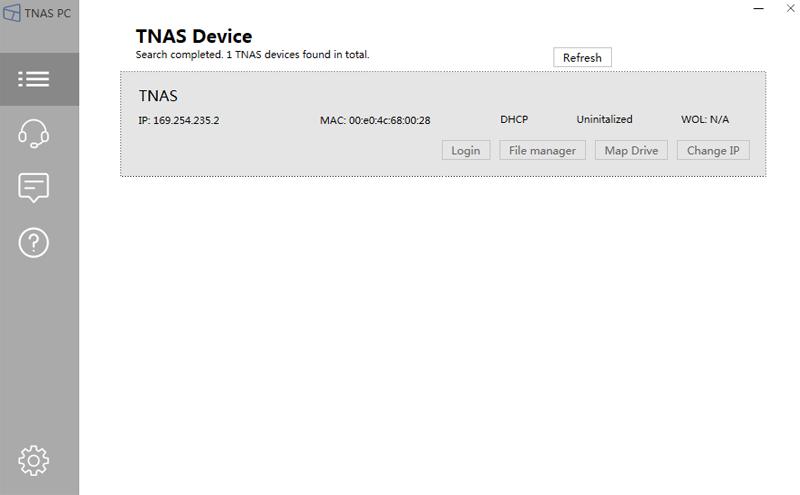
The TNAS PC client can search for TNAS, but the displayed IP address is 169.254.x.x, and it is inaccessible. This situation usually occurs when there is no DHCP server enabled in the network environment, resulting in the IP address obtained by the TNAS device being 169.254.x.x.

Solutions:
1. Enable the DHCP server of the router so that the TNAS device can obtain the correct IP address. Use TNAS PC to research for TNAS IP, and click "Login" or "Modify IP" to set the correct IP for TNAS.
When modifying the IP, here are the default password for various series models:
x86 models: admin
arm 210 models: Admin123
arm 212models: admin

2. Most routers have the DHCP server function. If your local area network environment cannot use or enable the DHCP server, you need to manually set the IP address for your TNAS through your computer. Please connect TNAS directly to your computer through a network cable and follow the steps below (taking the Windows operating system as an example):

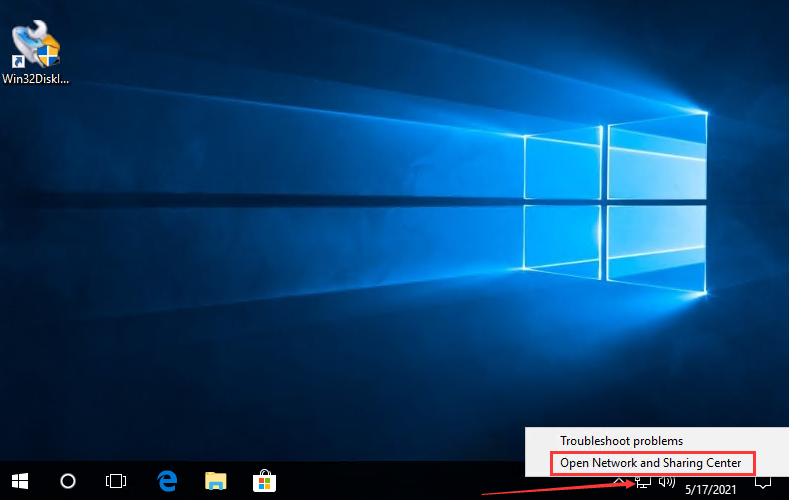
(1) Right-click on the network icon in the lower right corner of the computer desktop, and select "Open Network and Sharing Center".
Image

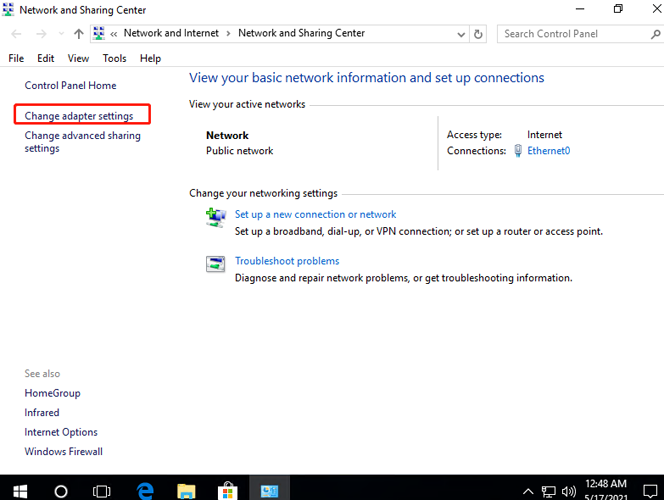
(2) Select "Change Adapter Settings".
Image

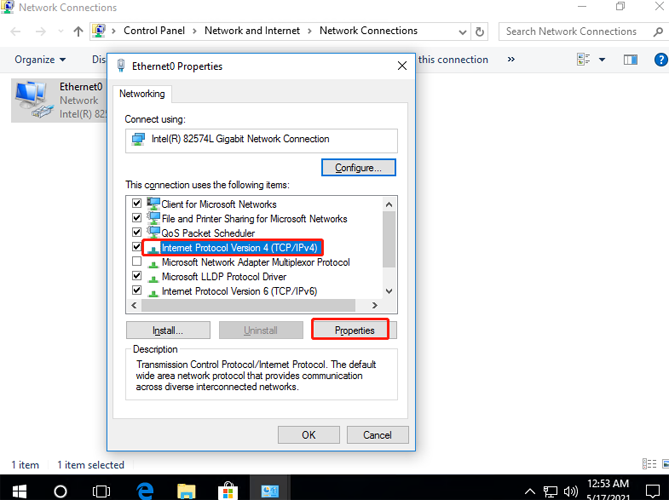
(3) Right-click on the network card and select "Properties", then double-click "Internet Protocol Version 4".
Image

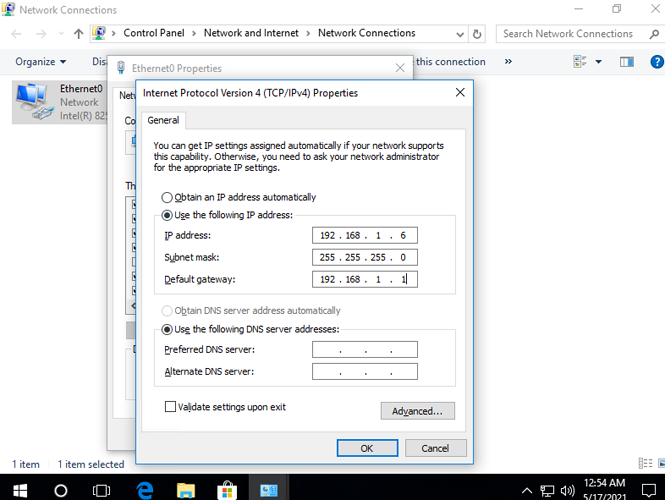
(4) You need to confirm that your computer's network port has been configured with a valid IP address. The IP address should not be 169.254.x.x or left blank! Otherwise, please select "Use the following IP address" and set an IP for your computer's network port, such as 192.168.1.x.
Image

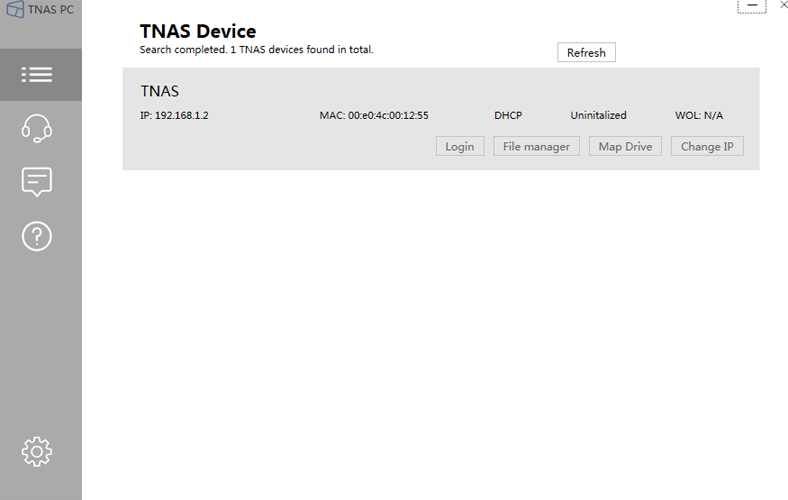
(5) Use TNAS PC to research for TNAS, and click "Modify IP" to modify the IP address of TNAS to the same segment as the computer, for example, 192.168.1.x. When modifying the IP, the default password for x86 models is admin, and the default password for arm models is Admin123.

Note: The IP address modified using TNAS PC is a temporary IP address. After successfully configuring the system for TNAS, you need to manually configure a fixed IP address.
Image

(6) After successfully modifying the IP, click "Login" and the page will jump to the system initialization page. After completing the system installation, enter "Control Panel > Network Services", select the network port and click "Edit", change "Obtain network settings automatically" to "Use the following manual settings", set the IP address to 192.168.1.x, and then click "Apply".

Now, your TNAS networking configuration is complete.
Image
To contact our team, please send email to following addresses, remember to replace (at) with @
Technical team: support(at)terra-master.com (for technical support)
Service team: service(at)terra-master.com (for purchasing, return, replacement, RMA service)
User avatar
bidmead
Posts: 117
Joined: 18 Jan 2021, 02:25
Great Britain

Re: Why does the IP address of my TNAS appear as 169.254.x.x and is inaccessible?

Post by bidmead »

My F4-223 running TOS 5.1 has a problem connecting to the LAN. After every power down, whether scheduled, manual or following an OS upgrade, the subsequent boot reliably fails to obtain an IP address. The four drive lights are lit and unblinking and the LAN light remains off. The NAS is inaccessible over the LAN, whether I've set the IP address statically or using DHCP.

The status of the front panel lights, together with the fact that a short press on the power button takes the NAS down instantly, seems to indicate that the machine has booted into a very low target level.

The workaround is to boot the machine manually for a second time, which reliably puts it fully functioning back onto the LAN.

My default first diagnostic step would be to ssh in and diff /var/log/dmesg and /var/log/dmesg.0. Sadly, although the dmesg utility works as expected, I can't find the location of any of its historic logs. Obviously I'm interested in ../dmesg.0, which I'm hoping will document the low target boot that fails to join the LAN. TOS 5 splits its logs between /var/log and (a couple of very old entries in) /var/logs but I can't find any trace of dmesg in either of them.

There is a dmesg.txt file in the zip file produced from WebUI Technical Support/Report Issues (I've used this feature to report this problem) but this log of course only documents the latest healthy boot. It's mainly dmesg.0 I'm looking for.

Any help with this would be very welcome. It might be particularly useful if I could track down dmesg.0.

--
Chris
User avatar
Gremlin
Gold Member
Posts: 1627
Joined: 02 Dec 2022, 22:31
Great Britain

Re: Why does the IP address of my TNAS appear as 169.254.x.x and is inaccessible?

Post by Gremlin »

You could do a

Code: Select all

find / -name *dmesg* - print
But to paraphrase U2 = you still won't find what you are looking for. :)
F5-221 TOS7.0.0777 - 4x4TB (Ironwolf) Traid
F2-424 TOS7.0.0777 - 2x500GB nvme (P3) Traid, 2x6TB HDD (HGST) Traid
F2-221 TOS7.0.0777 - 1x3TB Ext4, 1x4TB Btrfs
F2-425+ TOS7.0.0777 - 2x500GB nvme (P3) Traid, 2x6TB HDD (EXOS) Traid
User avatar
bidmead
Posts: 117
Joined: 18 Jan 2021, 02:25
Great Britain

Re: Why does the IP address of my TNAS appear as 169.254.x.x and is inaccessible?

Post by bidmead »

The code you cite, @Gremlin, won't find dmesg.0 (or indeed anything -- it's malformed). I had a go with find / -name "*dmesg.0*" before coming on here, but, as you suggest, the dmesg boot logs are nowhere to be found.

I'm hoping you're poised to follow up with a positive suggestion. :-)

--
Chris
User avatar
Gremlin
Gold Member
Posts: 1627
Joined: 02 Dec 2022, 22:31
Great Britain

Re: Why does the IP address of my TNAS appear as 169.254.x.x and is inaccessible?

Post by Gremlin »

Ok, there's a typo. But, if you knew about 'find' you really didn't have to call it 'malformed'. And, correctly typed (posts cannot normally be edited) it does work.

Code: Select all

[name@NAS /]# find / -name *dmesg* -print
/proc/sys/kernel/dmesg_restrict
/bin/dmesg
/usr/share/bash-completion/completions/dmesg
[name@NAS /]#
Don't expect TM version to act like a 'standard' linux distribution. Too much has been modified.

Which version of TOS5.1 are you running and did you upgrade from TOS4? (TMSupport will want to know.)
F5-221 TOS7.0.0777 - 4x4TB (Ironwolf) Traid
F2-424 TOS7.0.0777 - 2x500GB nvme (P3) Traid, 2x6TB HDD (HGST) Traid
F2-221 TOS7.0.0777 - 1x3TB Ext4, 1x4TB Btrfs
F2-425+ TOS7.0.0777 - 2x500GB nvme (P3) Traid, 2x6TB HDD (EXOS) Traid
User avatar
TMzethar
TM Support
Posts: 2819
Joined: 27 Oct 2020, 16:43

Re: Why does the IP address of my TNAS appear as 169.254.x.x and is inaccessible?

Post by TMzethar »

Currently TOS does not have the ability to record dmesg information from the last run.
We will discuss adding this useful feature.
You can accomplish this by running a background process with the following command. After an exception and reboot, you can get this file.

Code: Select all

dmesg -w > /Volume1/public/dmesgw_dd_mm_yy.log
To contact our team, please send email to following addresses, remember to replace (at) with @:
Technical team: support(at)terra-master.com (for technical support)
Service team: service(at)terra-master.com (for purchasing, return, replacement, RMA service)
User avatar
bidmead
Posts: 117
Joined: 18 Jan 2021, 02:25
Great Britain

Re: Why does the IP address of my TNAS appear as 169.254.x.x and is inaccessible?

Post by bidmead »

Many thanks, @TMzethar. Useful idea, I'll investigate that. The fact of dmesg.0 and the historic gzips missing from TOS 5 is a puzzle. These files are tiny -- about 25KB each. Why dispense with these useful diagnostic tools? Rather than just sshing into the NAS to mooch through /var/log I have to drag the F4-223 off the shelf and hook up a keyboard and monitor to it.

Which I've now done.

Thanks too, @Gremlin. And you're right, there are many important modifications to TOS 5 (I'm currently running version 5.1.123).

There's a curious Terramaster convention I don't understand that announces new official versions in the forum but only issues upgrade alerts via Control Panel/System/Update many weeks later. I shall be upgrading to the Forum-announced TOS 5.1.131 but I think it would make sense to get to the bottom of this current problem first.

If the OS update fixes the problem I'll never know what caused it. And if it doesn't fix the problem I'll be no better off.

My current conjecture is that the first boot that fails to acquire an IP address is encountering a system error, resulting in dropping the target level to rescue.target. This would explain the lack of an IP address and also the absence of drive activity indicated by the drive lights. I'm not clear, though, why the next, manual, boot achieves multi-user.target. Has the rescue.target done a temporary fix? Which the multi-user.target subsequently undoes?

Suggestions would be very much appreciated.

--
Chris
Post Reply

Return to “Networking”