[Help] WD Elements external USB Drive  [SOLVED]

RAID, Volume, storage pool, hard drive, USB, SSD cache and iSCSI LUN
Post Reply
User avatar
rfbjr
Silver Member
Posts: 400
Joined: 16 May 2024, 23:43
United States of America

[Help] WD Elements external USB Drive

Post by rfbjr »

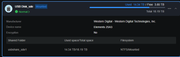
Has anyone had an issue with attaching a WD Elements external USB Drive (20TB) to a TerraMaster NAS?
I mean it works fine, but it seems to power off if the drive is idle after a while. I have to push the power button on the back of it to "wake" it up.
All the NAS hibernation settings are off.
It's attached to the F4-424 Pro
It's not part of a storage pool, just an USB External drive.
Image
F6-424 & F4-425 Plus at 7.0.0777
F4-424 Pro also at 7.0.0777
D4-320
User avatar
Phil
TM Support
Posts: 91
Joined: 23 Feb 2026, 09:38
China

Re: [Help] WD Elements external USB Drive

Post by Phil »

The issue you're experiencing may be due to incompatibility between the WD Elements 20TB portable hard drive's built-in firmware and the TOS system. Please generate and download a log report via TOS > Technical Support > Problem Report, and then send it to our technical support email address ([email protected]). We will analyze it.

Secondly, please monitor the temperature of your NAS or hard drive. Overheating may trigger the TNAS's shutdown protection mechanism.
User avatar
rfbjr
Silver Member
Posts: 400
Joined: 16 May 2024, 23:43
United States of America

Re: [Help] WD Elements external USB Drive  [SOLVED]

Post by rfbjr »

Ok will do. I am in the process anyway of copying the data off the device. I was going to reformat the WD to use ExFat but if there is an incompatibility issue then reformatting it might be a waste of time. I'll just get the data onto the new D4-320.
I had this WD before all of my TerraMaster devices.

Thanks
F6-424 & F4-425 Plus at 7.0.0777
F4-424 Pro also at 7.0.0777
D4-320
Post Reply

Return to “Storage”