[Help] Can't create new storage pool on F4-424, TOS 6  [SOLVED]

RAID, Volume, storage pool, hard drive, USB, SSD cache and iSCSI LUN
Post Reply
User avatar
fovisjoris
Posts: 2
Joined: 27 Oct 2025, 23:10
United States of America

[Help] Can't create new storage pool on F4-424, TOS 6

Post by fovisjoris »

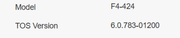
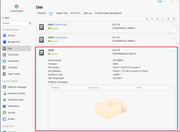
I have an F4-424 NAS. Drive bays 1 & 2 are populated with two Seagate IronWolf 20 TB drives. They are in a TRAID and are working fine. Bay 3 is populated with a Seagate Exos 8 TB drive, which I can see in the Disk dashboard. The drive shows as healthy in SMART.

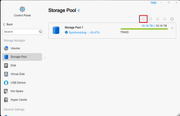
I want to create a second volume using only the 8 TB drive, but the option to create a new storage pool on the Storage Pool dashboard is greyed out.

Thanks in advance for any assistance.
Image

Image
Image
User avatar
TMnight
TM Support
Posts: 181
Joined: 30 Sep 2022, 16:40

Re: [Help] Can't create new storage pool on F4-424, TOS 6  [SOLVED]

Post by TMnight »

Since Storage Pool One is currently synchronizing, a second storage pool cannot be created directly. Please wait for Storage Pool One to complete synchronization。
To contact our team, please send email to following addresses, remember to replace (at) with @:
Technical team: support(at)terra-master.com(for technical support)
Service team: service(at)terra-master.com(for purchasing, return, replacement, RMA service)
User avatar
fovisjoris
Posts: 2
Joined: 27 Oct 2025, 23:10
United States of America

Re: [Help] Can't create new storage pool on F4-424, TOS 6

Post by fovisjoris »

Thank you for your reply. I was able to create the new storage pool once the first one was done syncing.

It would be nice to add a tool tip or message to the TOS console stating that a new pool can't be created until the current sync is complete, while a symc is running. The only place I saw that message was when I created the new pool. The first pool was created automatically so I never saw the message.
User avatar
TMnight
TM Support
Posts: 181
Joined: 30 Sep 2022, 16:40

Re: [Help] Can't create new storage pool on F4-424, TOS 6

Post by TMnight »

Okay, thank you very much for your suggestions. I will feed them back to the product team.
To contact our team, please send email to following addresses, remember to replace (at) with @:
Technical team: support(at)terra-master.com(for technical support)
Service team: service(at)terra-master.com(for purchasing, return, replacement, RMA service)
Post Reply

Return to “Storage”