[Help] RAID disk replacement but new disk space not visible  [SOLVED]

RAID, Volume, storage pool, hard drive, USB, SSD cache and iSCSI LUN
Locked
User avatar
ruyblaster
Posts: 5
Joined: 08 Nov 2024, 23:20
France

[Help] RAID disk replacement but new disk space not visible

Post by ruyblaster »

Hello,
I'm having a problem with my f4-423 NAS running TOS 6 :
I had four 4TB hard drives in TRAID. I installed 8TB hard drives one at a time. Between each, I waited for the RAID to be rebuilt and the Configuration to complete. (I am using TRAID Mode)
I used the utility, in which I clearly specified that I wanted to expand the space. (The 4th Option if I remember, during the TRAID rebuilding) :
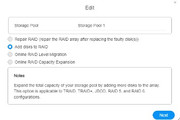
Image

At the end of the installation of the four drives, I clearly saw the 22TB of disk space in the Storage Pool.
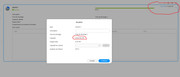
Image

I expanded the space using the utility in volume 1. I now have 0 free space, but unfortunately, the free space is still not visible on the NAS.
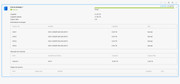
Image

I've seen some advice on the this forum, but I'm not comfortable with the linux's command line and the tutorial is only for TOS 4 and 5.
I wouldn't want to make a mistake and erase everything.

Could you help me, please?
Thanks for your help. :D

Sincerely,


Image
User avatar
CursaYang
TM Support
Posts: 740
Joined: 06 Jan 2025, 16:34
China

Re: [Help] RAID disk replacement but new disk space not visible

Post by CursaYang »

It seems that the volume capacity did not expand successfully.

Please collect a system report and send it to [email protected] for us to analyze. In the email, please attach the link to this post.
To contact our team, please send email to following addresses, remember to replace (at) with @

Technical team: support(at)terra-master.com(for technical support)
Service team: service(at)terra-master.com(for purchasing, return, replacement, RMA service)
User avatar
ruyblaster
Posts: 5
Joined: 08 Nov 2024, 23:20
France

Re: [Help] RAID disk replacement but new disk space not visible

Post by ruyblaster »

Done. :D

Thanks for your help :)
User avatar
ruyblaster
Posts: 5
Joined: 08 Nov 2024, 23:20
France

Re: [Help] RAID disk replacement but new disk space not visible

Post by ruyblaster »

Hello.

I am so sorry but I need help. The Terramaster support didn't reply. i have send 2 mails and no reply :|

I am blocked. Please help :D

Thanks
User avatar
CursaYang
TM Support
Posts: 740
Joined: 06 Jan 2025, 16:34
China

Re: [Help] RAID disk replacement but new disk space not visible

Post by CursaYang »

ruyblaster wrote: 11 Sep 2025, 16:02 Hello.

I am so sorry but I need help. The Terramaster support didn't reply. i have send 2 mails and no reply :|

I am blocked. Please help :D

Thanks
Hello, please use the in-site messaging to send me your email address, and I will confirm your email.
To contact our team, please send email to following addresses, remember to replace (at) with @

Technical team: support(at)terra-master.com(for technical support)
Service team: service(at)terra-master.com(for purchasing, return, replacement, RMA service)
User avatar
ruyblaster
Posts: 5
Joined: 08 Nov 2024, 23:20
France

Re: [Help] RAID disk replacement but new disk space not visible

Post by ruyblaster »

It's Done
User avatar
CursaYang
TM Support
Posts: 740
Joined: 06 Jan 2025, 16:34
China

Re: [Help] RAID disk replacement but new disk space not visible

Post by CursaYang »

ruyblaster wrote: 11 Sep 2025, 22:32It's Done
I apologize, but the system report attached in the email cannot be accessed.

To resolve your issue more quickly, we can perform remote operations for you.

Please visit our official website's live chat to schedule a convenient time for remote handling.
To contact our team, please send email to following addresses, remember to replace (at) with @

Technical team: support(at)terra-master.com(for technical support)
Service team: service(at)terra-master.com(for purchasing, return, replacement, RMA service)
User avatar
ruyblaster
Posts: 5
Joined: 08 Nov 2024, 23:20
France

Re: [Help] RAID disk replacement but new disk space not visible  [SOLVED]

Post by ruyblaster »

Problem Solved Thanks to The Teramaster support for his help!
Locked

Return to “Storage”