[Help] Pool Size  [SOLVED]

RAID, Volume, storage pool, hard drive, USB, SSD cache and iSCSI LUN
Post Reply
User avatar
Hashka
Posts: 3
Joined: 21 Jun 2025, 20:29
France

[Help] Pool Size

Post by Hashka »

Hello ,
I started an Install with three 4T hard disks generated the pool.
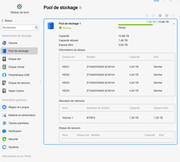
Then I added a fourth 4T disk and it seems that the Total pool is not at the desired size.

Could you explain the procedure for me to generate a global pool of the size of 12T I am TRaid by default

thanks for your advice
Image
User avatar
MikeZhang
TM Support
Posts: 101
Joined: 05 Sep 2023, 22:21

Re: [Help] Pool Size

Post by MikeZhang »

Hi, please use our RAID calculator https://support.terra-master.com/raidca ... n/?lang=en
You can edit volume size under control panel>volume, if you can't edit it, please expand volume manually viewtopic.php?t=2342
To contact our team, please send email to following addresses, remember to replace (at) with @

Technical team: support(at)terra-master.com(for technical support)
Service team: service(at)terra-master.com(for purchasing, return, replacement, RMA service)
User avatar
CursaYang
TM Support
Posts: 495
Joined: 06 Jan 2025, 16:34
China

Re: [Help] Pool Size  [SOLVED]

Post by CursaYang »

From the screenshot, the size of the storage pool is 10.88T, but volume 1 has only used 7.26T.
You need to manually expand the capacity of volume 1.
To contact our team, please send email to following addresses, remember to replace (at) with @

Technical team: support(at)terra-master.com(for technical support)
Service team: service(at)terra-master.com(for purchasing, return, replacement, RMA service)
User avatar
Hashka
Posts: 3
Joined: 21 Jun 2025, 20:29
France

Re: [Help] Pool Size

Post by Hashka »

hi,

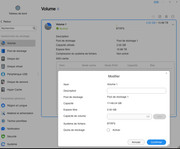
I do that :

Open the TOS
.._Open the DASHBOARD
...._storage _POOL
......_VOLUME
........_Select the storage pool you want to modify
.........._MODIFY
............_"MAX" key


But I don't seem to have the maximum space allocated.

With the raid calculator, I have the impression that I'm supposed to have 12 terra available (out of 16), which doesn't seem to be the case
To date, I have no data on any of the disks. Should I reset everything or can I use a simpler solution to allocate the missing space ?


Image
User avatar
CursaYang
TM Support
Posts: 495
Joined: 06 Jan 2025, 16:34
China

Re: [Help] Pool Size

Post by CursaYang »

The manufacturer's stated capacity of 12TB is based on decimal conversion, while the operating system displays capacity based on binary conversion. Therefore, converting 12TB results in approximately 10.88TB, which is normal.
To contact our team, please send email to following addresses, remember to replace (at) with @

Technical team: support(at)terra-master.com(for technical support)
Service team: service(at)terra-master.com(for purchasing, return, replacement, RMA service)
User avatar
Hashka
Posts: 3
Joined: 21 Jun 2025, 20:29
France

Re: [Help] Pool Size

Post by Hashka »

ok
So the current state of the capacity shown is the one that is real and optimally effective on my NAS containing the 16T of disk.

thanks
Post Reply

Return to “Storage”